68kMLA Classic Interface
This is a version of the 68kMLA forums for viewing on your favorite old mac. Visitors on modern platforms may prefer the main site.
| Click here to select a new forum. | |
| Macintosh Portable: IT LIVES! | |
| Posted by: khannonnd on 2015-12-04 11:55:22 After many months, and the motherboard being sent to people who are brilliant, and the battery being rebuilt, and the hard drive being replaced, MY MAC PORTABLE LIVES! Thank you very much to Techknight, Uniserver, and Canby for their awesome help! The only thing less than perfect on it right now is that the screen has a number of white lines coming from both sides of the screen. Im going to try to clean it and if that doesn't work I have a replacement screen in an unopened service box I can swap it with... 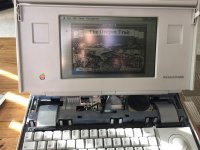 | |
| Posted by: Canby Fat Mac on 2015-12-04 12:23:55 SWEET! Always nice to see a MP back from the dead. Nice Work! | |
| Posted by: uniserver on 2015-12-04 13:21:32 beautiful! | |
| Posted by: joethezombie on 2015-12-04 13:55:51 So nice. I need to get one of these! | |
| Posted by: khannonnd on 2015-12-04 16:21:01 The new screen is beautiful. One odd quirk - my "f" key types "/" and my "v" key types "m" :-/ Every other key works. Physically the keyboard *looks* ok, so I dunno whats going on. Guess I'll find a new keyboard somewhere for it, haha. | |
| Posted by: uniserver on 2015-12-04 17:47:14 I know a guy on the Facebook page that is having that same problem… maybe not with the same keys but the same mixup, he is determined to think its the controler. | |
Posted by: khannonnd on 2015-12-04 18:31:33I know a guy on the Facebook page that is having that same problem… maybe not with the same keys but the same mixup, he is determined to think its the controler.I did a VERY technical fix. I pried off the offending keys and blew on the keyboard. No more problem. :shrug: | |
| Posted by: Elfen on 2015-12-04 20:43:19 Congrats! | |
| Posted by: uniserver on 2015-12-04 20:44:52 well heck! 🙂 Great! | |
| Posted by: MJ313 on 2015-12-05 06:33:51 That's awesome! Really nice machine. And nice keyboard fix 😛 | |
| Posted by: techknight on 2015-12-05 06:46:48 yea I was going to say, I know it isnt the controller. | |
| Posted by: bd1308 on 2015-12-07 14:05:31 I was the one Charles had said was having the same issue. I thought initially it had to be the controller, because in my case, it would type the correct character, THEN type an incorrect character. Example is 'u' and 'backspace'. It would type a U, then backspace it. I and enter do the same thing...if you hit an I, it'll type an I, then hit the return key. Now that I've thought about it, it's actually the microcontroller just scanning the rows and columns, and executing them in order, based on thier position and the rows/columns being scanned in order to find the key being hit. So, I took the key caps off of the offending keys and blew them out, i'm still having issues with the keypresses...issues persist. None of the keys themselves seem to behave "shorted" together, yet I do see continuity between keys where they aren't on the same row or column. the X/Y for U has continuity with the backspace key, even though they're on different rows and columns. Could the coupling caps go bad, causing this behavior? | |
| Posted by: Floofies on 2015-12-07 14:38:00 Dang, that's awesome! I was so hopeless, but good job! | |
| Posted by: XBHS1997 on 2015-12-08 01:25:20 Great! 🙂 I really need to make mine live again. | |
| 1 |