68kMLA Classic Interface
This is a version of the 68kMLA forums for viewing on your favorite old mac. Visitors on modern platforms may prefer the main site.
| Click here to select a new forum. | |
| At home with the Twiggy Mac | |
Posted by: Dog Cow on 2015-12-02 15:53:20 Bring a piece of the famous Twiggy Mac prototype from 1983 home with you. Using technology developed for Mac GUI Vault, I have extracted some resources from the Twiggy System file and formatted them for use with production Macintosh systems. Here, please find the fonts and desk accessories from the Twiggy Mac system disk. | |
| Posted by: unity on 2015-12-02 21:06:09 Sweet! I have some odd software on disk that appears to be pre-release Mac stuff. Maybe this was a common app, but have you ever seen this clock app? It was on one of the disks and did not look too familiar to me. | |
| Posted by: Paralel on 2015-12-03 00:34:31 Definitely looks like a test or proof of concept app | |
| Posted by: Dog Cow on 2015-12-03 08:23:59 That looks vaguely familiar to me. Maybe from a BCS disk or some other compilation. | |
| Posted by: Dog Cow on 2016-06-27 16:26:12 More Twiggy stuff: prototype Twiggy Mac resources | |
| Posted by: olePigeon on 2016-06-27 18:16:31 http://www.ebay.com/itm/RARE-PROTOTYPE-APPLE-TWIGGY-MACINTOSH-ROMs-EPROMs-v4-4T-ORIGINAL-SET-OF-4-/262493882573 Twiggy Mac ROMs. Probably out of the reach of most casual collectors, and not worth anything really unless you have an actual Twiggy Mac. | |
| Posted by: tanaquil on 2016-06-27 19:15:07 I believe that clock app is the Steve Capps "Clock" app (1984), it was distributed on the Through the Looking Glass disk (does it have an icon that looks like a Salvador Dali melty clock?). It had earlier been passed around through user groups, I think. It's in the BCS archive and also on some early BMUG disks I have. | |
Posted by: CelGen on 2016-06-27 19:41:38http://www.ebay.com/itm/RARE-PROTOTYPE-APPLE-TWIGGY-MACINTOSH-ROMs-EPROMs-v4-4T-ORIGINAL-SET-OF-4-/262493882573I do believed those EPROMS have already been dumped and made available so really all you're buying are the original chips with original code on them. | |
| Posted by: unity on 2016-06-27 19:42:23 No icon. But none of the stuff on the disk has customs, so it could be a system version thing (not showing customs) or a problem with the disk. Here is a pic of the disk its on. There is another label underneath labeled MAC TEST, INTERNAL ONLY and a date I can not make out without taking the upper label off. Most of the other disks I have say MAC TEST. By the way, with that clock app I can find no way to escape it. The cursor is gone and nothing I do quits it. I have to power cycle the computer. 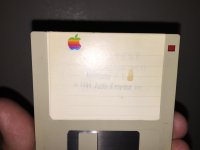 | |
| Posted by: tanaquil on 2016-06-28 08:59:35 Neat disk(s)! Have you considered imaging them to share on Macintosh Garden or the like? If it is indeed the Steve Capps Clock, I think you can quit the app by holding down the mouse button. But at least under emulation (vmac), this doesn't always work for me, especially under Plus emulation. I haven't tried it out on real hardware. | |
| Posted by: tanaquil on 2016-06-28 09:15:16 Here is a copy of the Clock app I have, btw. The only difference I notice from yours is that at least under Plus emulation, the whole screen goes black (except for the numbers), no grey border, and there is no title bar. Clock.sit.hqx | |
Posted by: Dog Cow on 2016-06-28 10:37:18I do believed those EPROMS have already been dumped and made available so really all you're buying are the original chips with original code on them.They're at Mac GUI Vault, and have been there for about a year. I've had them since February 2014.Twiggy Mac ROMs They will boot a Mac 128k. http://macgui.com/forums/software-sector/twiggy-mac-prototypes/t.1823/ | |
| Posted by: BadGoldEagle on 2016-06-28 13:54:53 The MacAuthor Disk works fine with mini vMac (128k), but MacPaint hangs and throws me a sad mac after a couple of seconds... Too bad! I love the Steve sez feature!! | |
| Posted by: Dog Cow on 2016-06-28 14:13:47 The MacPaint disk is somewhat corrupted. I think someone investigated it and found out why; read the discussion topic at Mac GUI, the later pages, IIRC. | |
| 1 |