68kMLA Classic Interface
This is a version of the 68kMLA forums for viewing on your favorite old mac. Visitors on modern platforms may prefer the main site.
| Click here to select a new forum. | |
| Powermac 8100 ATX PSU wiring | |
| Posted by: Jon183 on 2018-03-14 18:33:45 Hi everyone, I am wondering if anyone knows how to rewire a standard ATX PSU to use in a powermac 8100, my IIci uses one and I have another spare for the 8100. Also, will soft power work straight away? | |
| Posted by: MrGasS27 on 2018-03-19 12:54:45 https://discussions.apple.com/thread/2171912 Here someone says that the 8100 wants only +5V, +5V TRKL, +12V and -12V so, yes, you can do it. You'll not have the soft power, you'll have to power on/off the Mac with a rocker switch between the Green ATX cable (PS_ON) and a GND cable, there is a circuit to enable soft power, but honestly I never used it because I prefer the manual power, in a thread i submitted in this section a user posted the diagram of that circuit. However, I have this diagram from Dan Calhoun, in the first pinout is clearly mentioned the PowerMac 8100, so I think you can use it, if you put a manual switch to power up the ATX you don't have to connect the /PFW point, simply left it not connected. 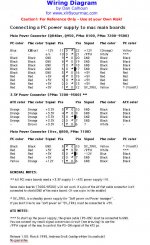 | |
| Posted by: Jon183 on 2018-03-22 22:21:23 Thanks, good to know. I am hoping my modern PSU with 28A on the 5V rail is ok. The original has 35A on the 5V rail. | |
| Posted by: MrGasS27 on 2018-03-23 02:41:38 With ATX I revived my Performa 6200, my IIci and IIsi, they are very useful | |
| Posted by: Jon183 on 2018-03-29 00:18:57 I plugged all wires in to what the diagram shows, PFW was left out, I turned on PSU with ground and PS_ON, fans spin and monitor gets out of idle mode but no screen and chime, CPU does get hot. | |
| Posted by: Jon183 on 2018-03-29 02:13:27 The ATX PSU still doesn't work, even with a fresh PRAM battery on the 8100 board. | |
| Posted by: MrGasS27 on 2018-03-29 03:16:47 Are you sure that the ATX works correctly and have you wired correctly the PSU to the motherboard? Did the motherboard work? | |
Posted by: Jon183 on 2018-03-29 04:34:21Are you sure that the ATX works correctly and have you wired correctly the PSU to the motherboard? Did the motherboard work?The MB has not been tested, I bought it dead. ATX PSU does work, was pulled from a working machine. I will double check the wiring. | |
| Posted by: Jon183 on 2018-03-29 05:06:55 Just tested everything on the newly put together 8100 PSU cable, all voltages are good on every wire. | |
Posted by: MrGasS27 on 2018-03-29 06:19:10Just tested everything on the newly put together 8100 PSU cable, all voltages are good on every wire.I'm thinking that your 8100 motherboard could be bad, check for cutted traces or corrosion or even recap it, has your motherboard surface electrolytics or SMD tantalum capacitors? | |
Posted by: Jon183 on 2018-03-29 06:47:54I'm thinking that your 8100 motherboard could be bad, check for cutted traces or corrosion or even recap it, has your motherboard surface electrolytics or SMD tantalum capacitors?The original electrolytic caps are still on. There is no corrosion though, the areas around the caps look great, ill recap it tomorrow and give it a clean. Its a 8100/110. | |
| Posted by: trag on 2018-03-29 10:54:28 The 8100/110 should come with a Peltier equipped heat sink. The peltier is a solid state heat transfer device between the heat sink and the CPU which is powered by a plug on the logic board. Make sure you have the correct heat sink (equipped with peltier sandwich), make sure it is actually plugged into the logic board power connector (two pin, IIRC). Check under the heat sink/peltier and probably clean and replace the heat sink grease. At this age, it is probably powder. AFter you clean the CPU (isopropyl alcohol works well) check the body of the CPU for cracks. A large number of X100 machines are dead because of cracked CPUs. Oh, do you have a ROM DIMM? The 8100 does not have ROM on-board. It needs a DIMM. That would be very simple. | |
Posted by: Jon183 on 2018-03-29 17:20:36The 8100/110 should come with a Peltier equipped heat sink. The peltier is a solid state heat transfer device between the heat sink and the CPU which is powered by a plug on the logic board. Make sure you have the correct heat sink (equipped with peltier sandwich), make sure it is actually plugged into the logic board power connector (two pin, IIRC). Check under the heat sink/peltier and probably clean and replace the heat sink grease. At this age, it is probably powder. AFter you clean the CPU (isopropyl alcohol works well) check the body of the CPU for cracks. A large number of X100 machines are dead because of cracked CPUs.ROM DIMMs are in, the cooler is attached, ill check it for cracks soon and if its fine, ill replace the paste. Sadly I left the iron outside and it rained, ill dry it out properly and then do a recap if the CPU is fine. | |
| Posted by: Jon183 on 2018-03-29 22:04:11 cannot see cracks on CPU, caps are very leaky underneath. | |
| Posted by: Jon183 on 2018-03-30 00:40:25 Recapped and applied new paste. It chimes and boots to question mark, it will get a drive one day. Thanks for the help MrGas and Trag. 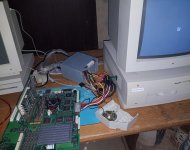 | |
Posted by: MrGasS27 on 2018-03-30 01:44:17Recapped and applied new paste.Good job man, I'm happy for you! 😀 | |
| 1 |