68kMLA Classic Interface
This is a version of the 68kMLA forums for viewing on your favorite old mac. Visitors on modern platforms may prefer the main site.
| Click here to select a new forum. | |
| The NoCSS development thread | |
| Posted by: TechEdison on 2018-02-24 14:49:06 On this thread you will find current progress and updates for my website "NoCSS". This is a site designed to function on 80s computers, and will have simple features such as chat, a web proxy, a google search system, and more. It will all function well on old computers due to stripping out modern day web scripts such as javascript, css, non HTML2.0 tags, etc. Below, the progress of each feature will be updated: Incomplete/concept stage In development Completed/functional
If you'd like me to add other features, just let me know below and I'll see what I can do. The current URL of the beta homepage (which I've only shared here) is: http://www.nocss.ml/index-new.php OR http://nocss.ml/index-new.php Security warning: all forms, INCLUDING ones that contain passwords, are processed in GET mode. This means that usernames/passwords are visible in the URL itself. Do not use this as a secure service, it's more of a toy/proof of concept to mess around with on your old mac/computer. The reason behind this is to provide 100% compatibility with all browsers. This also means that your Altair 8800 could technically use the chat, messaging, and registration system and it would still be functional! | |
| Posted by: TechEdison on 2018-02-24 15:05:42 The entire site will also support a "text only" mode, which removes all the <HTML> <HEAD> etc and the title and meta tags. | |
Posted by: TechEdison on 2018-02-25 12:34:18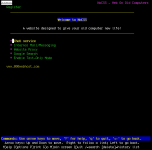 Using Lynx Browser. | |
| Posted by: TechEdison on 2018-02-26 14:28:47 The login and registration system is completed. It will automatically check if your browser supports cookies, and choose how to login based on that. Pretty cool if you ask me. I'll post pictures of the site running on my Mac Classic soon. | |
| Posted by: IlikeTech on 2018-02-27 09:55:17 I have an account now! | |
| Posted by: TechEdison on 2018-02-27 10:04:30 Neat! I'll be finishing the chat soon. | |
Posted by: TechEdison on 2018-02-27 14:23:43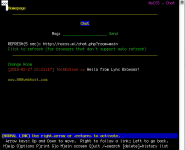 The chat is complete and functional now. "Main" room should be used for introductions. "Vintage" is for vintage computer stuff. "Spam" is for everything else. Edit: not sure why Lynx shows the meta refresh but doesn't use it | |
| Posted by: TechEdison on 2018-03-05 14:34:11 First test on an actual mac! I finally got the DNS settings working, and it is now running on a dedicated VPS. | |
| Posted by: TechEdison on 2018-03-14 14:11:57 Just entered into RetroChallenge with the intention of completing NoCSS! I'll be documenting it on my blog (https://www.techedison.net/blog/) when it starts. | |
| Posted by: Machead on 2018-03-28 22:44:51 The auto-refresh on the chat page interferes with entering a message. | |
| Posted by: TechEdison on 2018-03-28 23:10:24 i noticed that too, and will be removing it during RetroChallenge | |
| Posted by: TechEdison on 2018-04-09 15:54:23 Completed the google search function https://www.techedison.net/blog/2018/04/09/retrochallenge-update-04-09-2018-search-finished/ + Some other updates listed on that blog post | |
| Posted by: TechEdison on 2018-04-10 17:01:22 Website proxy finished. Supports HTTPS. https://www.techedison.net/blog/2018/04/10/retrochallenge-update-04-10-2018-proxy-finished/ + other updates | |
| Posted by: TechEdison on 2018-04-29 15:25:10 Website complete. The updates can be found here: https://www.techedison.net/blog/2018/04/29/retrochallenge-complete-04-29-2018-final-update/ the feature list:
[*]Forum
[*]Messaging
[*]Web proxy
[*]Google search
| |
| 1 |