68kMLA Classic Interface
This is a version of the 68kMLA forums for viewing on your favorite old mac. Visitors on modern platforms may prefer the main site.
| Click here to select a new forum. | |
| PowerBook 1400 Internal Farallon Ethernet Drivers | |
| Posted by: greystash on 2018-02-06 21:33:36 Hello, I've been trying to get the internal Ethernet card working on my PowerBook, It's a Farallon card that plugs directly into the motherboard. I previously had the driver for this and tested that it worked, but lost the system a while back when I wiped one of my drives. I've searched all over the internet and tried all of the drivers I've found but nothing has worked. Does anybody know where I can find the correct drivers? I have attached images of the card, and below are the drivers I've tried; Farallon EN Installer 2.2.2 PB1400 EN Installer 1.6 EtherLAN Installer 1.0 3Com EtherLink III PC Card Installer 2.2 Thanks 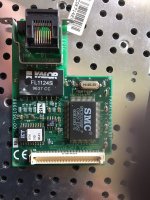 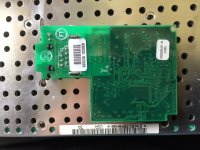 | |
Posted by: Trash80toHP_Mini on 2018-02-07 09:15:29It's a Farallon card that plugs directly into the motherboard. That's the 1400 VidCard slot which is 16 bits of the 32 bit I/O bus. The other 16bits head toward TREX, the PCMCIA controller. When you say PC Card Installer 2.2, are you referring to Farallon's PCMCIA Modem/NIC combo card's drivers? If not I'll look for my floppys. I've got a couple of those cards and IIRC they were boxed sets. I don't see how they wouldn't work with your card? | |
| Posted by: greystash on 2018-02-07 14:09:18 It is the Farallon Ethernet PC Card drivers, although I didn't expect these to work as it's not a PC Card. The most luck I've had was with the 'PB1400 EN Installer 1.6 '. Once installed and restarted, immediately when the Finder loads I get an error message saying "No valid ethernet address was found", and "An error occured while trying to use Alternate Ethernet, Make sure your network connections are correct". I can set the TC/IP control panel to use alternate ethernet ok, and have also tried setting a static IP Address. When I select Alternate Ethernet on AppleTalk I get the error message again and it switches connection back to Modem (default). I'm assuming the 1.6 drivers are meant for System 7? I've also tried it in another PB1400 and had no luck, the green light on the card is on and everything. On the actual card beside the ethernet port it says "EPIC" which is the codename for the card. I read somewhere that these were different from the standard Farallon cards (I don't know how correct that is since it is a Farallon card), but perhaps it requires different drivers to the original Farallon ones? | |
| Posted by: Trash80toHP_Mini on 2018-02-07 18:49:32 The 1400 is NuBus Architecture, so the Slot Manager treats NuBus Slots, the PDS and PseudoSlots all in the same manner. This is curious because most NICs had unified drivers to interface with their cards in NuBus or PDS, expected the same here. I'd need to look at the 1400 DevNote again to see how PCMCIA is really handled. U3 looks like a Declaration ROM for a NuBus card as does a labeled IC on my VIEWpowr 1400/16 Video Card for the same slot. ISTR looking at the setup as if it were a strange 16bit subset of PDS or a non-MUX'd NuBus kinda deal like the SE/30's PseudoSlot $E Video Subsystem that has a "Video ROM" sitting on its 68030 I/O bus. Dunno, that 16/16 split I/O bus on the the PCMCIA/NuBus Architecture PowerBooks is one strange beast! If those are ROMs on our boards they don't need drivers as such to function, they'd be on the ROMs. The OS needs drivers to interpret what the boards might naturally be putting out on the I/O bus (Like Slot location and board info via the DeclROM Setup) or are waiting for a driver's control panel setting to tell them what to do. I expected PCMCIA to be handled by Slot Manager as other Slot implementations were. Have you run TattleTech to see if U3 is the equivalent of a DeclROM showing up in the NuBus/PDS or PCMCIA(?) Slot Reports? | |
| Posted by: greystash on 2018-02-07 18:56:18 I haven't tried TattleTech, where can I get that from? I also just tried these drivers on OS7.6 and got the same results.. | |
| Posted by: Trash80toHP_Mini on 2018-02-07 19:12:28 Give this page a look see: Cameron Kaiser's floodgap page is still up and I've got search string links and instructions for some of the basic tools. Might be a start. | |
| Posted by: greystash on 2018-02-07 23:47:32 So here's how I went with TattleTech, and also Slot Info. Slot info seems as if it may be reading it as a video card?? 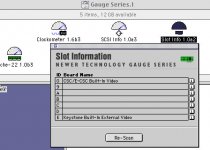 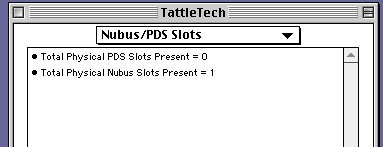 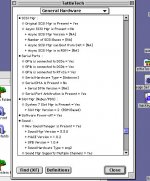 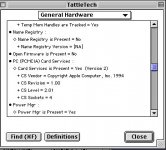 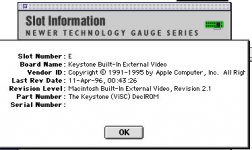 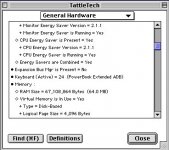 | |
| Posted by: Trash80toHP_Mini on 2018-02-08 08:59:48 Nice! you've got the RAM maxed out. You've got it right, the machine is apparently sensing that its "NuBus" Video Card slot is occupied. < TLDR > I'm taking some notes for myself here, in no particular order: 1400's 16bit Video Expansion Slot is mapped as NuBus Slot $E per a 4bit sense code that's built into the bus on the motherboard. That's how it works in the desktops. I've did a diagram of how that setup works kicking around somewhere in hacks if you're interested. WAG 1: "Keystone" DeclROM and very likely Slot ID sense coding are built into a Video Controller ASIC: ViSC. DevNotes & other source materials: CSC is the Video Controller in the 2300c, SCSC(?) is the Video Controller in the 5300ce (need to check 190 DevNote, no differentiation I've found yet between 5300 and 5300ce Video Controllers) and 1400, both 800x600 displays with 1MB VRAM. ICs on board to me like the 2300c has 512K VRAM, though everymac's spec is 1MB (wondering about 5300 and 190?) WAG: CSC/E-CSC Built-In Video makes me think SCSC mods to CSC ASIC include support for external video (with built-In DeclROM/Drivers?) < /TLDR > WAG: the above may explain why you need a card specific driver. While it looks like a NuBus Card to Slot Manager (curiously Version 2) the OS, Firmware or Hardware may only be set up to interpret any card in that Slot as a specific NuBus Video Card: Apple's "Keystone Built-IN External Video Card." That'd be an extension of the 1400 board as the PCMCIA module and its TREX ASIC is on a daughtercard plugged into a slot making up the other half of the curiously split I/O bus setup. I need to check the pincounts. One of my oldest impossible dreams has been to unify that split bus to add support for a NuBus Card expansion chassis to a 1400c/G3 built into the shell of my one of my 12" RGB monitors. Its front bezel opening is perfect for the 1400's LCD. 😛h34r: < TLDR > It's very interesting that it is indeed a 16bit subset of the Mac's NuBus setup as well as related some oddities about the Internal Video setup identified by SlotInfo. Appears to me that the drivers for your card must dissuade "Slot Manager Version 2" from its assumption that any card in the Video Expansion Slot of the 1400 (WAG extends this to 5300ce et al) must be Apple's 8bit Video Out Card. At that point SMv2 then polls again for DeclROM on the bus and identifies your NIC. The same is probably true of my 1400/16 VIEWpowr card. Support for 16bits for External Video output would be in the drivers and DeclROM on the card. I need to check on e of my Apple 8bit Video Out Cards, I'm guessing there's no DeclROM on that card? < /TLDR > | |
| Posted by: greystash on 2018-02-11 22:51:48 The monitor mod sounds like a great idea!! I understand what you're saying but the technical stuff is a little over my head now, i'm not sure what the DeclROM is or how to find it? | |
| Posted by: Punkyclown on 2018-02-16 09:21:18 I found drivers here, https://members.driverguide.com/index.php?action=getinfo&companyid=397 and here, http://list.driverguide.com/list/company397/device12/index.html. Good luck... Brad Hansen | |
| Posted by: Trash80toHP_Mini on 2018-02-16 09:36:32 Nice finds! THX. The monitor mod sounds like a great idea!! I understand what you're saying but the technical stuff is a little over my head now, i'm not sure what the DeclROM is or how to find it?That'd be U3(?) on your NIC with what appears to be a ROM revision code on the sticker. DeclROM = Declaration ROM, it's what stores the Information that SlotInfo displays and tells the Slot Manager same when it polls for PDS and NuBus cards installed at startup. If you wanted to chance peeling the sticker up to ID the IC, that would prove/disprove the DeclROM hypothesis. | |
| Posted by: greystash on 2018-03-30 23:44:37 Hi Night Stalker, Sorry for the very late reply, here's an image of the sticker removed. It appears to read: PEEL18CV8S CT005058VG 624FB -10 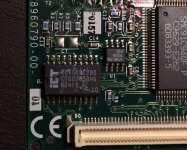 | |
Posted by: theducks on 2022-12-02 18:33:46Hi Night Stalker,Did you ever get it to work? I'm currently getting the same error message on 9.0.4 on my 1400/G3.. | |
Posted by: greystash on 2022-12-03 00:42:23Did you ever get it to work? I'm currently getting the same error message on 9.0.4 on my 1400/G3..@theducks Oh really that's interesting! No I haven't and I've tried it in multiple 1400 machines with different sets of drivers. Either I've lost some special drivers I originally had that were specifically for this card or something has gone wrong with the card. If you get yours working again please let me know how! | |
| Posted by: jeremywork on 2022-12-03 02:07:58 I have one too but from NewerTech, I vaguely remember posting about it though it could've been during the crash. I remember an issue that sounds exactly the same: Upon startup Finder would use the small dialogue (same as Speakable Items or clock being incorrect) to state an error about not having a valid ethernet address, selecting alternate ethernate would error out. I tried all the drivers linked throughout these threads, different OS versions, different 1400 machines, in both stock and G3 processor configurations, but nothing resolves error. I keep thinking it's unlikely the cards are going bad, because this error is seems correlated too frequently to 1400s using internal video slot ethernet cards, regardless of make. The card and the 1400 are a bit far from me right now, but here's an old photo cleaned up a bit: 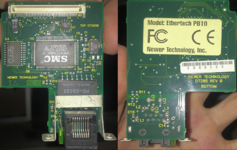 Original driver disk for the Farallon is visible here: 
Ethernet On PowerBook 1400 Series:I have set up a :apple: PowerBook 1400 Series. :) :apple: PowerBook 1400CS. I have a PowerBook 1400C with a built in ethernet. These ancient dinosaurs both work. :eek: :eek: And One of them gets online with Classilla. :D But the PowerBook 1400CS does not have a built in Ethernet. :( It has...
 forums.macrumors.com
cross-post: PowerBook 1400 Internal Farallon Ethernet DriversPowerBook 1400 Internal Farallon Ethernet Drivers
PowerBook 1400 Farallon ethernetI've been looking for a Mac OS driver for the Farallon internal ethernet card in my PowerBook 1400. All the Farallon support links are dead. The card works fine with Debian Sarge. Help, anyone?
 68kmla.org
| |
| Posted by: theducks on 2022-12-05 15:33:17 You know, I'm an idiot.. I have the focus enhancement one. Who would have thought there was a market for three different network cards for this model?! Adding pictures for completeness. The drivers seem to only be available in https://www.macintoshrepository.org/8258-mac-drivers-museum-archive-1990-2003- 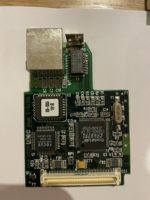 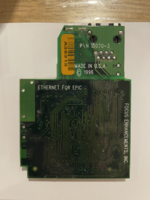 | |
| Posted by: greystash on 2022-12-06 01:17:10 @theducks I'm glad you found the right drivers for your card! @jeremywork thanks for those threads, I'll do some more digging soon. I've just noticed my 1400 is starting to show signs of the hinge cracking issue so I need to address that before I use it anymore. It must be a driver issue if @theducks was receiving the same error message for a different card. Very frustrating, I can't believe I lost my original set that worked.. | |
| Posted by: LaPorta on 2022-12-06 02:38:50 Here they are, I just found them a few weeks ago for my card: | |
| 1 |