68kMLA Classic Interface
This is a version of the 68kMLA forums for viewing on your favorite old mac. Visitors on modern platforms may prefer the main site.
| Click here to select a new forum. | |
| Macintosh Classic Ram problem | |
| Posted by: macalle69 on 2017-12-16 14:40:58 Hello Folks I recently acquire a Macintosh Classic for parts not working , logic board was pretty clean without battery explosion, as usual I washed Logic board and recapped with new radials capacitors . at the first start up no chime and distorted checkerboard pattern , I then replaced VIA and Classic start up with chime and apparently works but required at start up more ram even if expansion board was installed ( System 7.0.1) At this point I started up with system 6.0.7 floppy and discovered that only 512k ram were "detected" with or without ram expansion board installed ( at least the onboard 1 mb should be detected ) According with Ferrix I replaced the two multiplex MUX , no success . Floppy drive works , SCSI ok , adb ok , start up with Rom ok . Any suggestion ? thank you! 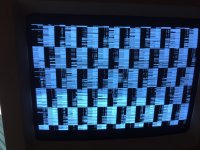 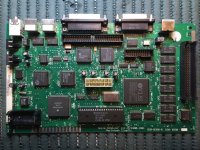 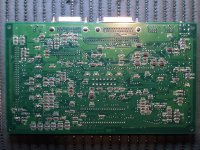 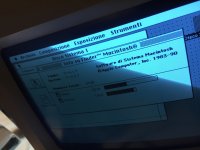 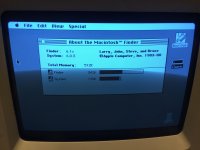 | |
| Posted by: marcelv on 2017-12-19 01:50:00 had the same problem once | |
| Posted by: macalle69 on 2017-12-19 07:30:09 Hello Marcel thanks for your suggestion , but in my board those VIAS are ok | |
| Posted by: marcelv on 2017-12-19 12:40:24 Hello Macalle, you have to check the connections from the pins of UH6 all the way to the CAS PAL UL1 and also to VLSI UI4 The must be a broken connection there In my case the connection was broken from UH6 to the via, but in your case may be somewhere else on the line. | |
| Posted by: macalle69 on 2017-12-19 14:37:24 Hello Marcel thank for your suggestions i have also tried replacing UH6 ( no success) i have checked all connection as following: pin UL1 to pin UH6 9 to 2 ok 3 to 5 ok 4 to 7 ok 5 to 10 ok UH6 to U14 BBU pin 13 14 1 R69 to pin 17 U14 BBU ok also to SCSI pin 10 pin 3 UH6 to UF3 pin 15 ok UH6 pin 9 to UI6 pin 5 ok UL1 CAS PAL to ram expansion board ok UI1 pin 19 to UI14 BBU pin 81 ok UE3 pin 1 to UI14 BBU pin 82 ok UE3 pin 15 to UI14 BBU pin 81 ok I only found an error in the schematic concerning UL1 to UI4 but I have another faulty MOBO and are correct as I write here following UL1 pin 6 to UI4 pin 15 ( schematic say 18) UL1 pin 7 to UI4 pin 18 ( schematic say 15) Will update when I'll found issue ( I hope !) Alex | |
| Posted by: marcelv on 2017-12-20 03:32:32 does pin 4 connect to to pin 26 UI4 ? could you complete the following list so all pins are checked (don't have a schematic myself) UH6 pin 1,13,14 to pin 17 UI4 BBU pin 2 to pin 9 UL1 pin 3 to pin 15 UF3 pin 4 to pin 26 UI4 pin 5 to pin 3 UL1 pin 6 to pin 7 to pin 4 UL1 pin 9 to pin 5 UI6 pin 10 to pin 5 UL1 pin 11 to pin 12 to pin 15 to these seem to be correct (schema is incorrect) UL1 pin 6 to UI4 pin 15 UL1 pin 7 to UI4 pin 18 | |
| Posted by: macalle69 on 2017-12-21 03:11:36 Hello Marcel referring to the above list UH6 pin 6 to pin 26 UI4 pin 11 to pin 25 UI4 pin 12 ?? not found pin 15?? not found | |
| Posted by: superjer2000 on 2018-08-05 19:55:22 @macalle69 Did you ever have any luck sorting this out? I have a Classic that is having the exact same issue. I checked the via noted by @marcelv (from UH6 pin 4) and couldn't find any broken traces (without a schematic) from UH6 to elsewhere. I removed UH6 and tested the vias underneath and didn't notice any issues. I also pulled out Q1 thinking some capacitor goo may have impacted that chip (not sure if it has any tie-ins to the memory system). | |
| Posted by: superjer2000 on 2018-08-05 20:54:42 Sorry, I'm going back and trying to find continuity between the pins noted earlier in the thread. For the numbering, is pin 1 at, for example, the chip notch, or at the little white dot on the logic board? For example on UL1 (a square chip) there is a notch on one corner and there is a white dot on the logic board by one of the pins in the middle of one of the sides. Do I go counterclockwise to count the pins? Sorry for what seems like a very elementary question but I'm not getting the readings I would expect trying to countpins either way. | |
| Posted by: superjer2000 on 2018-08-05 23:06:29 Ok - the white dot on the logic board is pin 1. I had the same good checks as macalle69 except for UI1 pin 19 to U14 pin 81, but that test also failed on a known good board I have. I am soaking the the board in IPA again to see if there is some residual capacitor goo, but I washed it pretty well the first time so I don't think that's the case. | |
| Posted by: superjer2000 on 2018-08-06 20:29:24 Well, I ponied up the US$17.00 for the Classic logic board schematics from Uniserver - I checked every single connection I possibly could on the sheets from the processor to the RAM chips and socket and I had connectivity on every single line. I am guessing I have a problem with either UH6 or UI6 as those interface with RAM and would have been potentially subject to capacitor goo. At this point, I think I'll order a few of these readily available chips and replace them one at a time and see what happens. | |
Posted by: tanaquil on 2018-08-06 22:19:39At this point, I think I'll order a few of these readily available chips and replace them one at a time and see what happens. Where do you order that type of chip from? Also, I should probably contact Uniserver - I could use a few schematics. Good to know that is still an option. I remember reading a thread about the service that was selling schematics and wasn't sure if it was still around. | |
Posted by: superjer2000 on 2018-08-07 08:32:05Where do you order that type of chip from?From Mouser. Digikey would have the same. These are the chips I have put in my cart that aren't proprietary and interface with the memory subsystem. I figure I will try one at a time to pinpoint the failed one. If that doesn't work, I'll just satisfy myself running Airborne on my 512k Classic, or I'll put it on eBay as a "512k Mac Classic Prototype??" and make big bucks. 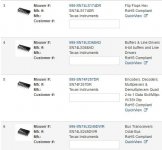 | |
| Posted by: macalle69 on 2018-08-07 15:54:51 Hello Folks sorry for my late reply , very busy at work , unfortunately not be able to fix that problem ! Hope you'll find the solution ! Good luck | |
| Posted by: superjer2000 on 2018-09-21 21:39:52 @macalle69 @marcelv I was able to fix my Classic that was only recognizing 512k of RAM. I had previously bought the Classic schematics from maccaps and checked every memory related trace and couldn't find any problems. I ordered the chips above from Mouser but figured I'd start with UH6 (74LS174) as that was the chip that was related to the exact same issue Marcelv had. Replaced that single chip, booted up and all 2MB of installed memory was recognized. Thanks for pointing out your original fix thread Marcelv. Now I have extras chips of various types but they might come in handy for something at some point. It was funny, when I first recapped the motherboard and the machine booted up, I was getting all kinds of weird system crashes. I thought there were potentially more issues with the system until I realized the system was only recognizing 512k. Now ClarisWorks runs like a champ. I had mentioned in another thread how much I love Quikchip SMD1 for desoldering SMD components. It's literally a 3 minute job. | |
| Posted by: just.in.time on 2018-09-21 22:43:53 Glad you got yours going! Always awesome to see a success story! | |
Posted by: macalle69 on 2018-09-22 09:27:25@macalle69 @marcelvHappy you solve the problem!! | |
| Posted by: techknight on 2018-09-22 09:40:23 If this solves more than one persons boards then we should sticky the information somewhere as a known fix. like UE8 is for SE/30 most of the time. | |
| Posted by: BOOtak on 2020-11-07 10:18:36 I had the same issue, after washing and recapping my Classic, only 512k would show up. In my case, it was caused by corroded trace between UH6 pin 2 and UL1 pin 9. After patching it, everything works fine. | |
| 1 |