68kMLA Classic Interface
This is a version of the 68kMLA forums for viewing on your favorite old mac. Visitors on modern platforms may prefer the main site.
| Click here to select a new forum. | |
| Apple IIe Enhanced RAM Error Help! | |
| Posted by: Mr. Macintosh on 2013-11-13 22:43:56 Hi there! I was wondering if anyone could help me with this particularly pesky problem of mine: So I just recently got an Apple //e off of eBay and was super excited as it came with loads of software and stuff. After cosmetically cleaning it I decided to test and see if the Duodisk it came with worked. I hooked everything up, the computer made a startup beep and the Duodisk did it's clacky thing and the drive indicator light came on. After cleaning the Duodisk I inserted a ProDos floppy into the drive. The computer then displayed the ProDos splash screen and then went to "Relocation/Configuration Error" and the drive turned off. I ran a self test (solid apple + control + reset) and I was met with a message saying "RAM 00000001" I repeated this process several times, and the result is always the same. I am assuming this means one of the RAM chips is broken, but I have no idea which one. If anyone could help me get this computer up and running I'd greatly appreciate it! | |
| Posted by: uniserver on 2013-11-13 22:51:32 if there is a 64k / 80 column card try pulling that first then see if it still does it. | |
| Posted by: Mr. Macintosh on 2013-11-13 23:07:15 I've pulled all cards and it still says the exact same thing every time. | |
| Posted by: volvo242gt on 2013-11-13 23:46:27 Ok, so, yeah, it's a motherboard issue. I'd examine the RAM chips and see if any look suspect... AFAIK, the 4164 chips may still be available new. -J | |
| Posted by: dorkbert on 2013-11-14 07:51:44 if you get lucky, the RAM is socketed, so just pull it and replace. If it's soldered... well, it could get painful. | |
| Posted by: Mr. Macintosh on 2013-11-14 09:28:57 I've thoroughly looked at all the RAM chips and even cleaned them a little with some alcohol and scrubbing. It doesn't seem like any of them are suspect cosmetically. And yeah, they are all soldered... | |
| Posted by: Mr. Macintosh on 2013-11-14 11:40:22 What would really help at this point I guess is to find out which RAM chip (f6-f13 I think) the "RAM 00000001" error is referring to. | |
| Posted by: Macdrone on 2013-11-14 12:44:02 If you buy one chip you can "piggy back" it one chip at a time and test and the problem should go away then you can replace. | |
| Posted by: Mr. Macintosh on 2013-11-14 12:48:10 That sounds like a really cool idea! I have an Applied Engineering RAMWORKS III that came with the computer, it's all socketed so could I pull a chip from there to test with? Also, how exactly do you "piggy back?" | |
| Posted by: dorkbert on 2013-11-14 12:59:27 I think the RAMWorks card uses 41256s. Do you have a stock 64k Aux RAM card lying around with socketed RAM? | |
| Posted by: uniserver on 2013-11-14 13:07:15 does that piggybacking acutely work? | |
| Posted by: Mr. Macintosh on 2013-11-14 13:18:02 It looks like my RAM chips are 4264, while my RAMWORKS card has all 6342s. | |
| Posted by: Macdrone on 2013-11-14 20:38:44 I checked one 128 upgrade and it worked, I'm sure the IIe should also. Or at least cause a different issue on the correct bad chip. | |
| Posted by: Mr. Macintosh on 2013-11-14 20:58:02 I think I might try piggybacking a 4265 once I can get my hands on one. Can a 4165 replace a 4265? | |
| Posted by: dorkbert on 2013-11-14 21:07:01 they're all variations of 4164 (64kb x 1) ram chip. | |
| Posted by: Mr. Macintosh on 2013-11-14 22:07:48 So are you saying I can piggyback one of my 6342s on one of the 4264s? | |
Posted by: dorkbert on 2013-11-15 08:16:14So are you saying I can piggyback one of my 6342s on one of the 4264s?actually, I've never seen or heard of a 6342 (nor can I find a datasheet for it.) so at the risk of offending, are you sure you read the numbers correctly? | |
| Posted by: Mr. Macintosh on 2013-11-15 09:37:10 Haha no worries, I'm probably wrong. Here is a picture of the RAM on the cards. 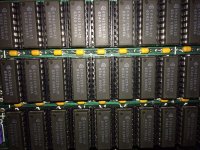 | |
| Posted by: volvo242gt on 2013-11-15 11:19:33 Those would be 41256 chips. -J | |
| 1 > |