68kMLA Classic Interface
This is a version of the 68kMLA forums for viewing on your favorite old mac. Visitors on modern platforms may prefer the main site.
| Click here to select a new forum. | |
| Floppy Emu Disk Emulator Updates | |
| Posted by: bigmessowires on 2013-10-31 15:52:28 It's been a long time and many late nights coming: 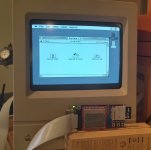 That's a Mac Classic booted from a System 7.0 high-density 1.44 MB emulated floppy. WOOOOO! The same board now works on anything from a Mac 128K to the Mac II series (and beyond?), with 400K, 800K, and 1440K disk images in either raw or DiskCopy 4.2 format. If you've got a board, you can try the new firmware here: http://www.bigmessowires.com/floppy-emu-1.0F-F7.zip | |
| Posted by: dougg3 on 2013-10-31 17:18:20 Wow, that is too cool that you got it working for 1.44 MB disks already! The AVR firmware update (femu.bin) worked great, but I can't get the CPLD update to work. It says "could not open firmware.xvf" after I press NEXT to confirm that I want to update the CPLD. I even tried formatting my card and copying it again...any ideas? I just tested and the previous firmware.xvf from the 64K update flashes, but I can't get the firmware.xvf from the linked floppy-emu-1.0F-F7.zip file to flash. Final edit: Nevermind, got it to work. It's because the file was marked as locked on the SD card, and I noticed from the old floppy emu code that it tries to open the file read-write. So that's all the problem was 🙂 Looks like the read-only flag is set on the file for some reason when I extract it from Windows. Now for testing! Real final edit: It works! Just tested with a 1.44 MB Disk Copy 4.2 image I had sitting around. Yay! Thanks bigmessowires, nice work! | |
| Posted by: bigmessowires on 2013-11-01 15:13:40 Awesome, glad the 1.4 MB is working for you! But what's "already"? 🙂 I've been wrestling with it for about a month, so I'm breathing a huge sigh of relief now. I updated my blog with details about the 1.4 MB disk emulation support, if anyone's interested: http://www.bigmessowires.com/2013/11/01/1-4-mb-high-density-floppy-emulation/ | |
| Posted by: Anonymous Freak on 2013-11-01 16:15:31 Now, when do we get a Duo/100 plug adapter, and a PowerBook 2400c plug adapter? 😛 | |
Posted by: dougg3 on 2013-11-01 17:17:30But what's "already"? 🙂 I've been wrestling with it for about a month, so I'm breathing a huge sigh of relief now.Oh man, I bet! Your hard work has ended up creating a working solution, so that's awesome. It just feels like you've gotten so much working on the floppy emu in the last month, it's very impressive! | |
| Posted by: onlyonemac on 2013-11-02 13:42:35 BMOW strikes again! The FloppyEmu V2, now a fully functional, fully compatible, fully bootable, fully usable floppy disk emulator for any Classic Macintosh! Just like your CPU. | |
| Posted by: olePigeon on 2013-11-02 21:49:45 Wooo! Freakin' awesome. 😀 | |
Posted by: bbraun on 2013-11-03 13:55:10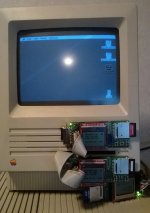 3 floppyemus on an SE! | |
| Posted by: ajacocks on 2013-11-03 14:48:44 Fantastic work, bigmessowires! This is such a wonderful tool to make OS installation and testing easy, on older Macs. I've started the assembly, and got everything done, all the way through the programming of the AVR. However, after adding the 74LVC244, 10k resistor, and 0.1uF cap, I can't get anything to display on the LCD. Do you have any quick suggestions as to points to check, on the board? I've already reviewed my solder points pretty closely, though I don't have a 10x loupe, yet. Thanks! - Alex | |
| Posted by: bigmessowires on 2013-11-03 17:32:04 Haha bbraun, that's awesome!! What are you going to do with all that floppy power? Alex - sent you a PM. | |
| Posted by: bbraun on 2013-11-03 17:41:36 I'm not really sure, but since I had to custom make those cables through the floppy opening, since the IDC connector doesn't fit, I'm kind of committed! Maybe I'll throw mmcmaster's SCSI2SD internally, use the USB to ADB adapter, and have the mega-SE. I still like the idea of using the SE as an initial step in bitbanging the PDS, since 1) it's 16bits wide, 2) it's slow, and 3) it has the connector allowing for easy access to the signals, so maybe I'll turn it into an experimentation box. | |
| Posted by: ajacocks on 2013-11-04 15:26:26 Well, I checked for shorts with my multimeter, in continuity mode, and didn't find anything. I also re-soldered all of the joints that were the least bit questionable, and tested the screen, itself, using an Arduino. I'll include the pictures of the ATmega and the '244, here. 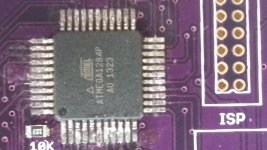 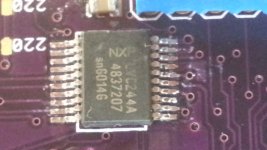 I also checked my solder joints with a loupe, and I couldn't find any bridges. So, I am officially out of ideas. Thanks! - Alex | |
| Posted by: bbraun on 2013-11-04 15:33:50 It's hard to tell, but some of the pins on the south side of the AVR look pretty close. But if it checks out with the continuity test, probably fine. Maybe double check the decoupling capacitors on the back of the AVR? FWIW, I'm at 3 working out of 5 attempted builds. The very first one I attempted, I screwed up the AVR. At least when the AVR isn't functional, you can stop early. Then in the last batch I ruined the CPLD on one, removed it, replaced it with a new one, and AFAICT, it's all good except one CPLD pin is grounded that shouldn't be, and I have no idea where. That one is 100% assembled before finding the problem. So, sorry about that. I can't really offer much advice, just empathy. | |
| Posted by: ajacocks on 2013-11-05 05:05:59 My problem turned out to be very simple/stupid: I did not solder the voltage regulator! With that in place, everything works file, so far. I've found a great way to hand solder those surface mount ICs. If you drag-solder the chips to the board, and then use a power vacuum solder remover (I have a Hakko 808), the joints come out looking great. 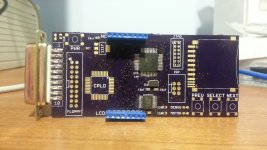 I can't manage to get my 0805s to lay perfectly flat, though. Those suckers are a pain! Good luck! - Alex | |
| Posted by: bigmessowires on 2013-11-05 17:47:31 I added support for subdirectories on the SD card, because things were getting a little out of hand once you had more than a few dozen disk images. This makes OS installs almost enjoyable! Just download the disk images from Apple, copy them to your SD card, boot the Mac from the Install Disk 1 image, and off you go. 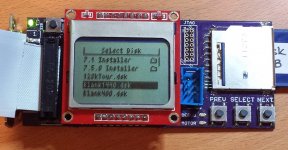 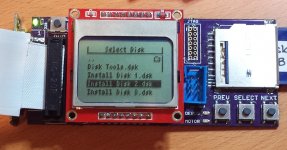 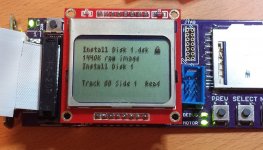 | |
| Posted by: olePigeon on 2013-11-06 08:51:53 Oooo, it supports Disk Copy disk images? When did I miss that?! Take my money already! :O | |
| Posted by: bigmessowires on 2013-11-06 13:30:39 I added Disk Copy 4.2 image support about a week ago, but it was buried in a footnote of another post. 🙂 DC4.2 images are mounted as read-only, since the image is checksummed, and I'm not prepared to recompute the checksum on the fly. I've ordered parts to build some more Floppy Emus, with a new v1.1 board that adds a couple of extra features. Hopefully I'll have some ready in a few weeks! | |
| Posted by: MinerAl on 2013-11-06 18:04:36 With the HD-20 extension, could you mount larger images? | |
| Posted by: bigmessowires on 2013-11-06 19:07:24 No, although it's physically connected to the floppy port, HD20 is a whole different animal. | |
| 1 > |