68kMLA Classic Interface
This is a version of the 68kMLA forums for viewing on your favorite old mac. Visitors on modern platforms may prefer the main site.
| Click here to select a new forum. | |
| DIY ADC to VGA lead | |
| Posted by: harrymatic on 2013-10-23 07:26:18 I was wanting to run dual displays on my PowerMac G4, but unwilling to spend £30 on the adapter to turn the ADC port into something more useful. This cludgy mess is what I came up with 🙂 - it does work though! I used the connector from an EVC cable which I got on eBay for £2.50, but removed the original shroud from the plug so it would fit in the socket.   | |
| Posted by: Trash80toHP_Mini on 2013-10-23 07:38:43 Nice hack. If it does what needs to be done and you can't see it anyway, it doesn't need to be pretty. 😉 | |
| Posted by: trag on 2013-10-25 15:02:11 The analog signals used by VGA are present on the ADC socket. The problem folks usually run into, is that almost none of the ADC<=>DVI adapters propagate those analog signals the DVI analog pins. So a combination of ADC > ADC/DVI adapter > DVI/VGA adapter usually does not work. It should be relatively trivial to open up an ADC/DVI adapter and connect up the analog pins at both ends properly. | |
Posted by: Bunsen on 2013-10-25 20:32:57but removed the original shroud from the plug so it would fit in the socketSo apart from the rounded shroud, (and the power/USB pins) ADC = DVI? | |
| Posted by: markyb86 on 2013-10-25 20:40:20 It's just 6 extra pins for LED, 25V, 25V, USB Data +, USB Data -,USB Return same pins after that but different orientation. 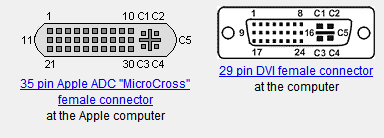 source: http://pinouts.ru/Video/apple_adc_pinout.shtml http://pinouts.ru/Video/dvi_pinout.shtml | |
| Posted by: harrymatic on 2013-10-26 01:09:37 I did write down the diagram which I used to make the cable -  | |
| 1 |