68kMLA Classic Interface
This is a version of the 68kMLA forums for viewing on your favorite old mac. Visitors on modern platforms may prefer the main site.
| Click here to select a new forum. | |
| IIFX RAM | |
| Posted by: zackl on 2013-09-07 15:10:00 Digging through my boxes this weekend, turned up 8 of these SIMMS from a IIFX: The writing on the chips says HY514100J-70 Searching google makes me think these are 1MB SIMMS but they are not clearly labeled - any ideas? See attached photo too 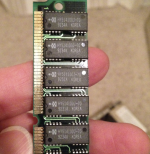 | |
| Posted by: bbraun on 2013-09-07 16:03:26 They should be 4Mx1, so 8 of them on a SIMM would be 4MB. I think. | |
| Posted by: bear on 2013-09-08 12:57:38 They are, and you are correct. | |
| Posted by: zackl on 2013-09-22 21:55:52 How are you able to tell that from the writing on the SIMM? Any guide / info online? Thanks for info so far! | |
| Posted by: Trash80toHP_Mini on 2013-09-23 13:25:04 http://www.chipmunk.nl/dram/chipmanufacturers.htm https://www.google.com/#q=HY514100j-70 😉 Sorry, can't find a link with a simple formula handy. :-/ | |
| Posted by: zackl on 2013-09-23 14:18:37 That's awesome, thanks for the links. Will report back - Z | |
| Posted by: zackl on 2013-09-25 22:04:48 Ok following link above Looked up a SIMM labelled gm71c1000j80 Which according to that first link is lucky good star http://www.chipmunk.nl/dram/DRAM_LGS.htm#anchor212911 But then I'm lost as the syntax is close but not exact? | |
| Posted by: dougg3 on 2013-09-26 18:58:03 Sometimes you have to search for the first portion of the part number. Usually the number at the end is just signifying how fast the RAM is, so in your case it's probably 80 ns. Sometimes extra letters have to be ignored too because they just represent different options. So for example, I might try searching for GM71C1000J or GM71C1000. Searching for GM71C1000 gives some good results that indicate the chip is a 1-megabit chip. When they say something like 1048576 words x 1 bit, they mean it has 1048576 addresses that each represent a bit, so 1048576 bits = 1 megabit. With eight of those chips on a SIMM, it would indicate a total size of 1 megabyte. | |
| 1 |