68kMLA Classic Interface
This is a version of the 68kMLA forums for viewing on your favorite old mac. Visitors on modern platforms may prefer the main site.
| Click here to select a new forum. | |
| Ultimate Mac Portable Collection | |
| Posted by: haplain on 2013-06-04 12:11:59 Here are some photos of my Mac Portables. Both have all the original components and are 100% complete. The units have upgraded RAM, modems (one prototype), all disks, manuals, cases, extended keyboard, and even this Mac Portable Battery Recharging unit that I have never seen. Does anyone else have one of these rechargers, or seen one? I need to take a photo of my CF reader and will do so later today. 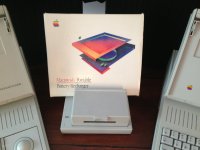 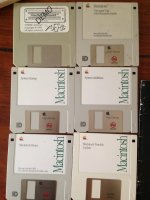 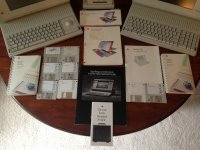 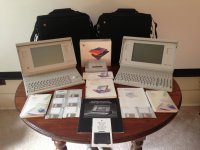 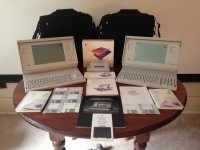 | |
| Posted by: uniserver on 2013-06-04 13:05:57 Here is the photo I took of your aztechmonster, mounted to your custom milled HD mount 🙂 | |
| Posted by: cangrande on 2013-06-07 18:50:55 I have a battery charger as well--though not an Apple one. I'll get it out of the closet and take a picture and post it. It's a little clamshell plastic box and even comes with a car charger. I have an accessory that I've never seen before as well, which is a backlight kit for an original non-backlit Portable. It needs a special piece of software to run, but it works. I need to get a battery for it, and haven't started it up in a long time. Probably I should open it to make sure there isn't capacitor goo everywhere. Nothing like a Portable with extra RAM to make System 6.0.8 run screaming fast! | |
| Posted by: Mk.558 on 2013-06-07 19:53:12 Very nice. I'll reckon that cost a tidy sum. I assume the one on the left is the non-backlight model and the one on the right is the backlight edition? | |
| Posted by: uniserver on 2013-06-07 20:58:30 No he is just signal handedly inflating the price of these 🙂 By buying up all the ones for $60 to $120 :-D I would assume soon he will have a Mountain O Portables. | |
| Posted by: haplain on 2013-06-07 22:48:19 Exactly. It did take quite a bit to get to that complete of a collection but I also sell them to offset the cost. | |
| Posted by: SpectreGadget on 2013-06-08 08:51:11 My 5126 came with 3 batteries and the Apple recharger. I don't have an a second AC adapter, so I just switch between if needed. I have a bag with strap, but none of the original documentation. I love that HD mount for the Aztec. I keep thinking about getting one of those, but my project funds are going to other projects ATM. | |
Posted by: haplain on 2013-06-09 19:27:12My 5126 came with 3 batteries and the Apple recharger. I don't have an a second AC adapter, so I just switch between if needed. I have a bag with strap, but none of the original documentation.I'm considering making those brackets for people. The cost of the materials isn't too much and neither would the finished part. I would fabricate the mounting plate and you would have to mount the reader so it would be more or less universal. Please let me know. | |
| Posted by: NJRoadfan on 2013-07-15 07:49:01 Can you image the original install floppies? I haven't had much luck finding a copy of the factory system (6.0.3?) and utilities. | |
| Posted by: haplain on 2014-01-21 08:18:20 I was always under the impression the M5126 could only take 4MB of RAM. Found this literature in some of the portables we bought with the collection. Turns out that's incorrect, or I misunderstood! | |
Posted by: unity on 2014-01-21 09:22:59I was always under the impression the M5126 could only take 4MB of RAM. Found this literature in some of the portables we bought with the collection. Turns out that's incorrect, or I misunderstood!My understanding it that the Backlit can support 8MB and the non-backlit 9MB. That even according to Apple. | |
| Posted by: haplain on 2014-01-21 09:25:31 I must have only had half a listening ear during that convo, whoops. Now I'm going to max my RAM out on those. Hoo rah! | |
Posted by: shred on 2014-01-21 23:07:21My understanding it that the Backlit can support 8MB and the non-backlit 9MB. That even according to Apple.Correct. Backlit Portable supports a 4MB RAM expansion card via the 50 way RAM slot, but you can add a 7MB card for a total of 8MB if you use a PDS slot card. Apple advise against using the PDS slot for this (I have the developer note), but it was quite common. I maxed my backlit Portable out back when I could still buy RAM new. It's great to set up a large RAM drive, although less of a benefit now the hard drive has been replaced by CompactFlash. | |
| Posted by: Anonymous Freak on 2014-01-22 01:06:56 I thought there was even a way to get it up to 14 MB of RAM, but you had to use everything above 8 MB as a RAM Disk... Or am I remembering a different model? | |
| 1 |