68kMLA Classic Interface
This is a version of the 68kMLA forums for viewing on your favorite old mac. Visitors on modern platforms may prefer the main site.
| Click here to select a new forum. | |
| jaz drive crash on boot | |
| Posted by: markyb86 on 2013-01-08 12:22:45 on the Plus Without a tape in it boots fine, termination is set to auto, scsi id 6, (my zip drive is on 5 which I boot from.) With a tape in I get this 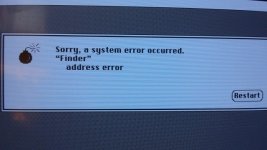 On the SE same thing except the internal zip is scsi Id 1 iirc. | |
| Posted by: CC_333 on 2013-01-08 21:23:06 Hi, Did you format the Jaz disk? It might do that if the driver's all weird (i.e. too new, etc.). It's possible that the Jaz drive is simply incompatible with the 68000 CPU (as used in the Plus and SE). Do you have a Mac (other than the Plus and SE) to which you can connect the drive where you can format the disk appropriately? c | |
| Posted by: markyb86 on 2013-01-09 05:26:32 No other machine of the same era around, however... I was able to get it to work. I had to use FWB Hard Disk ToolKit 1.6 to format and install their driver over the iomega version. The mac sees it as a hard drive now. Actually I couldn't format it, but when I went into drive options, there was an Erase option which did the trick. :O | |
| Posted by: CC_333 on 2013-01-09 09:46:04 Hi, So apparently the Iomega driver was at fault? Certain versions of the Zip drivers are known to cause trouble on 68000 based machines, so I wouldn't be surprised if the same was true of Jaz. I'm glad you got it sorted out 🙂 . c p.s. You could get a SCSI card for one of your modern-ish Macs (or PCs) so you could connect the Jaz drive to it. That would make troubleshooting much easier. Alternatively, you could try to find a USB to SCSI adapter. I have one, but it seems rather temperamental (I couldn't get it working properly with the Jaz drive, but it works OK with Zip) so I tend to not use it much. | |
| 1 |