68kMLA Classic Interface
This is a version of the 68kMLA forums for viewing on your favorite old mac. Visitors on modern platforms may prefer the main site.
| Click here to select a new forum. | |
| LC III External Hard Drive? | |
| Posted by: fyndr on 2015-08-31 18:04:02 I have a fully functional LC III but am thinking about getting some sort of external data storage in case the current HDD fails. From what I can tell, the case only has a DB-25 connector in the back which could be used toward this end. My question is, what would be the simplest set of components I would need to connect some form of data storage to the LC III in this way? I am guessing I would need a DB-25 to a 50-pin SCSI cable or something like that and then attach that to an internal HDD which I could then put in some sort of enclosure. Is there a better way of doing it than this? Alternatively, is there anything else I can attach to that port which might serve a similar purpose? | |
| Posted by: LazarusNine on 2015-09-01 10:14:26 While I can't provide a more workable solution than the one you've already described, I use a PowerMac G4 with OS X Tiger that acts as a file server and backup for my LC III, which I consider to be my main 'classic' machine. Perhaps that's something you might consider? With an updated Open Transport and AppleShare, AppleTalk works extremely well between the two machines. The beauty is that my newest Mac with OS X Yosemite can see all of the PowerMac files, meaning that the PowerMac acts as a link between the new and the old(er). =) | |
| Posted by: fyndr on 2015-09-02 16:32:59 I have an iMac G3 that I might be able to use for this purpose, but mostly I meant something that I could boot the computer off of besides the floppy drive in the event that my current hard drive bites the dust. | |
| Posted by: fyndr on 2015-09-05 10:30:56 Pardon the double post. For the LC III, would the following cable work to attach to an external hard drive? http://www.ebay.com/itm/SCSI-Cable-HPDB50-to-DB25-6-ft-HD-50-to-DB-25-SCSI-2-to-SCSI-1-NEW-/121746644895?hash=item1c58aa5f9f Or is it possible/preferable to get DB-25 to one of the newer SCSI standards like 68/80-pin? | |
| Posted by: jhorvath911 on 2015-09-05 12:57:59 Just grab something like this http://m.ebay.com/itm/VINTAGE-APS-External-SCSI-Hard-Drive-APPLE-MACINTOSH-/151788396659?nav=SEARCH Then you could use either a old 50 pin drive in it or a newer drive with proper adapters in it etc. Or as another possibility you could just use external SCSI Zip drive if you don't need tons of storage space. | |
| Posted by: LazarusNine on 2015-09-06 03:55:14 If there was ever anything in need of the retr0bright treatment in a serious way, that external HDD is it! I can vouch for the newer SCA SCSI drives with adapter. That is a nice solution, and also offers the potential for greater storage capacity. You'll still need an external case like the one above, though. 🙂 | |
| Posted by: jhorvath911 on 2015-09-06 05:18:39 Yeah I wasn't going for asthetics in that post, if I were I would have posted this one http://m.ebay.com/itm/291554173349 Which happens to be the case I prefer but they a lot of times go for a high price on eBay. | |
| Posted by: fyndr on 2015-09-06 07:35:09 I'm able to get internal drives fairly cheaply which I can then put into an enclosure, so I'm more concerned about getting the proper cables than anything. Sounds like DB-25 to 50-pin SCSI is the way to go then, since I have some adapters I can fall back on if necessary. | |
| Posted by: jhorvath911 on 2015-09-06 09:47:57 Yes generally most enclosures used the centronics 50 port so you would need db25 to that.. And also you usually need some sort of terminator on the enclosure and you should be all set. | |
| Posted by: fyndr on 2015-09-06 10:10:22 Actually I'm a bit hazy on what termination means in the context of hard drives, although I've seen it mentioned in various places. What specifically does that mean, and how would that affect using, e.g., a more modern 68-pin drive with an adapter? | |
Posted by: Strimkind on 2015-09-06 10:29:29Actually I'm a bit hazy on what termination means in the context of hard drives, although I've seen it mentioned in various places. What specifically does that mean, and how would that affect using, e.g., a more modern 68-pin drive with an adapter?A Low End Mac article describes it well: http://lowendmac.com/1998/termination-explained/ The tricky part is to figure out how and when to terminate. The best option of course is to find a case with built in termination, usually configured by an external manual switch. However those are reserved for newer cases, and usually are SCSI2 or 25pin connectors, not the 50 pin centronics. Should you only be able to find the 50 pin centronics connector (most common), how you terminate depends on how many devices are in the SCSI chain. If the external HD is the only device in the chain, then it is best to use a pass-through terminator (http://www.scsi-cables.co.uk/images/site/active_terminator_cn50_pt.jpg). If not, then you will need a standard terminator at the end of the chain (example: http://www.scsi-cables.co.uk/images/site/passive_terminator_cn50.jpg). My experience has shown that you get best results using the bottom connector on a device to go to the computer, or the device closest to the computer in the chain (ie computer <--> Bottom Connector HD ; Top Connector HD <--> Zip Drive (Zip Drive terminates Internally) ). Hope that helps. | |
| Posted by: fyndr on 2015-09-06 10:51:24 Thanks for the in-depth explanation. So as I understand it, assuming I had a DB-25 to 50-pin SCSI cable, a 50-pin SCSI to 68-pin SCSI adapter, and a 68-pin SCSI hard drive, I would need to add a pass-through terminator either before or after the adapter in order for the hard drive to function correctly with the LC III? This is assuming that the drive itself doesn't have any sort of termination on its own. | |
| Posted by: Strimkind on 2015-09-06 14:29:58 I've never used 68 pin enclosures unfortunately. However I would assume that it would be like the 50pin High Density connector (http://www.scsi4me.com/images/external-connectors.gif) where you would either need a 25 pin to 68pin cable with passthrough, or a 25pin to 68pin with an adapter, and a terminator (http://www.scsi-cabl...ator_cn50.jpg). It may be possible to combine an adapter and passthrough terminator, but I have not tested that possibility. Perhaps someone who has tested it can comment. | |
| Posted by: fyndr on 2015-09-07 09:38:08 I purchased a DB-25 to 50-pin Centronics cable since that seems to be the best way to go. The two external drives I'm looking at are http://www.ebay.com/itm/VINTAGE-APS-External-SCSI-Hard-Drive-APPLE-MACINTOSH-/151788396659?hash=item23574b2073 or http://www.ebay.com/itm/SPIN-MACINTOSH-APPLE-external-hard-drive-/111747084992?hash=item1a04a532c0 since they're at roughly the same (low) price point. It doesn't look like either of them come with a power cable, however. Is there a way to determine what kind of power cable these would need in order to function properly? Can't seem to find anything useful online. | |
| Posted by: jhorvath911 on 2015-09-07 10:02:15 Most of those all just use a standard computer power cable, same as pretty much any tower/monitor etc. And looking at those enclosures that's what it would be. 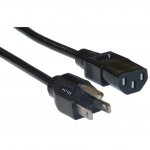 | |
| Posted by: fyndr on 2015-09-07 10:08:52 Thanks, I'll proceed once I get the cable/enclosure. | |
| Posted by: jhorvath911 on 2015-09-07 10:39:21 In addition to the enclosure, power cable, and 25-50 SCSI cable, you will need a terminator like this one http://m.ebay.com/itm/SCSI-TERMINATOR-50-PIN-CENTRONICS-MALE-FEMALE-PASS-THROUGH-PASSIVE-SCSI-1-/281780390113?nav=SEARCH | |
| Posted by: fyndr on 2015-09-08 14:53:07 Yep I included a pass-through terminator as part of the original order. | |
| 1 |