68kMLA Classic Interface
This is a version of the 68kMLA forums for viewing on your favorite old mac. Visitors on modern platforms may prefer the main site.
| Click here to select a new forum. | |
| Mac Plus and AztecMonster CF | |
| Posted by: steeler_fanatic on 2015-08-29 18:39:55 So I have a healthy Mac Plus that I restored over the last several months. One of my experiments has been to buy an AztecMonster Compact Flash (CF) SCSI drive. It works well enough as a storage device but I have so far not been able to boot from it. I know about the notorious SCSI issues with the Plus and the stated work around for the AztecMonster is to disable pin 40 (RST) by "cutting" the pin. I have done this by severing the corresponding wire in the cable ribbon assembly with an exacto-blade (I have some spare 50 pin ribbons so no big deal). However this hasn't worked, I can't see the drive at all. I used SCSIProbe and received a message about possible termination error. I'm guessing I may need to ground the severed wire??? So my questions are.. (1) Has anyone been able to boot a Mac Plus from of an AztecMonster CF SCSI drive? (2) If so, what modifications, if any, did you do? Thanks! | |
| Posted by: uniserver on 2015-08-29 19:05:44 well first you would need to buy this. http://www.ebay.com/itm/Stratos-BakMonolith-2-5-inc-to-25pin-SCSI-adapter-for-PowerMonter-/262020285662?hash=item3d01a044de then you would need to buy this http://www.ebay.com/itm/CF-PowerMonster-II-CF-2-5-SCSI-Converter-Card-/262020283623?hash=item3d01a03ce7 install a diode here, for termination power. 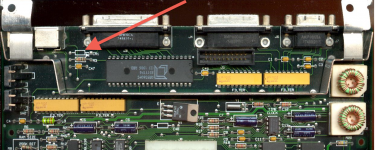 | |
| Posted by: steeler_fanatic on 2015-08-29 19:20:17 Hi Uniserver, Actually I have this unit (the 3.5" version): http://www.ebay.com/itm/Stratos-Technology-CF-Aztec-Monster-Brand-New-From-Japan-/271927477329?hash=item3f50240451 It connects as a storage device no problem (self terminated and has jumpers for the SCSI setting). However the user manual states this for booting: About MacPlus [SIZE=10pt]Mac Plus does not boot from this card normally. You must cut #40pin RST fuction from flat cable. CF card volume is recommended under 2GB. [/SIZE] So I'm thinking only a cable mod is needed? | |
| Posted by: uniserver on 2015-08-29 19:27:45 what id is your scsi2cf device set at? | |
| Posted by: steeler_fanatic on 2015-08-30 16:04:15 Hi Uniserver, It is jumpered to 6. I also verified the SCSI number via SCSI Probe. If I use a normal 50 pin cable, the device mounts during start-up (via the SCSIProbe INIT). I can access it as if it were a hard disk (read/write no problems). However I cannot use it to boot the Mac (the driver does not load at start-up). This is not an issue with the device, but rather an issue with the early implementation of SCSI in the Mac Plus ROMs and compatibility with more "modern" SCSI drives. The advice given by the drive developer is to remove the RST function by cutting pin #40 (the problem as I understand it is "reset" is sent to the drive repeatedly before the drive can actually reset thus removing the signal eliminates the problem). However when I use the "modified" cable (wire leading to pin #40 is cut), the drive is no longer recognized. I suspect this is due to the cut wire not being grounded or terminated. If I go back to a normal cable, behavior is as before. So I was wondering if anyone had solved this problem using this device (or other modern drive having same problem). | |
| 1 |