68kMLA Classic Interface
This is a version of the 68kMLA forums for viewing on your favorite old mac. Visitors on modern platforms may prefer the main site.
| Click here to select a new forum. | |
| Recapped SE/30 with no Speaker Sound | |
| Posted by: yezzah on 2015-08-28 13:09:19 Two questions regarding a recently recapped SE/30: 1. The internal speaker does not emit sound even after cleaning the logic board and recapping all capacitors. I've swapped speakers and checked that all power cables are properly attached. The audio out jack works, producing loud, clear sound through external speakers, but it makes a brief crackle on cold boot. What other points of failure should be considered? If the sony chips need to be replaced, are SE and SE/30 components interchangable? 2. While recapping C13, one of the pads peeled up slightly but did not lift from the trace. Could this be related to no sound or other problems in the future? The machine appears to run fine apart from its sound issue. | |
| Posted by: yezzah on 2015-08-28 13:11:04 capacitor in question: 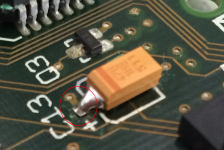 | |
| Posted by: tanuki65 on 2015-08-28 15:23:20 The other joint looks bad. | |
| Posted by: 360alaska on 2015-08-28 16:39:02 How I solder these little guys: https://drive.google.com/file/d/0B_Xp3uN-BcxsZFpCMFBWanRvTDg/view?usp=sharing Does it work at the headphone jack? 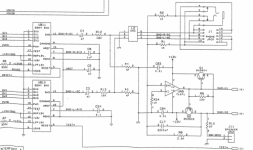 If it works out from the headphones and not the speaker either the speaker is bad or part of the amplifier setup is damaged. Also, If it works out from the headphones and not the speaker check your -12v: https://68kmla.org/forums/index.php?/topic/24470-se30-no-sound-after-recap-experience/ | |
| Posted by: uniserver on 2015-08-28 16:59:30 this is how this guy RetroGameModz does it. haha https://www.youtube.com/watch?v=wttmB_axr2Q | |
Posted by: bobo68 on 2015-08-29 02:55:382. While recapping C13, one of the pads peeled up slightly but did not lift from the trace. Could this be related to no sound or other problems in the future? The machine appears to run fine apart from its sound issue.C13 has nothing to do with sound IMHO. You can find SE/30 schematics on the web. C13 is part of the pullup/pulldown of the power connector J12. It should connect to pin 12 of J12. | |
| Posted by: falen5 on 2015-08-29 03:46:03 i was in the same situation after recapping an se30. No sound from internal speaker Good sound from headphones - turned out it was the headphones socket itself. When u plug in headphones there is a switch in the headphones socket, that turns off the speaker (its basically a small metal bar mounted on springs) this small bar was stuck in the wrong position so when you remove the headphones jack it was not going back to its home position to turn on the internal speaker again there was some grease in there (Dont know if it was to help the connection of movement) - but it was dried up. Just cleaned it all out and reassembled and sound was working - its a delicate job to open the socket and be careful because when you lift the cover you will see the small components im talking about...dont loose them - | |
| Posted by: 360alaska on 2015-08-29 10:49:28 You can desolder that jack and open it pretty easy if that's found to be the problem otherwise, this should be the right one: http://www.ebay.com/itm/5PCS-5-Pin-1-8-3-5mm-Jack-Stereo-Headphones-Socket-nut-PCB-Panel-Mount-Chassis-/321642046094?hash=item4ae35c228e To be sure simply ohm out the headphone jack in accordance with the diagram posted above... | |
| Posted by: yezzah on 2015-08-29 13:36:07 Thanks for the advice. The two springloaded metal bars in the headphones socket both return to their home position when the jack is unplugged. Was dried grease interfering with the connection in yours, falen, or were the bars not moving at all? | |
| Posted by: falen5 on 2015-08-30 07:36:57 was about 3 years ago - all i remember was the cover was all black plastic, opened it, full of grease, cleaned it out (think i flushed it with wd40) put it back together and it worked. you can see how when the jack is inserted that it lifts the contact bar off one set of terminals and makes contact with another. its normal operation was only possible when the cover was replaced( again im trying to remember) - pretty sure you can meter it out first to see if its working or not. if you open it up you have to force it by drilling out plastic rivets so check it first with a meter | |
| Posted by: yezzah on 2015-09-21 15:04:03 UPDATE: It turned out to be a faulty joint on the analog board. After resoldering all joints for the PSU and logic board connectors, sound has been restored. | |
| Posted by: pixelwrangler.design on 2015-09-22 14:29:00 Yazzah, I have several machine with similar issues, were you able to narrow down where the fault may have been? | |
| Posted by: yezzah on 2015-09-22 16:41:15 I resoldered every joint for the harness and PSU connector at once so I can't say for sure, but it was most likely the -12v pin on the harness. The joints looked perfect before resoldering them, so don't rely on visual inspection alone! | |
Posted by: Fizzbinn on 2022-11-19 18:57:55UPDATE: So restoring my SE/30 I ran into this exact same sound issue. And the culprit was the same, a cracked solder joint on the analog board, -12v pin on the harness! In my case once I looked I could see it was broken, the pin could be wiggled a tiny bit from the back side of the analog board. Its so awesome when a post from years ago helps someone out! Thanks! | |
| 1 |