68kMLA Classic Interface
This is a version of the 68kMLA forums for viewing on your favorite old mac. Visitors on modern platforms may prefer the main site.
| Click here to select a new forum. | |
| iMac G4 - ethernet port dead | |
| Posted by: BGoins12 on 2012-06-09 06:40:48 Ok, so I bought the iMac knowing that the ethernet port wasn't working. I looked at the pins and all of them are fine. I've already reset the PMU and the NVRAM with no luck. I did a Google search, and some people got lucky when they reset their PMU and NVRAM. Me? Not so lucky. Any help would be nice. I am currently using a USB adapter on it that works fine, BTW. | |
| Posted by: phreakout on 2012-06-09 14:35:37 The only thing I can suggest is to first get access inside to the logic board and inspect the 8p8c jack (RJ45). Is it a through-hole type or surface mount (SMT)? Do the joints appear to be soldered well or are they "cold"? I would check all that out with a continuity tester on a multimeter, just to rule that out. It is possible that maybe it got zapped real good with a voltage spike, either lightning or through a faulty surge protector, ethernet hub/router, etc. If that's the case, then the port may be dead as a doornail. You'd have to replace more than that jack to get it working; maybe the whole board. Let's also think about the drivers/extensions. Which OS? Are they all installed properly? Are they intact or corrupt? Just thinking outside of the box as far as what it could possibly be. 73s de Phreakout. :rambo: | |
| Posted by: techknight on 2012-06-09 15:46:18 Usually this happens because it gets whacked by lightning. I haven't had my iMac G4 apart yet so i cant really explain how to fix it. But in most cases, ive fixed on-board LAN ports fried by lightning just by replacing the matching transformer network that couples the jack to the NIC chip. Some jacks have this network built in so you would have to replace the jack, sometimes not and replacing the matching transformer network will bring it back alive. I haven't had the G4 apart so i cant tell you which one it is. But thats usually the cause especially if the mac sees the NIC chip. usually what happens is when the lightning/high voltage spike hits the line, it blows open the winding inside the matching transformer. new gigabit NICs might be directly coupled to the IC, but the older NICs the RJ45 jack was totally isolated from the IC, and matched up via transformer due to the higher voltages being sent/received down the line. So if lightning hits, it blows the matching network. | |
| Posted by: techknight on 2012-06-09 15:55:28 Here is a picture i just formulated up explaining what I mean. 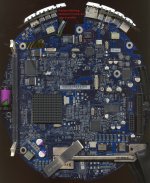 | |
| Posted by: techknight on 2012-06-09 16:01:45 Here is an example clipped from a national semi datasheet that represents how this is setup. all designs vary, but you get the idea. 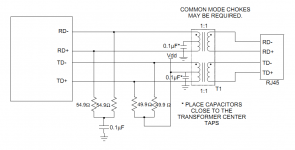 | |
| Posted by: BGoins12 on 2012-06-09 17:55:49 I can't get it to work in OS 9, either. Oh well, looks like I'm snagging an AirPort card off eBay (Unless someone here has one for $6.89 shipped or cheaper?) http://www.ebay.com/itm/Apple-Airport-Card-for-iBook-Powerbook-iMac-G3-G4-and-many-more?item=230791161725&cmd=ViewItem&_trksid=p5197.m7&_trkparms=algo%3DLVI%26itu%3DUCI%26otn%3D4%26po%3DLVI%26ps%3D63%26clkid%3D9024692152829778728#ht_2551wt_952 | |
| Posted by: techknight on 2012-06-09 19:13:24 Do you see it in the apple system profiler? does it show the NIC present? if so, then all you need is that matching transformer to fix it. | |
| Posted by: BGoins12 on 2012-06-09 19:38:27 It shows up, but I don't plan on pulling it back apart. I just took it apart and cleaned it. I also used the last of my Arctic silver 5, so I don't have any more of that. I don't mind using the AirPort card. | |
| Posted by: techknight on 2012-06-09 21:03:52 ya if it sees it, its for sure the matching transformer network. | |
| 1 |