68kMLA Classic Interface
This is a version of the 68kMLA forums for viewing on your favorite old mac. Visitors on modern platforms may prefer the main site.
| Click here to select a new forum. | |
| Replacing Portable HD with SSD/SD card | |
| Posted by: CompuNurd on 2015-08-14 18:04:17 After the hard drive in my Portable failed, it has been sitting untouched. I have plenty of spare hard drives, but they are 50 pin and the 32 pin cable on the Portable looks like it is permanently attached to the hard drive board (correct me if I am wrong). I don't want to have to mess with all this, plus I want to give it the special treatment. I know there are some SD to SCSI, floppy EMU, etc. but I have little experience with any of them. I would like some opinions from your experiences with these products and which you think would be the best to replace the hard drive. The only thing I miss is the sound of the beast spinning up! | |
| Posted by: uniserver on 2015-08-14 19:39:24 if you have any of those 40 meg conner hd's from Classic or LC, You can swap the bottom pcb and use the drive with the pcb that was on the hd in your portable or you can go to maccaps.com, and in the for sale section, I sell a 34 to 50 pin adaptor. or you can whip up your own adaptor cable. 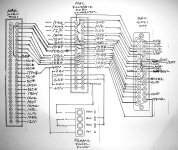 | |
| Posted by: CompuNurd on 2015-08-15 10:19:52 So I can just get a 34 to 50 pin and hook up a regular Quantum drive? Or get a SCSI2SD or Floppy EMU? Can a floppy EMU be installed inside the Portable and setup to act like a hard disk? | |
| Posted by: CC_333 on 2015-08-15 10:25:14 A Floppy Emu can "act like" a hard disk, but it needs to connect to one of the internal floppy ports. You probably already knew this, yes? c | |
| Posted by: CompuNurd on 2015-08-15 10:29:12 I have limited knowledge of the Floppy EMU and the SCSI2HD. I knew it had to connect to a floppy port though. The portable has two floppy ports if I remember correctly. No way to connect a Floppy EMU to SCSI? | |
| Posted by: CC_333 on 2015-08-15 12:57:23 No, Floppy and SCSI are quite different, and thus aren't compatible. Maybe someone will invent an adapter? c | |
| Posted by: CompuNurd on 2015-08-15 14:25:19 I guess the floppy adapter would be better though, since there are two of them and it already comes with the cable. Can you run a regular SCSI drive alongside a floppy EMU? | |
| Posted by: uniserver on 2015-08-15 16:39:38 pretty sure the floppy emu HD20 support is only on the external floppy port. its just the MAC II / MAC IIx that needs to use the internal port for HD20, because those models do not have an external floppy port. and to answer your question for the 34 to 50 pin mac portable adaptor.  There are some hard drives out there ... they were commonly in the Macintosh Powermac 6100 and maybe some other models, in sizes of 500/700/1gig, they are called quantum Trail blazer. they have lower power requirements then what the original 40mb needed. they look like this...  Other wise you can hook up a normal regular Connor 40mb from a Classic or LC, but before you did that i would try to swap the 34 pin HD pcb, as i mentioned earlier. otherwise you could use the 34 to 50 pin adaptor with a 3.5 to 2.5 and run a scsi laptop HD as well. the deal is your power budget is so NARROW for the mac portable... you don't want to over run the 5v or 12v rails... Trust me! If you decide to go the SCSI 2 SD or SCSI 2 CF option... those options always work great with the 34 to 50 pin adaptor because they are WAY under the power budget for the portable. | |
| Posted by: uniserver on 2015-08-15 16:50:52 i am not 100% sure the portable had termination power out of the external scsi port. but the 34 to 50 pin adaptor does have the option to provide termination power. both the new SCSI to SD and the new SCSI to CF do have the ability to run from the BUS, termination power!!! from the external port. The power supply has been reworked to be much more efficient, and will allow the new SCSI2SD to run on the terminator power alone. In many cases there will be no need for the power cable.  and from ARTMIX on ebay   | |
| Posted by: CompuNurd on 2015-08-15 17:53:43 I have plenty of Quantum drives but have no Conner drives, otherwise I would do the swap. That is why I am trying to decide between buying a Conner, getting a 34 to 50 pin adapter and installing a Quantum (which I hear are failing now), or just get a Floppy EMU, SCSI2SD or SCSI2CF and not worry about it. | |
| Posted by: uniserver on 2015-08-15 17:55:21 yeah pay attention to the +5 +12 ma ratings. as long as the HD you are using is At or less of the original 40 mb connor then it should work great with the 34 to 50 pin solutions. | |
| Posted by: bigmessowires on 2015-08-18 08:59:11 On the Portable, the Floppy Emu can function like an external hard disk, connected to your external floppy port. It's not a SCSI device, however. You could use it simultaneously with a SCSI drive, like a SCSI2SD or a real hard disk - then you'd have two hard disks. I'd say the best path depends on what you want to do with it. If you want something internal that's the most similar to having a real hard disk, then SCSI2SD is probably the best solution for you. But if you also want the option to emulate floppy disks, or you want to download a lot of Mac software disk images from the internet to an SD card, then I'd recommend the Floppy Emu. Of course, I am biased. 🙂 | |
| Posted by: max1zzz on 2015-08-18 09:12:44 Out of interest, Why won't the Floppy emu work in hd20 mode when attached to the portable's internal floppy ports? | |
| Posted by: bigmessowires on 2015-08-18 09:26:19 I'm not 100% sure, but I suspect the HD20 driver in the Mac ROM was written that way. A real HD20 hard drive could never have been connected internally, so the driver author at Apple probably simplified things by just assuming it was external. | |
| Posted by: max1zzz on 2015-08-18 09:53:12 Ok, that would make sense | |
| Posted by: uniserver on 2015-08-18 16:26:38 6.0.8 and 7.1 flys with the portable , using the Floppy emu, in HD20 mode. | |
| Posted by: techknight on 2015-08-18 17:35:56 Or, if you have the extra RAM, you could setup a RAM disk and boot 7.1 that way. Really fast. | |
| Posted by: uniserver on 2015-08-18 19:33:58 haha, dont remind me that you are not making those ram cards any more…. (sad) (sad) (sad) 🙁 | |
| Posted by: 360alaska on 2015-08-18 22:29:25 If you can afford a SCSI2SD would be just great in a portable, I can just imagine how nice it would be not waiting for the hard drive to spin up... And on the subject of portables, I can't believe this one was bid up to 610$ :http://www.ebay.com/itm/1989-Macintosh-Portable-M5120-/281771394368?hash=item419ae24540 I guess, a SCSI2SD in a portable is a pretty solid investment eh? | |
| 1 > |