68kMLA Classic Interface
This is a version of the 68kMLA forums for viewing on your favorite old mac. Visitors on modern platforms may prefer the main site.
| Click here to select a new forum. | |
| Video Adapter Docs Scan Dump | |
| Posted by: Trash80toHP_Mini on 2011-10-11 19:52:53 I've tried to collect some prime examples of Mac Video Adapters and Adapter Cables along with the Documentation for them over the past 20 years or so. A question came up about a four DIP Switch adapter, this is the only similar adapter that I've found. The small pamphlet's pages were compiled using a photo copier back in the day, so pretty they ain't, but hopefully a bit helpful to my comrades. MacVDO 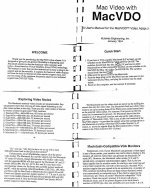 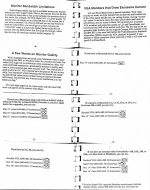 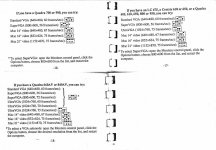 _______________________________________________________________________________________ More to follow: | |
| Posted by: Trash80toHP_Mini on 2011-10-12 11:18:54 Here are scans of all the adapters that I had readily available in my Mac Video Drawer, I've got Documentation of most of them and Documentation for several that are scattered about on Macs hither, thither and yon. [😉] ]'> 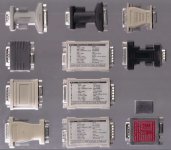 Notice the DA-19 <-> DA-19 ENHANCE branded "Liberty Adapter," I haven't found a use for it yet, but it's pretty darn 😎 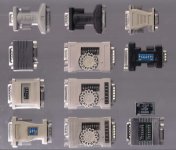 I also have a handful of DB-15 <-> 3, 4 & 5 BNC Mac Cables. My favorite is a 4 BNC <-> DB-15 that has a 4 DIP switch, Resolution Setting Dongle attached at the Mac end. I did a few Docs scans while I was at it, but they need some work before they're ready to post. | |
| Posted by: krye on 2012-07-27 05:00:49 Neat. I have the gray one on the top left. Back in 2001 I took a networking course. The instructor said he had a 15" monitor he was going to toss and offered it to anyone who wanted it. I said I'd take it. He went and grabbed it out of his car. To my surprise it was an old Apple monitor with the adapter attached to the cable. I thought that was a pretty neat score. | |
| Posted by: Trash80toHP_Mini on 2012-09-02 23:54:18 ARGH!! Looks like I need to load the adapter images locally. The frog ate one. :-/ | |
| Posted by: tecneeq on 2013-02-19 16:52:31 Damn you, Frog! }🙂 I have a Miro 6-switch that's not listed yet, including documentation. And i just bought a new one, not yet clear wich maker, but according to the description it has documentation as well: http://www.ebay.de/itm/261170673685 Should arrive soon. Do you guys accept photographs instead of scans? Might even find a sheet of acrylic glass to properly flatten the documentation. The scanner is hidden under a heap of stuff. :I | |
| Posted by: tecneeq on 2013-02-22 06:27:05 The one from ebay metioned earlier. If you are in europe and you need one, get it. It's cheap and worked instantly with my 19 inch HP 1955 TFT (Ebay, 20 Euros) and with a C610, Q650, LC475 running 7.5.5. I guess others should work too. Use the 21" Multisync setting in Mode 1, that way you can switch between resolutions using the monitor applet. While there, disable gamma correction, it's not needed. 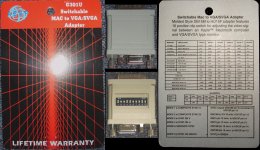 Finally. My 13" Mac CRT days are over! :approve: Edit #1: Works also flawless with a modern LG Flatron IPS224 22" Full HD IPS TFT | |
| Posted by: tecneeq on 2013-02-23 02:59:13 Another adapter, this time Miro branded. It sucks. I wish i hadn't payed 10 Euros for it. 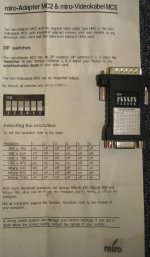 Here is a quick table of what worked with a modern display, the LG Flatron IPS224 22" TFT, wich you can get for about 150 Euros at Amazon: Miro MC2, MacOS 7.5.5, LG IPS224 TFT
Q650 C610 P475 IIsi
640 x 480 + -¹ - +
832 x 642 + + - -
1024 x 768 + + - -
1152 x 870 + + - -
Msync 640 - -² - +
Msync 832 - - - +³
Msync 1152 - -² - +³
+) Works!
-) Monitor stays blank, thinks no signal is there
¹) Monitor says out of Spec
²) Until MacOS starts, then it goes blank
³) 640 x 480 onlyI also tested another display, a HP 1955 19" TFT, wich in it's documentation claims to support Mac modes 832x642 and 1152x870 and even a Sun mode. However, with this adapter it didn't work at all.It works fine with another adapter and i can recommend the display. It's very cheap, you can get it used at Ebay for 20 Euros. The robust VESA-Stand (with pivot) is worth it alone. I only wish i had the 17" model, wich electronically is the same, but in a smaller display. | |
| Posted by: Trash80toHP_Mini on 2013-02-23 21:22:15 Localized and fixed . . . . . . what frog? [}🙂] ]'> http://allrecipes.com/recipe/caramelized-frog-legs/ | |
| Posted by: tecneeq on 2013-02-24 04:53:33 So the frog ate your image and then you ate the frog? Poetic justice. :approve: Should we make a large matrix that lists makers of display/mac/adaptor and wich modes work? Like the small table i posted? | |
| Posted by: olePigeon on 2013-02-28 09:54:56 Here's one for an adapter I got recently. 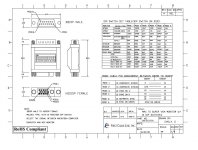 | |
| Posted by: tecneeq on 2013-02-28 15:06:50 Nice. :approve: The construction and configuration looks exactly like the AESP Adapter. I wonder if all 10 switchers are really just all the same. | |
| Posted by: tecneeq on 2013-03-04 05:45:57 Some more adapters and their documentation: http://www.brix.de/computer/mac-vga-adapter.html | |
| Posted by: Ike on 2013-03-10 17:23:04 i have two Unimac Fly adapters with a single row of Dip switches, it really works on every mac i have with my dell something something 15" LCD panel. They all seem to do 60Hz 640x480 or sometimes 1024x768 when you tell the adapter to do so, even the ones with onboard video. | |
| Posted by: tecneeq on 2013-03-10 17:56:35 Make pics, scan docs. :approve:  | |
| Posted by: NJRoadfan on 2013-07-09 20:28:52 Manuals for Belkin MacVGA adapters. http://www.belkin.com/support/dl/f3h1381revised.pdf http://cache-www.belkin.com/support/dl/mac-vga_9_dipswitches.pdf Belkin also made a HDI45 to VGA adapter for the Powermac x100 series using the dial and dipswitch style controls that the first F3H1381 manual shows. | |
| Posted by: Cory5412 on 2019-07-17 09:20:23 Uploading the two previously linked Belkin PDFs (which still work) as local-to-the-forum attachments to this post, just in case. View attachment f3h1381revised.pdf View attachment mac-vga_9_dipswitches.pdf | |
| 1 |