68kMLA Classic Interface
This is a version of the 68kMLA forums for viewing on your favorite old mac. Visitors on modern platforms may prefer the main site.
| Click here to select a new forum. | |
| DVD writer for G3 PowerBook? | |
| Posted by: haemogoblin on 2015-07-17 16:17:35 Hey guys I think the DVD drive in my laptop in on the way out, I'd like to get my hands on a replacement. But still want to use the original fascia to keep the laptop looking original. | |
| Posted by: TheWhiteFalcon on 2015-07-17 16:25:16 There were SuperDrive upgrades made for the Pismo (and possibly the Lombard). Not sure on the WS/PDQ. Good luck finding them today though. | |
| Posted by: MikeatOSX on 2015-07-17 18:23:35 I altered several Pismo DVD modules into DVD/CD Writer (one with Slot-in). This worked very well and I can use it in my Lombard too. It's impossible with Wallstreet / PDQ and Original PowerBook G3 (Kanga) as they have specific modules. http://home.comcast.net/~macdan/ebms.html | |
| Posted by: Elfen on 2015-07-17 18:54:05 Expensive as all heck - wegenermedia.com has replacement drives and upgrade drives. Might be lucky to get one on ebay if they can be found. | |
Posted by: haemogoblin on 2015-07-18 08:48:10I altered several Pismo DVD modules into DVD/CD Writer (one with Slot-in). This worked very well and I can use it in my Lombard too.I took a look at your site, I'm not to bother about a DVD writer (would be nice tho), a CD writer, DVD reader would be perfectly fine. I just want a drive that I can use the original facia with. So that the Pismo looks like it should do. Could you recommend a drive? I think I spotted one on your list, but thought it wise to ask first | |
| Posted by: MikeatOSX on 2015-07-18 09:37:55 That's not MY site. 🙂 I too have pictures, which I shot during the assembling, but must look for them first. The old DVD drives / burner are very cheap nowadays, so don't buy the first one. | |
| Posted by: Macdrone on 2015-07-18 10:12:02 I know I have put slot load DVD drives from G5 iMacs in a lombard and its bootable, have had no need to be a burner but it works. Maybe someday Ill even paint the cover black so its a little more hidden. | |
| Posted by: MikeatOSX on 2015-07-18 17:19:39 haemogoblin, I have some pictures now. 🙂 I‘ve assembled 4 different DVD/CD R/W for my Pismos and the Lombard (and I have some more different drives to test ….): Matsushita UJ-845B my lovely slot-in burner, which is recognized by everything and boots into OS 9 and OS X (with "C") and the Pismo "sees" a UJ-845S 🙂 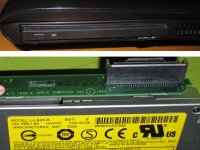 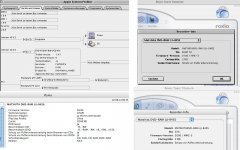 Matsushita UJ-840 boots into OS 9 and OS X (with "C"): 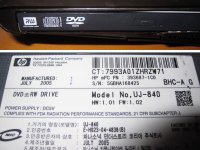 Toshiba Samsung SD-R6472 boots into OS 9 and OS X (with "C") with original Pismo face plate: 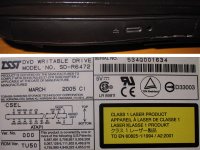 Samsung SN-S082D boots into OS 9 and OS X (with "C") after firmware update FW SH02: 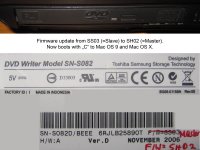 Master is necessary for booting with "C". Firmware link: http://www.tsstodd.com/eng/firmware/fwdownload/?functionvalue=list&product=SDWI&model=SN-S082D&searchText=S082&pTop=0&mTop=0&tabIdx=1 Here are more links: http://www.xlr8yourmac.com/PB_G3/oem_combo_drives/build_guide/build_combo_drive.html http://www.powerbook-fr.com/dossiers/dvd_region_free_en_article30.html | |
| Posted by: CC_333 on 2015-07-18 17:30:10 What is "C"? c | |
| Posted by: TheWhiteFalcon on 2015-07-18 17:31:30 He's saying you need to hold C down, I believe. | |
| Posted by: MikeatOSX on 2015-07-18 17:31:45 Yes, for booting many (not all) Macs from the CD-Rom - for emergency booting. Sorry, some system pictures from OS 9, OS X and Roxio Toast v5.2.3 are in german. | |
| Posted by: CC_333 on 2015-07-18 17:36:56 OK, I c :lol: Do the Startup Disk control panel and the boot picker work also? c | |
| Posted by: MikeatOSX on 2015-07-18 17:41:37 Yes, this is (mostly always) working, when the CD-Rom drive isn't ready yet to boot with c (no Master set). | |
| Posted by: haemogoblin on 2015-07-19 01:29:52 MikeatOSX - Thank you for posting those pictures, I think I know which drive I'm getting now. The Samsung SD-R6472 is a no brainer, it used the existing fascia plate, which is exactly what I wanted. Some of the other do look pretty good, better then I'd expected actually. It's great that you've been able to test a selection of drives on the Pismo and certainly handy for me! It has made finding a replacement drive a lot easier. I've two more Pismo's in the attic, but they both have the stock optical drives inside. So not much point taking one of those, if I'm going to replace the drive in my main Pismo. Then it's going to be an upgrade, not a like for like swap 🙂 | |
| Posted by: MikeatOSX on 2015-07-19 01:46:58 I think I'll test more drives in the near future. 🙂 | |
| Posted by: haemogoblin on 2015-07-19 01:49:26 Oh I those these were pictures of drives you had tested already. I've looked on ebay for the SD-R6472, but some of the results are a little confusing. | |
| Posted by: MikeatOSX on 2015-07-19 02:02:33 The drives in the pictures are in use since one year, but I've gotten 2 more original Pismo drives for testing with different CD-ROMs. | |
| Posted by: MikeatOSX on 2015-07-19 07:23:19 Another firmware page for Mac Dvd/CD Rom: http://superdrive.cynikal.net | |
| Posted by: haemogoblin on 2015-07-19 15:43:09 Found myself an SD-R6472, will report back with my results 🙂 | |
| 1 > |