68kMLA Classic Interface
This is a version of the 68kMLA forums for viewing on your favorite old mac. Visitors on modern platforms may prefer the main site.
| Click here to select a new forum. | |
| Apple IIc doesn't format/duplicate | |
| Posted by: Philsan on 2011-08-12 01:01:34 My recently acquired Apple IIc read disks perfectly but when I try to format or duplicate disks (with ProDos v1.1.1 or 1.0.2), after the normal drive noise (like start-up one), I get this error message: 4356- A=0C X=60 Y=0C P=30 S=DA and the red drive light remains lit. I tried different double side double density disks (the same I use for Commodore 64 and Atari 800XL). | |
| Posted by: magnusfalkirk on 2011-08-12 09:45:14 You are probably using the wrong disks. The Apple II prefers Single sided/Double Density or Single Sided/Single Density disks. Dean | |
| Posted by: david__schmidt on 2011-08-12 10:56:00 Have you verified if you can write a file on one of the known-good disks? I.e. can your disk write at all? On ProDOS, try: NEW 10 PRINT "HELLO, WORLD" SAVE HELLO NEW LOAD HELLO LISTDoes it save without error? Does your program re-appear? | |
| Posted by: Philsan on 2011-08-12 11:11:28 Thank you guys. I think my Apple IIc has memory problems. If I use ProDOS User's Disk (for 64K Apple IIe) instead of Apple System Utilities (for 128K Apple IIe and IIc) I am able to format and copy disks (DSDD). I've done David's Basic save and load test too. Moreover, do you think those moving pixels (top right and bottom center) on screen are normal? They are always in those positions. Loading ProDOS 1.0.2 (instead of 1.1.1) I get the error message you see. 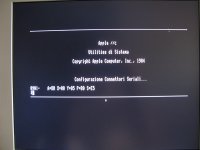 | |
| Posted by: Philsan on 2011-08-21 01:18:43 Thanks to ADTPro http://adtpro.sourceforge.net/ I was able to use two test programs. Master Diagnostics IIc gives "010C – A=BF X=60 Y=00 P=35 S=5E" when I test auxiliary 64K of RAM. Apple IIc Diagnostics gives "main logic board RAM test failed". | |
| Posted by: mcdermd on 2011-08-22 16:13:05 I know that in the past I've been able to test RAM chips by placing a known good one over each soldered-on chip, leg to leg. When it tests with no error, you'll know which one to desolder and replace. Is there a better way to test them? | |
| Posted by: Philsan on 2011-08-26 08:07:27 mcdermd, I've tried your method of placing a RAM chip over a soldered-on chip on my Apple IIc. I have many chips but I am unsure if they are compatible and if they are OK. What should happen when I place a good chip over a soldered one? Testing the same soldered chip with my different chips, sometimes I get garbage on screen and sometimes nothing happens. | |
| Posted by: mcdermd on 2011-08-26 10:34:22 Hm. I've used this method with a few old Atari computers. I used a known good replacement DRAM chip and carefully placed it over the old chip, making sure all of the legs contacted properly. If there is only one bad RAM chip on the board, you can find it by hopping the good chip over all of the others one by one until it passes testing. Alternately, you can get a full replacement set and remove them one by one until you find the problem chip(s). If you've got the time, iron and a sucker, I'd just order a whole new set of chips and do them all at once. Apple II Csa2 FAQ[/url]"]018- What chip can I use to replace a bad RAM IC on my IIemotherboard?Jameco sells these for a buck a piece. | |
| Posted by: Philsan on 2011-08-26 14:57:47 Thanks but what should happen when I place a good chip over a soldered one? Testing the same soldered chip with my different chips, sometimes I get garbage on screen and sometimes nothing changes. I think nothing should change when a good chip is placed over a good soldered chip. Are you sure that this method works on Apple IIc? | |
| Posted by: mcdermd on 2011-08-26 15:05:16 I've never tried it on an Apple II but I don't see why it would not work. On the Ataris I've done this with, placing a good chip over a bad chip will "repair" the bad chip and allow it to boot. If you have any doubts, just desolder and replace them all and you'll be positive the RAM is good. | |
| Posted by: Philsan on 2011-08-26 15:16:30 Are you sure that Jaleco's chips are OK for my Apple IIc? BTW, I love Atari 8 bit computers... The chip I used for testings are from Atari 800XL computers. | |
| Posted by: mcdermd on 2011-08-26 21:47:15 According to the Apple II FAQ There they should be. The real way to know is to read the number from the top of the DRAM that's in there now. | |
| 1 |