68kMLA Classic Interface
This is a version of the 68kMLA forums for viewing on your favorite old mac. Visitors on modern platforms may prefer the main site.
| Click here to select a new forum. | |
| LC 475 chime, displays starts, then roll | |
| Posted by: quinnmacdonald on 2015-07-15 16:42:20 Hi there, I picketed up an LC 475. The first thing I did was swap the battery with a new one I had just purchased brand new 🙂 I power it on, it chimes ok, the external display shows the grey screen on and mouse pointer for a few seconds. Then, the video starts to roll to an extent that I can't make it out. I think it is still sitting at that screen and not trying to boot further. No other error chimes or disk activity is heard. I tried booting it with a known-good internal SCSI drive w/7.5.3 that boots my IIci, Centris and SE fine. Same time happens attempting to boost from an external Zip drive (yes, I have 2 that work!). It's almost if, after a few seconds of being on, something is overheating. Do I need to to recap? System board cleaning? Is it a lost cause? if component level repair is needed, I will probably hire one of the pros on this site - I know my limits! | |
| Posted by: uniserver on 2015-07-15 16:47:39 bad caps ... and if the psu is TDK one that is going to need new caps too. | |
| Posted by: techknight on 2015-07-15 17:05:12 the Aztech ones are just as bad. I have one that wouldnt hold the HDD on spinup before cycling off... | |
| Posted by: uniserver on 2015-07-15 17:22:59 well the nice thing about the aztechs is there is like one big cap and just a few tiny ones 🙂 | |
| Posted by: quinnmacdonald on 2015-07-15 17:50:03 Thanks for the feedback. I may need to send you this board! I don't see Aztec or TDK on the power supply. It says DynaComp. Is that better? 🙂 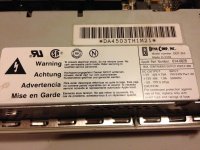 | |
| Posted by: uniserver on 2015-07-15 18:12:25 yeah the dyna ones are pretty good, i don't normally see too many of those. cool well you can pm me for the details. | |
| Posted by: sstaylor on 2015-07-15 19:49:35 Another possibility: maybe the LC is changing video resolutions early in the boot process, and your monitor doesn't support that resolution? | |
| Posted by: quinnmacdonald on 2015-07-15 20:31:37 You know.. somehow I ruled that out early on, but I must have been mistaken. I was using a 12" RGB Apple display, which I think runs at 512 x 384? Something low. Anyhow, I tried again using an Apple 14" display that does 640 x 480. She booted to the desktop.. I have never seen her boot to the desktop.. and then it said the OS was corrupt or some such and needed to be reinstalled. Darn. That us surprising, as it had booted several other Macs recently. I am hoping my SCSI drive didn't just fail. That would suck. I also tried booting off of my Zip drive with 7.5.3 but it just sat there with the blinking question mark, even after a PRAM reset. Ok - I'm going to have a scotch first, and then tomorrow, try another OS install. | |
Posted by: onlyonemac on 2015-07-16 14:06:45and then it said the OS was corrupt or some such and needed to be reinstalled.It is more likely that the OS does not contain the right stuff for your LC (system enablers, extensions, and device drivers within the system file) than that the disk is to blame. | |
| Posted by: quinnmacdonald on 2015-07-16 15:56:48 That could be it. MacTracker says the LC 475 needs System Enabler 065. I went with 7.5.3 because the enablers are built in to the system folder, if I recall correctly. I thought I did a universal install, but now I can't be sure. I'll blank the drive on another machine and ensure I do a universal install of 7.5.3. Or maybe 8.1. Fingers crossed! | |
| Posted by: Elfen on 2015-07-16 17:03:00 The system folder is not blessed on that media, which is why your System 7.5.x is not loading. Usually if the system enabler is missing, you get the Smiley Mac and then an Error Window saying "This System is not for this Mac." Booting from a Zip Drive is difficult as not all systems will boot off it (the LC 475 should however). The cartridge needs to be Mac formatted on the Mac and the System put on it first and then blessed. A PC Formatted cartridge will be readable but not bootable. I forget where, but there are sites out there, including Apple, where you can download the proper System Enabler for the LC 475. This is why I prefer System 7.6, it does away with System Enablers. | |
| Posted by: quinnmacdonald on 2015-07-16 17:27:17 When I formatted the Zip disk, I used Mac OS Standard and installed 7.5.5 on it, which my IIci and Centris 610 can boot from. Now none of my machines can see the SCSI Zip drive even with Iomega guest installed. Zip disks that don't mount on my SCSI Zip drive mount in my USB Zip drive. Looks like the SCSI Zip drive packed it in. | |
| Posted by: Elfen on 2015-07-16 17:48:35 Neither the IIci or (I believe) the Centris 610 need a system enabler for System 7.5.x. Q: At any time have the Zip Drive had "The Click of Death" occur? Q2: How old are these disks? If over 10 years old, they may have went through media failure, and it is not the drive but the disks. Same thing happens to Floppy Disks. | |
| Posted by: quinnmacdonald on 2015-07-16 17:55:10 As far as I know, it hasn't had the click of death. The thing is, the same Zip disks that won't read in my SCSI Zip drive on the Centris *will* read in my USB Zip drive on my other Mac. Both the drives and disk are old. Must be late 90s. I'm amazed they worked this long. Tomorrow a friend is coming over with an external SCSI drive. We'll see if we can get OS 7.6 copied to it from the Centris, and reinstall the OS on the 475. | |
| Posted by: Elfen on 2015-07-16 18:15:39 I wish you the best on that. | |
| Posted by: CC_333 on 2015-07-17 09:56:55 If you can get the patched version of Apple SC HD Setup, you can format a Zip disk as a regular hard drive to make it universal (it'll boot on virtually any Mac that has SCSI, as it's seen as a regular SCSI hard drive). c | |
| Posted by: techknight on 2015-07-17 17:13:10 All ZIP drives that work on SCSI are getting old at this point. I think they "still" sell new media though. But dont quote me on that. | |
Posted by: quinnmacdonald on 2015-07-17 20:28:36If you can get the patched version of Apple SC HD Setup, you can format a Zip disk as a regular hard drive to make it universal (it'll boot on virtually any Mac that has SCSI, as it's seen as a regular SCSI hard drive).Do you know what version # that is? | |
| Posted by: CC_333 on 2015-07-18 06:30:02 Apple HD SC Setup 7.3.5. I think uniserver might have a copy on his site. c | |
| 1 |