68kMLA Classic Interface
This is a version of the 68kMLA forums for viewing on your favorite old mac. Visitors on modern platforms may prefer the main site.
| Click here to select a new forum. | |
| PB 1400 40MHz Overclock | |
| Posted by: LC_575 on 2011-06-30 14:07:39 I just installed a 40 MHz oscillator in my PB1400, replacing the original 33.333 MHz one, as seen here: http://home.comcast.net/~gionpeters/hhhh/pb1400.htm The oscillator, while difficult to solder in (solder points are fragile), seems to be working properly. However, I don't really observe any great increase in speed (Keep in mind that the CPU is running at 200 MHz) - in fact, It almost seems slower than it was. Also, the Apple System Profiler says that the 603ev is running at 167 MHz, however that may just be a recorded value and not a measured one. Where should I go next? And does anyone have any good benchmarking tools (like MacBench) that I could use? | |
| Posted by: Byrd on 2011-06-30 16:19:03 Hey, where did you pick up the oscillator? I'd benchmark using Norton System Info, which gives you some nice comparisons at the end. Note that Apple System Profiler is usually on the money, so I'd double check your soldering too. JB | |
| Posted by: LC_575 on 2011-06-30 16:50:34 Actually, MacBench 5 reports that I am indeed running at 199.99 MHz. Apple System Profiler seems to have lied. So, who wants to benchmark an original PowerBook 1400c/166 against me? | |
| Posted by: ClassicHasClass on 2011-06-30 16:53:05 Are your PCMCIA cards still working properly? | |
| Posted by: LC_575 on 2011-06-30 20:22:44 Well, my Farallon EtherMac card still let me talk to my W2000 server. My Orinoco WiFi card also seems to work. | |
| Posted by: MacUp72 on 2023-10-02 01:46:25 necropost.. I think about trying that mod in my PB 1400c/166.. sadly the above mentioned site is offline, does anybody have some infos on this, maybe a screenshot? | |
Posted by: Phipli on 2023-10-02 01:57:38necropost..https://web.archive.org/web/20120716013521/http://home.comcast.net/~gionpeters/hhhh/pb1400.htm (@joshc) | |
| Posted by: MacUp72 on 2023-10-02 01:59:10 oh, that was quick thanks..👍 | |
| Posted by: MacUp72 on 2023-10-06 04:34:39 success! so far so good..😎 disassembled the 1400c and located the original 33 Mhz crystal, then desoldered it, which wasnt easy. I'm not a particular practiced smd solderer, there are some very tiny R's right next to it and my iron is good but the tip is a little to big. the oscillator is marked yellow in the pic: 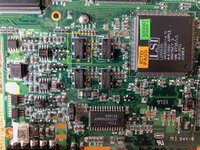 placed the 40 Mhz one on the old position, it's a smaller but the pmc is correct, 5mm 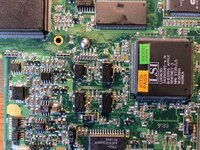 Gauge Pro reads the now corret 200 Mhz, nice..must do some benchmarks. 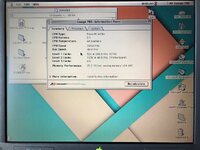 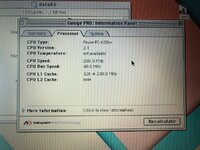 btw, how do I set up MacBench with other systems like the readings of a pb 3400 or similar? theres only one reference of a PM G3/300 | |
| Posted by: Snial on 2023-10-06 05:04:42 Hmm, for a PB1400 running at 166MHz upgraded to 200MHz. However, would the same kinds of tricks make more of a difference to a stock PB1400/117. I could change the PLL to make it go up to 132MHz, then change the clock to take it to a theoretical 160MHz. However, since it lack san L2 cache I'd probably only get half the speed-up (18%) and possibly fry the CPU. What's not to like ;-) ? | |
| Posted by: 3lectr1cPPC on 2023-10-06 05:28:11 Looks like I should try overclocking my 1400. Would be nice then to bench it against my 200MHz 3400c board. I know the 3400 will win since it's a PCI Mac and the 1400 is NuBus, but would still be interesting to see. And it would also be nice to have a 200MHz 603 1400. | |
Posted by: Phipli on 2023-10-06 05:35:03However, would the same kinds of tricks make more of a difference to a stock PB1400/117You'd really do better to find a faster CPU card because of the L2 Cache. | |
| Posted by: MacUp72 on 2023-10-06 08:14:44 its fun to tinker around nontheless, even with a 117 model..I think the performance would be like a 5300 as said, you need some smd soldering skills🙄 | |
| Posted by: LaPorta on 2023-10-06 09:00:43 You can bench it against my NewerTech G3 card as well. | |
Posted by: Snial on 2023-10-06 11:07:42You'd really do better to find a faster CPU card because of the L2 Cache.An L2 cache is for wimps[*] ;-) ! Actually, I don't really plan to overclock crystal, but I've received a new CPU today (again 117MHz) so I might try to take that one up to a cache less 132MHz! * That is, it's a very sensible suggestion, why am I so reluctant to do that? | |
| Posted by: MacUp72 on 2023-10-06 23:32:08 mods..as there is no fan inside the 1400 machines its getting warmer..there is a simple copper shield directly on the CPU and there is that funny aluminium heatsink under the keyboard that presses onto the CPU unit..I just replaced the old thermal pad with an Arctic thermal pad between those, but a fan would be better..but I dont think that small fan of a 3400 would fit anywhere in there 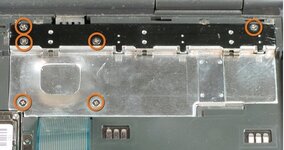 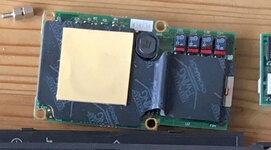 | |
Posted by: croissantking on 2023-10-08 23:25:50An L2 cache is for wimps[*] ;-) ! Actually, I don't really plan to overclock crystal, but I've received a new CPU today (again 117MHz) so I might try to take that one up to a cache less 132MHz!It’s safe to try, but do you know the resistor values for 133MHz operation? I am planning to overclock crystal 😀 | |
| Posted by: MacUp72 on 2023-10-09 00:06:08 you mean this mod? I didnt change any resistors, I just soldered the crystal in. the bus is working, no probs with the PCMCIA slots or WIFI card. | |
Posted by: Snial on 2023-10-09 00:12:32It’s safe to try, but do you know the resistor values for 133MHz operation?Yes! I used the Motorola data sheet for the 603e and traced it to the pins on the CPU, so I know it's correct. It's in a recent thread too, I'll provide the link later. | |
Posted by: croissantking on 2023-10-09 03:29:15Yes! I used the Motorola data sheet for the 603e and traced it to the pins on the CPU, so I know it's correct. It's in a recent thread too, I'll provide the link later.You might be the first person to attempt an overclock on the humble 117MHz module, ha. | |
| 1 > |