68kMLA Classic Interface
This is a version of the 68kMLA forums for viewing on your favorite old mac. Visitors on modern platforms may prefer the main site.
| Click here to select a new forum. | |
| I have a sad Powerbook 140 | |
| Posted by: FlyingToaster on 2011-05-04 16:42:54 Yep title says it. I have a "new" Powerbook 140. It seems to be in good shape physically. I turn it on, hear a chime, screen lights up, the end. I hear the hard drive initializing over and over and the lit up screen seems to not respond to adjusting the contrast. Brightness works. I know the drive might be shot or just needs a good erase, but I can't figure out what is wrong with this screen. I switched the display from my PB145 and I see an arrow in the corner and no little mac in the middle. I don't know what I'm asking help for, maybe just an answer...is the dark display completely broke? and why does the drive initialize over and over? I am new to the original powerbooks, usually play with duos and 1400/3400/5300 series. :?: | |
| Posted by: techknight on 2011-05-04 18:36:34 you have to replace all the bad capacitors on the display panel to bring full contrast back. Otherwise, thats the condition you will see. if you take a blowdryer and blow it on the back of the bad panel, across the caps, the screen will "brighten" up. thats how you know. Also when heated, the smell of "dead fish" is sure evidence of leaking caps. And as far as the HDD, if its shutting down, starting up, reinitting, and shutting down. over and over again, the HDD is toast. | |
| Posted by: FlyingToaster on 2011-05-05 11:02:05 Well so I pretty much have a useless powerbook! Thank you for your insight. I guess I have a few spare parts now | |
| Posted by: cjtmacclassic on 2011-05-05 11:09:52 I wouldn't say "Useless". It's more like "In need of repair", But hey, more spare parts. | |
| Posted by: techknight on 2011-05-05 19:28:55 the "parts" units in that aspect are going to be the norm here shortly. most of the 2.5" SCSI HDDs have passed away, and what few remaining are dying off with old age. Then the caps are taking out the rest of the unit. a recapped unit with a good SCSI SSD and the thing would be good for another 20 years. | |
| Posted by: naryasece on 2011-08-06 15:25:46 I'm guessing my PowerBook 140 is having a similar screen issue. Prior to today, when I would boot it up (cold start) the screen would be really dark, then would come to the regular contrast after warming up for a few minutes. Now It gets immediately washed out when I boot it up. Are the capacitors on the front of the display itself? Or on the interconnect/inverter board? I pulled apart my 140's display case and looked over the visible electronics and noticed a few had some sort of corrosion or other gunk on it. See the attached pictures. I think I could replace them. 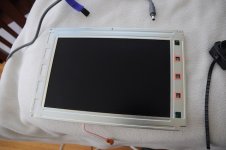 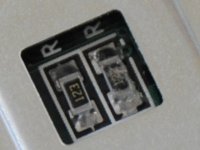 | |
| Posted by: techknight on 2011-08-06 19:23:37 No, rear of display. they are your standard SMD aluminum electrolyics. | |
| Posted by: naryasece on 2011-08-06 20:07:34 Oh on closer inspection of the capacitors on the back, I do notice some corrosion around the terminals of the smaller ones. I'll have to figure out how to get them out, clean the board and install new ones. I did clean off the gunk though on the front ones. Hopefully it won't damage things 🙂 | |
| Posted by: naryasece on 2011-08-08 16:43:09 i got the LCD isolated away from the rest of the display unit (the housing, backlight) so I could get access to the capacitors. Tried taking some pictures in case anyone else is doing this too. There are 6 of the smaller capacitors, which read: e 3.3 35 and 3 more that read: i 3.3 35 my guess is they read 3.3 ufarads at 35 volts? 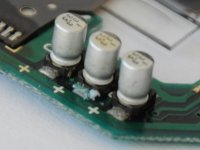 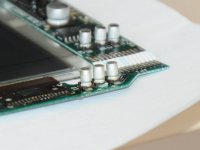 | |
| Posted by: techknight on 2011-08-08 19:50:43 Yes... they all need replaced, and the display will be fully functional. I have done this twice now. You will also need to replace the bigger ones as well. | |
| 1 |