68kMLA Classic Interface
This is a version of the 68kMLA forums for viewing on your favorite old mac. Visitors on modern platforms may prefer the main site.
| Click here to select a new forum. | |
| A Pismo | |
| Posted by: quantumii on 2011-02-25 05:11:10 Here I go again, this time I found a Pismo Powerbook, with 2 chargers. It appeared dead at first, then after unplugging the backup battery, the machine booted into OS X. Asks for user & password, so I will have to wait until I get home so that I can boot from the CD and do a password reset. It has some brandind, but I should be able to remove 90% of it. The LCD is a little dark in the lower section, the CFFL is probably a bit worn. The battery LED flashes so it appears to be charging it. Let's see if it works on battery after a few hours 🙂 Picture attached! 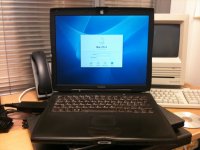 | |
| Posted by: classic on 2011-02-25 05:41:44 You could try booting with the option key held down and see if it has mac os 9. Many Pismo's get chucked in the belief that they are kaput. A handy thing to know is disconnecting the pram battery :approve: Best of luck with the battery charging. | |
| Posted by: quantumii on 2011-02-25 05:46:05 I guess this one got chucked because the Uni think "it is too old" or something like that. Or maybe because of the fact that it did not boot. Who knows? This is from the same place I found a Dual 2 ghz G5, which was working just fine. Probably just replaced with a Mac Pro or something. No OS 9, but I can boot into single user mode. I think I can poke around and set a new root password from here. | |
| Posted by: J English Smith on 2011-02-25 07:52:14 Congratulations! They are, I think, the best notebook Apple ever made! | |
| Posted by: quantumii on 2011-02-25 15:30:12 Thanks 🙂 I am going to let it charge overnight and we will then see if the battery is any good. I will reset the password somewhere in the weekend(or maybe reinstall after checking for interesting programs) I am planning on dual-booting it with Tiger and OS 9.2. I will also upgrade the memory as much as I can. I do not yet know if it is upgraded in some way or how much ram it has. I have been too busy to be able to investigate yet. | |
| Posted by: cjtmacclassic on 2011-02-25 16:50:59 To reset your OS X password without an OS X CD you need to enter terminal and create a new admin account: Reboot Hold apple + s down after you hear the chime. When you get to the text prompt enter these terminal commands to create a brand new admin account (hitting return after each line): mount -uw / rm /var/db/.AppleSetupDone shutdown -h now After rebooting you should have a brand new admin account. When you login as the new admin you can simply delete the old one and you’re good to go again! Keep in mind that you must type them exactly as shown. UNIX Is quite picky about capitals and spaces. Also, all of the original data will be preserved. | |
| Posted by: quantumii on 2011-02-26 09:55:31 Thanks for the tip. I will try that 🙂 It does not seem to be too happy to boot of burned CD's. It stalls somewhere at the apple logo with the spinning wheel. The battery does not seem to take a good charge.. | |
| Posted by: quantumii on 2011-03-01 13:14:32 An update: The Pismo is now happily running Tiger. I burned a new copy on a DVD and it installes just fine on the first try. I am posting this from it 🙂 I gave it a good cleaning, and nearly all the branding are gone. The screen is also perfect, the reason for the dark lower section was because the laptop had been carried for a while outside in the cold. Now I need to install an airport card | |
| 1 |