68kMLA Classic Interface
This is a version of the 68kMLA forums for viewing on your favorite old mac. Visitors on modern platforms may prefer the main site.
| Click here to select a new forum. | |
| PowerMac 4400 with DOS card and display cable | |
| Posted by: quantumii on 2011-02-25 03:00:59 Hi, Today I found a complete PowerMac 4400, and it has the DOS card inside as well. Along with it I picked up a printer (Canon printer with Apple branding), the keyboard and the mouse. I also got the special split cable for the display for use between the mac and the PC card. The monitor was also there, but I think it is both too big and heavy for me, so I left it. I figure I can use the machine just fine with a common apple-to-vga adapter which I already have. I powered it on, and it chimes. The HDD is noisy. No further tests done yet. May have time for that after lunch today 🙂 It does not look similar to this one: http://en.wikipedia.org/wiki/Power_Macintosh_4400 Mine has a plastic case, the Floppy is above the CDrom, and the HDD is next to the floppy. Weird.. | |
| Posted by: joshc on 2011-02-25 03:53:18 Pictures? | |
| Posted by: quantumii on 2011-02-25 05:08:12 Here's the pics! 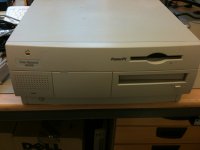 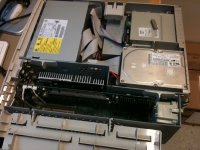 | |
| Posted by: quinterro on 2011-02-25 06:31:50 Looks like someone took the case badge off of a 4400 and put it on a 7300/7500/7600. | |
| Posted by: kvanderlaag on 2011-02-25 08:01:09 4400 in an Outrigger case. How curious. | |
| Posted by: quantumii on 2011-02-25 15:26:46 Why would someone do that? Maybe the true identity of the machine is hidden on the mainboard somewhere? The machine is located in my office, so I will not be able to check until Monday. | |
| Posted by: LCGuy on 2011-02-25 15:33:35 That CPU card looks like a 604, so I'd say it'd most likely be a 7300 or 7600. Its definitely not a 4400 - this is a 4400:  (I know it says 7220 - the photo was taken by our very own Danamania, the 4400 was sold as the 7220 here) Either way - its definitely no 4400 - the 4400 was based on a Tanzania board, which not only won't fit in an Outrigger case, but also has a soldered-on CPU. (G3 upgrades were available via the L2 cache slot) | |
| Posted by: IIfx on 2011-02-25 17:43:09 What an oddity! Who knows what it is... | |
| Posted by: quantumii on 2011-02-26 09:53:39 Either way it is weird. I will need to look at it when I am back in the office Monday. 😎 | |
| Posted by: tmtomh on 2011-02-26 11:41:03 Interesting mystery - but from the photos it seems pretty clear that the only thing from a 4400 on that machine is the name badge on the case. Inside and out it's definitely a 7300, 7500, or 7600. | |
| Posted by: quantumii on 2011-02-26 13:40:08 Yes. Probably the previous owner wanted to fool somebody with replacing the badge. Still, a good find with the DOS card and all. Also, I ditched the inkjet printer. It did only have a black ink cartrige, and it was probably dried out. The battery kept the machine alive for about 5 minutes. Not very useful. 😛 | |
Posted by: Bunsen on 2011-02-27 04:36:11Also, I ditched the inkjet printer. It did only have a black ink cartrige, and it was probably dried out.Don't underestimate the utility of a printer that can be refilled with cheap ink without the manufacturer's guard dog chip telling you you can't. | |
| Posted by: quantumii on 2011-02-27 14:01:49 Hey, Do not make me go down to the recycling room to re-rescue it now. I have too much weird stuff already.. On second thought, maybe I will rescue it again. After all, it is a printer with a Mac printer port on it. It is a Stylewriter II if I remember correctly. | |
| Posted by: quantumii on 2011-02-28 06:37:15 Update: Tested the machine with a monitor now. It boots into OS 9. A lot of personal data, so I guess a reinstall would be the right thing to do. Does anybody know what software I need to install on it to make use of the PC card? It had a 1 GB disk image file on it, but I could not figure out how to boot it. Also, mystery solved. It is a 7300/7500 series machine, according to System Profiler. No video input, so this must be a 7300 with the PC card. | |
| Posted by: joewhk on 2011-03-07 03:40:03 http://download.info.apple.com/Apple_Support_Area/Apple_Software_Updates/English-North_American/DOS-Windows/DOS_and_PC_Compatibility_SW/ Software should be available there for PC Compatibility Card. Check Control Panel for hot key switching to PC, but usually Command-Return. Hope these helps 🙂 | |
| Posted by: quantumii on 2011-03-07 05:13:02 Thanks 🙂 I will look into that when I have time. The mac is sitting in my storage room at work right now. | |
| 1 |