68kMLA Classic Interface
This is a version of the 68kMLA forums for viewing on your favorite old mac. Visitors on modern platforms may prefer the main site.
| Click here to select a new forum. | |
| Mac OS 9 scroll bar problem | |
| Posted by: ken27238 on 2011-02-23 10:52:12 I did a clean install of os OS 9.2.2 to get everything working snappy again and it work fine. i got all of they extensions and control panels moved over and i was working for about 10 minutes and I noticed that there were two set of scroll arrows (see picture for what I mean). I restarted without extensions and control panels and the problem is still there. its not effecting anything its just annoying. any ideas? 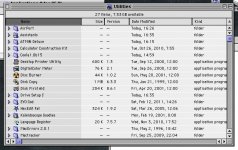 | |
| Posted by: quinterro on 2011-02-23 11:03:01 If memory serves me right there is an option under Appearance that will let you change how the arrows are displayed on the scroll bars. | |
| Posted by: ken27238 on 2011-02-23 11:09:15 yea, I did that first and checked or unchecked it did nothing at all. i'll zap the pram and try it again to see if that fixes it :beige: | |
| Posted by: ClassicHasClass on 2011-02-23 13:49:14 Grab a copy of Smart Scroll (should be freeware) and see if that fixes it. | |
Posted by: ken27238 on 2011-02-23 14:19:38Grab a copy of Smart Scroll (should be freeware) and see if that fixes it.thanks!!! getting a copy off mac garden right now and I will try it out :beige: | |
| Posted by: ken27238 on 2011-02-23 16:53:03 I installed smart scroll 1.1 and it did nothing, anyone know of a new version? | |
| Posted by: Byrd on 2011-02-23 17:33:11 Try deleting any preference files that refer to the dual scroll bars - not in front of an OS 9 machine, but delete whatever preference file the control panel refers to for scrolling (eg. Appearance prefs). | |
| Posted by: ken27238 on 2011-02-24 06:00:29 never mind I fixed it!!! Kaleidescope (a theming control pannel) had double scroll arrows on. Alls good now :beige: | |
| 1 |