68kMLA Classic Interface
This is a version of the 68kMLA forums for viewing on your favorite old mac. Visitors on modern platforms may prefer the main site.
| Click here to select a new forum. | |
| Visioneer PaperPort VX Scanner for Mac | |
| Posted by: Concorde1993 on 2011-01-29 23:12:16 I have had this scanner since last summer (the seller decided to include it as part of the 512ke/Plus hybrid package), and I have been unable to use it with my 5215CD as I do not have the software for it. I've already performed a Google search on this particular scanner unit, but so far no success. Before attempting to sell it (I have the original SCSI connectors, AC adapter & manual), I would like to know if any of the forum members owns one of these PaperPort units, or has any knowledge pertaining to them. Here are some pictures below: 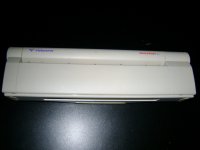 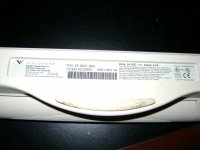 | |
| Posted by: Concorde1993 on 2011-02-02 11:57:26 I received some software from Register over the web. I made a video regarding the issues with the PP installation software. Here is the link below: Btw, my apologizes for the low-quality video. This particular camera can only shoot in 240p. | |
| Posted by: ccmac on 2011-02-02 14:46:31 I watched the video and don't have any help with the problem you are having but here are some links that might help: http://tech.groups.yahoo.com/group/paperportpreservationsociety/ http://www.macdrivermuseum.net/scanner/paperport5.sit http://tech.groups.yahoo.com/group/macdrivers/ http://support.visioneer.com/products/Sheetfed/downloads.asp | |
| Posted by: Concorde1993 on 2011-02-02 16:18:55 Thanks for the links, ccmac. I am going to try this link http://www.macdrivermuseum.net/scanner/paperport5.sit, download the software package, and let you know what happens. Btw, I already tried the software packages on the main Visioneer site. They do not work for some reason (the computer displays a System Bomb). xx( | |
| Posted by: Concorde1993 on 2011-02-02 18:46:48 Unfortunately, I can't get past the initial registration process of the installation, as I do not have the product serial number. According to the user's manual, this came with the original PP installation CD. I've attempted to confuse it by using another serial number from a Corel installation disc, however it does not accept it. I even tried the basics by putting in "0," or nothing at all. No success. The previous owner didn't record the CD serial number in the manual, in case anyone asks. | |
| Posted by: ccmac on 2011-02-02 20:12:00 This might help: http://nuance.custhelp.com/app/answers/detail/a_id/1100/~/serial-numbers-for-re-installations If those numbers don't work, google the supplied numbers and you might find other numbers. | |
| Posted by: Concorde1993 on 2011-02-03 11:23:48 Thanks, ccmac. This code completed the installation: PaperPort for Macintosh— SE (base)- bundled with scanner by scanner manufacturer: 5.0 Strobe ZAMBENHUMH Now the 5215, and the PP VX scanner are communicating. Overall, the scanner is fairly quick when scanning both text & pictures, and the quality of the scan is not too bad, either (I'll attach some pics of the image quality soon). Another advantage is it is lightweight, and portable, thus suitable for transporting around (all I am missing now is a good vintage PowerBook running OS 7, or 8+). The only drawback is it only scans in monochrome. | |
| 1 |