68kMLA Classic Interface
This is a version of the 68kMLA forums for viewing on your favorite old mac. Visitors on modern platforms may prefer the main site.
| Click here to select a new forum. | |
| Switching monitor resolution in System 7.0.1 | |
| Posted by: VMSZealot on 2015-06-20 15:27:59 I have a Quadra 650 running A/UX and hence System 7.0.1. Question is, how do I switch monitor resolutions - the monitors control panel doesn't show different resolutions, it just says Apple 21" Monitor (it isn't - it's a Samsung LCD). At the moment, I have to switch to MacOS 8.1, switch resolution and then reboot. Inconvenient to say the least! | |
| Posted by: bamdad on 2025-01-12 08:42:57 i know this is an old topic, but have you figured it out? i have a Q700 and it's behaving exactly the same.. i even tried using the monitors control panel from system 7.5.5 but that didn't help at all, nor adding the 'quadra monitors extension' to my user's system folder. | |
| Posted by: cheesestraws on 2025-01-12 09:19:18 Which monitor adapter are you using? | |
Posted by: joevt on 2025-01-12 14:55:59i have a Q700 and it's behaving exactly the sameAre you also using A/UX? | |
Posted by: bamdad on 2025-01-14 07:55:05Which monitor adapter are you using?i'm using this one with 10 switches: 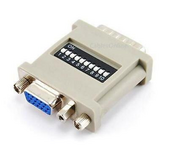 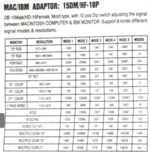 my current settings are: 1-4-5-8 for "multiple scan 16" - the "multiple scan 21" one doesn't give me all the resolutions under 7.5.5 | |
Posted by: bamdad on 2025-01-14 07:55:44Are you also using A/UX?yes i am | |
Posted by: joevt on 2025-01-14 16:58:40i'm using this one with 10 switches:According to my notes at https://tinkerdifferent.com/threads/documentation-for-db15-to-vga-adapters.318/post-21290 , the MULITPLE-SCAN 16" and MULITPLE-SCAN 21" items are reversed. Which means MULITPLE-SCAN 16" is for 21" displays and therefore has more options. | |
Posted by: bamdad on 2025-01-14 17:41:36According to my notes at https://tinkerdifferent.com/threads/documentation-for-db15-to-vga-adapters.318/post-21290 , the MULITPLE-SCAN 16" and MULITPLE-SCAN 21" items are reversed. Which means MULITPLE-SCAN 16" is for 21" displays and therefore has more options.aha, that actually explains a lot, thanks : ) it doesn't solve the <system 7.5.x and A/UX dynamic resolution switching thing though.. | |
| Posted by: bamdad on 2025-01-14 17:44:08 btw just some random info from here: 21" and 16" color monitors default to the “Page-White Gamma” profile which affects white balance. This can be changed in the Monitors control panel. so that's why i'm seeing everything in yellow under A/UX by default even though i've changed it in the pre-boot system 7.0.1 and on 7.5.5 too. | |
| 1 |