68kMLA Classic Interface
This is a version of the 68kMLA forums for viewing on your favorite old mac. Visitors on modern platforms may prefer the main site.
| Click here to select a new forum. | |
| How to start a Portable? | |
| Posted by: CompuNurd on 2015-06-11 10:20:55 Well, I feel like a complete idiot. I just bought a Mac Portable and can't even figure out how to turn the thing on. There is no power button from what I can tell. Can someone help me out? Maybe it's the battery? | |
| Posted by: Macdrone on 2015-06-11 10:30:08 First recap it. Even if you have a good battery most likely needs a recap. | |
| Posted by: Macdrone on 2015-06-11 10:30:19 First recap it. Even if you have a good battery most likely needs a recap. | |
| Posted by: Charlieman on 2015-06-11 10:31:46 You have to press the "Any" key 🙂 From my notes: The limited intelligence of the power management unit PMU) is a major annoyance. The PMU may refuse to boot the Portable even when all components are fully functional. Even when fitting a fully charged battery, the PMU may require occasional resets, so make them a regular part of your diagnostic routine for the Portable. Later desktop and portable Macs have better PMUs which do not require such frequent resets. My preferred method of resetting the Portable PMU is a bit more thorough than the one described by Apple: 1. Shutdown the Portable if it is running. 2. Unplug the power adapter. 3. Locate the Reset and Interrupt switches on the left front side of the case below the keyboard. Reset is the one with a simple triangular icon. 4. Slide the locking switch towards the rear of the computer to enable the Reset and Interrupt switches. 5. Hold both switches down for 15 seconds. Release the Interrupt switch first. If you perform a PMU reset while the Portable is running, the Mac should now power off. 6. Slide the locking switch towards the front of the computer so that the Reset and Interrupt switches can't be operated accidentally. 7. Wait for four minutes before reconnecting the power adapter. 8. Press any key to restart the Portable. | |
| Posted by: mactjaap on 2015-06-11 10:32:13 Just hit the "any" key. But whiitout a rechargable battery it won't start. And the original are all dead. I have a 6V 3amp. That works. | |
| Posted by: Charlieman on 2015-06-11 10:39:33 You must have a battery or a dummy installed. Also change the secondary 9V PP9 battery. About power supplies: The original power adapter (M5136) for the Portable provides a modest output -- 1.5A at 7.5V, a nominal 11W. The adapter's output is not sufficient to recharge a heavily discharged battery and to run the Portable simultaneously. The PowerBook 100 power adapter (M5140) provides a nominal output of 15W and is more effective at recharging heavily discharged Portable batteries. Later PowerBook adapters provide outputs that are too great to use safely with a Portable. The Portable may run briefly, but the life span of its electronics will be shortened. Apple sold an external charger for Portable batteries that allowed them to be recharged outside the computer but this appears to be rare. | |
| Posted by: CompuNurd on 2015-06-11 10:43:53 I'm getting somewhere. I will order capacitors for the unit soon, however in the mean time, what do you recommend to get the battery re packed? | |
| Posted by: 360alaska on 2015-06-11 10:51:37 You can get a 6v 4.5AH from radioshack. It's pretty snug inside the old battery case but it does work! | |
| Posted by: Elfen on 2015-06-11 21:35:35 The battery, from what I seen, is a square/cube lead gel-cell, like those in those uninterruptible Power strips w/battery backup. It's not a ni-cad or li-ion pack where you can open it and take batteries out to exchange. It is one of the few things that makes it heavy. like 360Alaska stated - the 6V 4.5 radio shack battery is a nice choice. | |
| Posted by: unity on 2015-06-11 22:03:34 The battery is easy to rebuild. Opening it though without damaging, I have only accomplished this once. Batteries Plus sells a direct replacement three-cell of exact size and they can even weld the gold tabs from the original battery on for you. 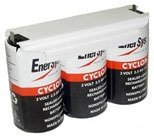 | |
| 1 |