68kMLA Classic Interface
This is a version of the 68kMLA forums for viewing on your favorite old mac. Visitors on modern platforms may prefer the main site.
| Click here to select a new forum. | |
| Classic II Vertical Lines after replacing caps | |
| Posted by: maxheap on 2015-06-07 11:53:18 I was getting three black bars, so I thought I'd replace the caps on the motherboard, but now I'm getting vertical stripes (I also got this after cleaning, but thought the caps were just too far gone). I can't find good documentation for a Classic II, but I'm leaning towards the power supply being the issue, but I am getting 5v, 12v and -12v. 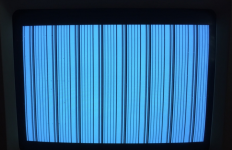 | |
| Posted by: Macdrone on 2015-06-07 12:34:39 I would guess goo under the chips and such. May need some deeper cleaning. Did you scrub the areas under the caps when you changed them? look at traces for rot also. | |
| Posted by: uniserver on 2015-06-07 14:10:33 the issue is the mainbaord... if you do searches on this forum you will find countless Classic II threads and posts. | |
| Posted by: uniserver on 2015-06-07 14:12:20 make sure you wash the board good... and compressor dry it ... there might be some cap goo some where... but more then likely there are some open's in places. I'v added the Classic Ii schematics to my catalog on my site. also maybe post a picture of your mainboard | |
| Posted by: unity on 2015-06-07 14:14:23 ROMS installed right? I think the Classic II also have the extra pins on the sockets. So they can be offset depending on the ROM chip. | |
Posted by: maxheap on 2015-06-07 15:10:01the issue is the mainbaord... if you do searches on this forum you will find countless Classic II threads and posts. The search I did was more around the larger bars and replacing the capacitors, which I did and I'm still at the vertical bar screen. Can you help point me in a direction of a good prior post for my issue? | |
Posted by: maxheap on 2015-06-07 15:11:03ROMS installed right? I think the Classic II also have the extra pins on the sockets. So they can be offset depending on the ROM chip.I also reseated the ROMs and still have the issue. | |
| Posted by: Elfen on 2015-06-07 16:49:17 Some of the lines to the RAM SIMMs are rotted by the Cap Goo. You need to check the lines out with a multimeter from the SIMM Sockets and adjacent connections to the VSLI chip. Soldering a thin wire to fix the trace if the hard part. Mind you, there are at least 3 if not 4 or 5 Classic II Boards. I have one of the earlier ones with 4 EPROMs. Some boards have 2 ROMs, other have 4, and either can have jumpers on them or not. It's like the SE board, with 3 or 4 different board set ups for the RAM SIMMs. The job is not that hard to do, just tedious and time consuming. I mostly fixed my Classic II from dead Schimas Screen to Booting up in 4 hours after a recap - found 2 dead lines rotted by the goo. It still had no audio, again caused by the cap goo, but I'm happy that It boots. I can fix the audio on it some other time. | |
| Posted by: uniserver on 2015-06-07 18:22:03 here is a good one. https://68kmla.org/forums/index.php?/topic/22339-simasimac-on-recapped-classic-ii/ the issue you are having is VERY common with the Classic II. | |
| Posted by: uniserver on 2015-06-07 18:26:32 https://68kmla.org/forums/index.php?/topic/22873-macintosh-classic-ii-raster-but-no-sound-or-arrow-pointer/ | |
| Posted by: uniserver on 2015-06-07 18:29:23 https://68kmla.org/forums/index.php?/topic/23011-macintosh-classic-ii-need-help-with-problem-identification/ looks like the same screen as well. | |
Posted by: maxheap on 2015-06-08 16:23:49here is a good one.Thank you very much uniserver for the links. | |
Posted by: maxheap on 2015-06-08 16:24:47Some of the lines to the RAM SIMMs are rotted by the Cap Goo. You need to check the lines out with a multimeter from the SIMM Sockets and adjacent connections to the VSLI chip. Soldering a thin wire to fix the trace if the hard part. Thanks Effen, I'm going to check into this more. | |
| Posted by: uniserver on 2015-06-08 16:40:41 do you have any parts boards laying around? maybe battery exposed ones? if so as a shot gun type fix, you could remove 4 ram chips from any of the various macs, even the 4 ram chip that come on the LC. Or any 4 of the 8 that are on many of the other various 68k boards. then remove the 4 on your board...(set em aside) clean up the pads nice and good with flux and wick. and flow the 4 replacements down. | |
Posted by: maxheap on 2015-06-09 19:27:21do you have any parts boards laying around?I used to have parts LC's but I eventually fixed them all. Weird thing yesterday was that, I cleaned the board again and I got the three bars instead. Today I continue to get the vertical stripes. I'm assuming it has to be the memory now and I'll have to pick some up to try. Wish you could just remove it and boot off of the sims. | |
Posted by: uniserver on 2015-06-09 19:42:03Wish you could just remove it and boot off of the simsagree, i originally thought you could, but looks like you can't. 😛 the LC and LC-II are the same way they will not start if you take off the onboard ram… however starting with the LC-III pretty sure you can remove the onboard ram from most all boards and they will work. | |
Posted by: maxheap on 2015-06-11 17:27:41agree, i originally thought you could, but looks like you can't. 😛One thing I forgot to add. I ran out of 1uf and used some 10uf in their place. Any issues with that on the recap? | |
| Posted by: Elfen on 2015-06-11 18:08:07 1µf caps in a Classic II? There are 47µf and 10µf caps on the board as I remember. OK, that refreshens my memory: (yours I think) http://www.maccaps.com/MacCaps/Capacitor_Reference/Entries/1991/10/21_Macintosh_Classic_II_Revision_2.html (mine) http://www.maccaps.com/MacCaps/Capacitor_Reference/Entries/1991/10/21_Macintosh_Classic_II.html I think if they are part of the audio circuitry, then probably not. Only if. Thing is, are they 50V rated? | |
Posted by: maxheap on 2015-06-21 05:57:251µf caps in a Classic II? There are 47µf and 10µf caps on the board as I remember.They are 16V rated, should be good as its only being fed 12v max from the PSU. I included a picture of the RAM if anyone sees anything off with my solder job or anything else. Also, is there a certain RAM chip that always goes bad and where do you source replacement chips? I'm wanting to minimize what I replace. 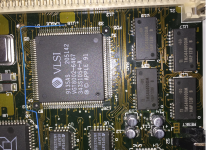 | |
| 1 |