68kMLA Classic Interface
This is a version of the 68kMLA forums for viewing on your favorite old mac. Visitors on modern platforms may prefer the main site.
| Click here to select a new forum. | |
| LCIII problem after a recap schematics required | |
| Posted by: bibilit on 2015-05-16 08:22:13 I have been performing a recap on a LCIII, the board was pretty clean and capacitors were not completely shot, and most of all even if it was not tested before, the owner just advised having problems when using the floppy drive (is a member of the forum) The problem is that i have now a short between the +5 volts rail and ground, i have removed the capacitor C19 and i have continuity on both pads. The problem is not always present and seems to come and go. Anybody can help with schematics or point a common issue ? Thanks for assistance, i have pictures of all the process if required. | |
| Posted by: tanuki65 on 2015-05-16 08:30:37 I don't know, Uniserver might be able to help. | |
| Posted by: 360alaska on 2015-05-16 08:39:02 Start out by figuring out which cap is for 5 volt, can you post a high-res image of your logic board? Also, I remember reading somewhere that Uniserver found a cap that was labeled incorrectly on a LCIII: https://www.thinkclassic.org/viewtopic.php?id=97 | |
| Posted by: bibilit on 2015-05-16 11:13:17 Apparently C19 should be the cap for +5 volt (C22 for -5 volt) i have removed the capacitor but without schematics i won't be able to trace anything. Here are pictures: 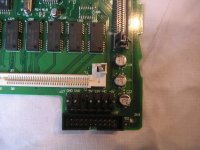 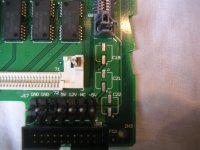 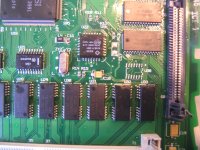 | |
| Posted by: uniserver on 2015-05-16 12:26:38 Yep the c22 there, especially if you're installing a Tantalum , The silkscreen is incorrect, so plus is negative the negative is plus, for c22 only. Of course installing bipolars or MLCC would also remedy the situation | |
| Posted by: 360alaska on 2015-05-16 18:46:28 Yeah, Here's a board with stock caps that has correct polarity so it's not backwards on all of them... Just be mindful of it... Your silk screening is correct BTW... Stupid question, how do you know it's shorted? 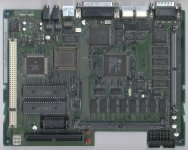 | |
| Posted by: bibilit on 2015-05-16 22:55:56 I havé continuity between 5 volt and ground at the PSU connector and at C19 pads. | |
| Posted by: bibilit on 2015-05-17 05:43:14 I am thinking that maybe the board is bad, the problem come and goes for whatever reason, i have removed most of my work to double check, and nothing obvious. The problem disappears as soon as the board is flexed... if somebody can confirm my point of view. | |
| Posted by: uniserver on 2015-05-17 08:03:14 Well since pretty much everything on the entire board runs on 5 V . Usually shorts are caused by solder bridges. But in the case of these LC boards. Have a closer look at all the legs of all the various i/c's mishandling very easily causes legs to bend and touch. | |
| Posted by: 360alaska on 2015-05-17 08:22:46 If you didn't bridge anything then you might have a small fragment of debris floating around... Take that board out and shake it or blow some air on it... Also, Have you checked with the Hard drive disconnected? I' haven't seen a hard drive short the 5v but it's technically possible... I have seen a bad hard drive pull down the 12 volt and cause and LC III not to boot at all... | |
| Posted by: bibilit on 2015-05-17 09:46:53 Thanks to everyone for support. I will have a closer look, and hope to find something. I have checked with hard drive disconnected, without VRam and Ram. | |
| Posted by: lopaka1998 on 2015-05-18 19:07:53 I was having the same problem as you... see my thread below. I had to wash the board 5 different times to get it to work. I also discovered pin 50 bent, touching pin 49 on the cpu, which was causing an issue. So look for something similar - maybe in another ic, etc... Also... Once I removed C13, the short went away. This is why I thought it was in the audio circuit. If I plugged speakers into the headphone jack the short also disappeared. I then "baked the board" at 190 F for about 15 minutes, and recapped afterwards with new capacitors, once more. It then started normally. So try those things, and good luck. Remember not to give up. And be sure to completely get all water out of the board. Baking the board I think is what solved the issue for me. Edit - if you bake the board - remove everything you can beforehand- battery, roms, battery holder plastic, ram, vram, etc... Thanks to everyone for support. | |
| 1 |