68kMLA Classic Interface
This is a version of the 68kMLA forums for viewing on your favorite old mac. Visitors on modern platforms may prefer the main site.
| Click here to select a new forum. | |
| 7.5.3 on a Macintosh Classic | |
| Posted by: 360alaska on 2015-04-09 15:34:39 Hello all, I just wanted to share my experiences with installing System 7.5.3 on an emulated Classic... Eventually I will try this on a real classic and you'll know how I make out... 1. Install Configuration Custom Install System Software System Software for this Macintosh Multimedia Macintalk 2 Macintalk 3 Networking & Connectivity Classic Appletalk Appletalk Networking MacTCP Utility Applescript Control Strip Find File Apple Menu Items Calculator Chooser Find File Jigsaw Puzzle Key Caps Note Pad Scrapbook Stickies Control Panels Apple Menu Items Brightness Control Strip Date & Time Extensions Manager General Controls Keyboard Launcher Memory Map Mouse Sound Startup Disk Text Views Extensions Clipping Extension Startup Tuner Fonts All Fonts Total Install size: 15,645 After install Memory Consumption: 1,667k | |
| Posted by: 360alaska on 2015-04-09 15:36:36 Too My Dismay, Many Items I hadn’t chosen did magically appear… Including Apple Photo Access (And Extension that allows access a Kodak Photo CD) and QuickTime… 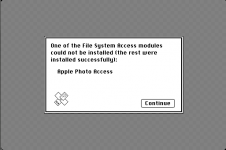 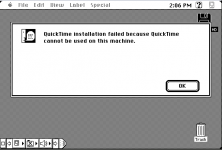 ALSO: In this picture you can also see how useless the control strip will be on a compact mac… In my opinion it’s not worth installing… | |
Posted by: 360alaska on 2015-04-09 15:38:41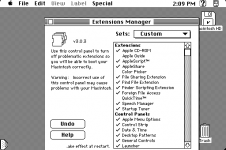 Opening the Extensions manager I spotted several useless items: QuickTime, Color Picker, and Apple Guide. At this time I also dumped the Control Strip… The Apple Photo Access Extension cannot be removed from the extensions Control Panel, instead, one must drag it out of the extensions folder. Since I’m in the extensions folder I can see there is a Macintosh Guide document which is 1.8MB. I also got rid of Finder Help, About Apple Guide, Apple Built-in Ethernet, and Ethernet (Built-in). After Restarting memory consumption was down to 1557k and it did seem to boot up quicker.  | |
| Posted by: 360alaska on 2015-04-09 15:53:31 The next thing I did was remove extra keyboard layouts from the System suitcase... And also I found a program called PowerPCheck (freeware), this program can strip programs of the the PowerPC code or even strip 68k code. I ran this program on the Finder and the System file and was able to save some disk space... I have attached a boot disk I made that contains said program... Slimmer.zip | |
| Posted by: 360alaska on 2015-04-09 15:59:35 Anyways, Here's the image so far, I think I may do resedit and also conflict catcher (to measure the amount of memory each extension actually takes.) 753.zip | |
| Posted by: 360alaska on 2015-04-09 16:54:06 Conflict Catcher Report: System Memory Loc Filename Version Used K/Rqst K High K === =============================== ======= ============= ======= EXT AppleScriptLib 1.1 Loads before. N/A EXT ObjectSupportLib 1.0.2 Loads before. N/A EXT Audio CD Access 5.1 Loads before. N/A EXT High Sierra File Access 5.1 Loads before. N/A EXT ISO 9660 File Access 5.1 Loads before. N/A EXT MacinTalk 2 1.4 Loads before. N/A EXT MacinTalk 3 1.4 Loads before. N/A EXT Apple CD-ROM 5.1.7 zero K/72K zero K EXT AppleScriptª 1.1 42K/320K zero K EXT AppleShare 3.6.1Re zero K/47K zero K EXT File Sharing Extension 7.6.2 zero K/zero K zero K EXT Find File Extension 1.1.1 <.5K/zero K zero K EXT Finder Scripting Extension 7.5.5 zero K/zero K zero K EXT Foreign File Access 5.1 74.5K/153K zero K EXT Speech Manager 1.4 7K/320K zero K EXT Startup Tuner 1.1 zero K/zero K zero K CTL Apple Menu Options 1.1.2 42.5K/50.5K zero K CTL Date & Time 7.5 3.5K/16K zero K CTL General Controls 7.5.7 5.5K/32K zero K CTL Launcher 2.8 zero K/zero K zero K CTL MacTCP 2.0.6 90.5K/97.5K zero K CTL Memory 7.5.5 zero K/6K zero K CTL Mouse 7.5.3 zero K/zero K zero K CTL Speech 1.4.1 zero K/zero K zero K CTL WindowShade 1.3.1 6K/zero K zero K EXT Clipping Extension 7.1.4 N/A N/A EXT EtherTalk Phase 2 2.5.7 N/A N/A EXT MacTCP Token Ring Extension 2.0.4 N/A N/A EXT Network Extension 7.5.5 N/A N/A So let’s take a quick look at what we have here: Apple CD-ROM / High Sierra File Access / ISO 9660 File Access / Foreign File Access extensions / AUDIO CD Access These extensions are the part of the CD-ROM driver and can be disabled if you don’t plan on using a CD-ROM. Also, I doubt a Plus or a classic will actually play an audio CD, so at the very least you can dump the CD player and the Audio CD Access Extension. Potential ram savings: 80k+ Apple Menu Options: This control panel allows submenus which are nice to have but at the end of the day can be considered superfluous. Potential ram savings: ~ 50k MacTCP/Ethertalk/ Network / Sharing Setup/Token Ring/Network/File sharing monitor If you don’t have an Ethernet card trash these! Potential ram savings: 100k + Macintalk / Speech Manager Making your vintage Mac say stuff is in my opinion one of the coolest features and should be kept in my opinion… Potential ram savings: 7-320k Applescript / ApplescriptLIB Applescript can be useful but if you don’t use it make it disappear… Potential ram savings: 42-320k Have a look HERE for more detailed descriptions of extensions and control panels: http://www.yale.edu/acsca/macguide/System/System.Folder.html | |
| Posted by: 360alaska on 2015-04-09 17:12:20 After disabling all of the aforementioned items we're down to just 1300k of ram use by system, we could go further by swapping the finder with an older version or maybe res editing the system file but I see 1300k as acceptable... 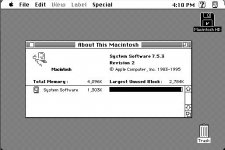 Cheers, Josh | |
| 1 |