68kMLA Classic Interface
This is a version of the 68kMLA forums for viewing on your favorite old mac. Visitors on modern platforms may prefer the main site.
| Click here to select a new forum. | |
| Upgrades for G3 All-in-one | |
| Posted by: EvilCapitalist on 2015-03-03 11:20:23 I picked up a G3 All-in-one last year which is working quite well as a bridge machine. It already had a bunch of upgrades (RAM, HD, bootable DVD-ROM/CD-RW Drive) done before I got it but I'm curious about a few other things: It looks like from this thread that I can use the same ZIF processor from the B&W G3 series in my machine without issue, which would be nice as I found a site where I can pick up an OEM 450MHz G3 for $28. My question is, would it make a noticeable difference going from a 233MHz G3 to a 450MHz G3 as far as basic file management and light web browsing are concerned? It does both decently right now but it really slows to a crawl in Classilla when I'm scrolling on even the most basic of sites. I understand it's not going to be fast by any stretch of the imagination, I'm just looking for if it would be noticeably better than what I have. I thought I remembered seeing somewhere on here that there is a combo card that had 10/100 Ethernet, Firewire, and USB all in one PCI card, but I can't seem to find that thread or the model number for the card anymore. Does anyone remember the card to which I'm referring? The RAM was already upgraded to 224MB which I feel is already a solid number for OS 9. Given that RAM is so cheap now, would I gain anything going up any higher than that? | |
| Posted by: TheWhiteFalcon on 2015-03-03 11:33:22 You'd be nearly doubling your clock speed, I bet you'll see benefits. | |
| Posted by: MinerAl on 2015-03-03 13:07:09 You'll need to mess with some jumpers on the Logic Board to change the speed, even with the new ZIF CPU installed. http://lowendmac.com/1997/overclocking-beige-power-mac-g3/has a nice table relevant to your needs 🙂 Looks like 66MHz @ 7x would put you at 466MHz, which shouldn't too greatly overtax your 450 chip. | |
| Posted by: TheWhiteFalcon on 2015-03-03 13:08:17 http://www.kevinomura.com/macs/g3aio/ Here's some info on the upgrade, jumper changes. | |
Posted by: trag on 2015-03-03 14:31:06It looks like from this thread that I can use the same ZIF processor from the B&W G3 series in my machine without issue, which would be nice as I found a site where I can pick up an OEM 450MHz G3 for $28. My question is, would it make a noticeable difference going from a 233MHz G3 to a 450MHz G3 as far as basic file management and light web browsing are concerned?The Enet, USB, FW combo cards were made by SIIG and the part numbers are JU-2Ne012, JU-2NG011 and JU-2NG012. The latter two are gigabit and much harder to find, although there are none of the former on Ebay at the moment. Some Macs do not work properly with PCI-PCI bridges, which is the magic chip which lets a card like this put three PCI devices in one slot, so whether you'll get full functionality from such a card is in question. For scrolling, a faster CPU or a fast video system are indicated. Depends on which is causing your slow performance. You might try putting in something like a Radeon 7000 or Radeon 9200. G3 ZIFs were made up to 1.1GHz, although those are very hard to find. The 450 MHz is a good compromise between performance and realistic expectations of finding something faster. After that, there are teh somewhat rare 500 MHz cards with copper based G3s with the 10X multiplier, all of which, I think, are IBM manufactured G3 chips. Then there's a big gap before the 800 MHz, 1 GHz and 1.1 GHz G3s, also with chips from IBM, but the actual ZIF is from PowerLogix. Also, if the hard drive is original, replace it with something, anything, more modern. Even though the ATA interface is only 16 MB/s, Apple's original hard drives in those machines were still much slower than that. Even better is to add a disk interface card such as an Acard AEC-6280M or AEC-6290M (fomer = PATA, latter = SATA) along with a newer drive. | |
Posted by: Bunsen on 2015-03-03 20:29:14I can use the same ZIF processor from the B&W G3 series in my machine without issueYou can also use a ZIF G4 without issue (once you've set the motherboard jumpers to the correct speed, same as with a G3 upgrade) would it make a noticeable difference going from a 233MHz G3 to a 450MHz G3Absolutely. it really slows to a crawl in Classilla / if it would be noticeably better than what I have."A slightly less frustating crawl" is probably realistic. No fault to Classilla, which is a nice piece of work, but the internet just is that demanding these days. 10/100 Ethernet, Firewire, and USB all in one PCI cardIn my experience the FW/USB combo cards work without issue, even generic PC-world ones. Stick to OHSI compliant USB chipsets and Oxford FW, and you should be off to the races. I have no experience with the Ethernet/USB/FW combo cards, so I defer to trag's note above. Given that RAM is so cheap now, would I gain anything going up any higher than that?If you are 100% sticking with OS 9? Probably not. But max it out to 768MB if you plan on using OS X or any kind of unix/linux ever. I notice you haven't mentioned video upgrade. | |
| Posted by: Bunsen on 2015-03-03 20:32:41 There was one PCI card which had 100MB/s IDE/ATA, Firewire and USB bundled: the Sonnet Tempo Trio. Good luck finding one these days though, particularly the Mac compatible one. One note with adding a faster storage controller (PATA / ATA) - have a think about how you're going to route cabling from the card to the drive bay. That may well be a little trickier in the AIO than in the desktop/tower G3. | |
| Posted by: Bunsen on 2015-03-03 20:36:55 Oh yeah, and USB 2 cards will only work at USB 1.1 speeds under OS 9. | |
Posted by: EvilCapitalist on 2015-03-04 04:21:16You'll need to mess with some jumpers on the Logic Board to change the speed, even with the new ZIF CPU installed.Jumpers and I are very well acquainted with all the years I spent futzing with Socket 3, 5, 7, and Super 7 boards on the PC side of things and that chart is exactly what I need. I wouldn't have figured that Apple would have been nice like the PC guys and silk screened that onto the board itself. The Enet, USB, FW combo cards were made by SIIG and the part numbers are JU-2Ne012, JU-2NG011 and JU-2NG012. The latter two are gigabit and much harder to find, although there are none of the former on Ebay at the moment. Some Macs do not work properly with PCI-PCI bridges, which is the magic chip which lets a card like this put three PCI devices in one slot, so whether you'll get full functionality from such a card is in question.That's exactly the card I was thinking of, guess I'll have to set up a search to monitor for when one gets listed. Worst case scenario I get a 10/100 card and a Firewire/USB combo card. Hard drive was replaced before I got it with a 40GB Seagate so I'm definitely all set for space. I have an extra Sonnet ATA/100 card around that I could toss in as well, though wouldn't that affect my ability to boot from CDs? "A slightly less frustating crawl" is probably realistic. No fault to Classilla, which is a nice piece of work, but the internet just is that demanding these days.I don't have high expectations, given how the web performs on my iBook G4. This machine isn't used for much web browsing, just downloading files that I don't already have on the server or on some random flash drive somewhere. 100% sticking with OS 9 as I've got an iMac G4 that covers the OS X side of things. As far as a video upgrade is concerned, how would that work with this being an all-in-one? Thanks for the suggestions guys, sounds like it's definitely worth $28 to give the processor a bump (and probably another $20 or so if/when I can find the combo card) | |
| Posted by: trag on 2015-03-04 13:43:33 Adding the Sonnet card should not affect your ability to boot from CDs. Leave the optical drive connected to the built-in ATA bus. There's no reason to put it on the ATA-100/133 bus. If the Sonnet cards have proper firmware, even if you move the optical drive to them, it should still boot properly. I'm not that familiar with the Sonnet cards, though. Optical drives work on the VST UltraTek-66 and on the Acard cards, that I know of, perhaps others as well. | |
Posted by: Gorgonops on 2015-03-04 16:41:05You can also use a ZIF G4 without issue (once you've set the motherboard jumpers to the correct speed, same as with a G3 upgrade)One caution there; I seem to recall there was some sort of issue with the VRM modules shipped in a few Beige G3s that made them likely to fail when used with G4 CPUs and said failure stood a chance of destroying the CPU along with the VRM... (*googlegoogle*) AHA: Here's the info. Edit: This link says it could be a problem with faster G3 upgrades as well. | |
| Posted by: Macdrone on 2015-03-04 16:57:40 The VRM is removable and really easy to recap tho. | |
| Posted by: ArmorAlley on 2018-07-20 13:30:36 G4 processor as slow in a Beige G3 as the original G3 processor. I'm highjacking this thread and posing a question that had been answered, but is not working for me. I have been experimenting with bus-speeds and CPU-Speeds in my Beige G3 MT. I put in a 300MHz G3 that originally came with my B&W G3. That worked at 266MHz. I was able to boot as normal into Mac OS 9.2.1. I changed the jumpers according to one of the many jumper-charts and set the CPU clockspeed to 400Mhz (still with a 66MHz bus-speed). That worked and the machine was faster. I was able to boot as normal into Mac OS 9.2.1. I swapped the processors and put in a G4 400MHz. That worked but it was as slow as the 266MHz G3. Maybe the AltiVec libraries need to be installed. I installed mac OS 9.2.1 fresh. It was still slow. From what I have read online, it seems that I may need to update the OpenFirmware firmware. Any updates that I have found are only for the B&W G3 or for G4s. Is there an firmware update for Beige G3s that I need? Has anyone done this processor swap successfully with a Yikes! processor in a Beige G3 before? If so, what I am failing to do? | |
| Posted by: EvilCapitalist on 2018-07-24 09:35:28 I have to assume someone has tried at some point, whether they had any success or not I can't say. I lucked into finding a Sonnet Encore G4/ZIF that I dropped in which does very nicely. If I run the machine without the Sonnet enabler it definitely feels slower so "something" isn't being properly enabled without that running. | |
Posted by: ArmorAlley on 2018-07-25 11:32:20I have to assume someone has tried at some point, whether they had any success or not I can't say.I tried that route. I installing the Sonnet Enabler, but to no avail. I have a Sonnet Encore/ZIF too but I went and lost the ATX cable for it... More fool me. | |
| Posted by: EvilCapitalist on 2018-07-25 11:51:45 I know they made Encore/ZIF CPUs that looked pretty similar to the regular Apple CPUs (found an image on Bing, see below). I would guess those would be easier to find just based on them being so similar to regular CPUs that people might get confused if the sticker is removed. I think the additional power requirement may just have been for the higher clocked G4s. 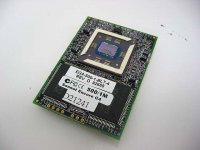 | |
| Posted by: just.in.time on 2018-07-25 15:43:10 I’ve wanted an Encore G4/ZIF for my Beige G3 for so long. Hopefully you can get yours working. | |
| Posted by: ArmorAlley on 2018-07-27 13:00:58 I am so close. I just need the cable. I even have the official wiring diagram in PDF-format from Sonnet. Bolle has suggested that I go out, buy the crimping pliars, cables and plugs and make the thing myself. Which is what I may yet do. | |
| 1 |