68kMLA Classic Interface
This is a version of the 68kMLA forums for viewing on your favorite old mac. Visitors on modern platforms may prefer the main site.
| Click here to select a new forum. | |
| Bad Smell from Duo 230 | |
| Posted by: kb3wmh on 2015-01-25 16:14:35 I own a PowerBook Duo 230, in decent shape. However, when I turn it on, it starts smelling strongly of fish. It has gotten a lot better, and seems to be working fine. What is wrong? Is it major? | |
| Posted by: TheWhiteFalcon on 2015-01-25 16:16:03 Leaking capacitors, most likely. | |
| Posted by: techknight on 2015-01-25 16:51:23 the duo only has a few caps, but they are mostly concentrated around the DC jack area, and they are fairly large, and will do some serious damage when they leak. | |
| Posted by: Elfen on 2015-01-26 08:44:38 Its the caps. Replace them now while the Duo 230 still works. | |
| Posted by: Paralel on 2015-01-27 01:16:27 Fish smell always = Bad Xaps | |
| Posted by: mitchW on 2015-01-29 08:02:38 Yup, I recently recapped two PowerBook 230 Duos which both of them had major capacitor leakage. One of them sadly decided to quit working shortly afterwards, I believe that it was probably because of capacitor leakage. You can quickly check for the leakage by simply lifting the keyboard. If the small SMD cap on the left side is leaking, then you know that the others are on their way. Below I provided a quick diagram of affected capacitors. One of them is already removed. 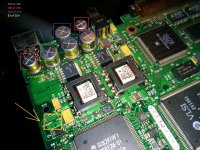 | |
| Posted by: kb3wmh on 2015-02-15 15:26:32 How do I take the keyboard off? | |
| Posted by: techknight on 2015-02-15 15:44:13 With a computer grade apple certified data hammer? | |
| Posted by: Elfen on 2015-03-03 10:49:05 There are 4 T8 (or T7) Torx Screws at the bottoms of the case. Here's Apple's technical notes on taking one apart. This applies to all the Duo's since they use the same case. http://tim.id.au/laptops/apple/powerbook/powerbook_200_series.pdf To replace the caps, you need to remove the logic board from the case, the area is too small to work with the logic board inside the case. And TechKnight - the Apple Certified 50 pound Sledge Hammer is for repairing Worthless Windows PCs. }🙂 | |
| 1 |