68kMLA Classic Interface
This is a version of the 68kMLA forums for viewing on your favorite old mac. Visitors on modern platforms may prefer the main site.
| Click here to select a new forum. | |
| Macintosh Plus Internal Hard Drive *Mod* | |
| Posted by: uniserver on 2012-11-30 18:27:07 ok i finally have some time to my self... my sleeve's are rolled up and my soldering iron is hot 🙂 christian music is playing... lets do this 🙂 | |
| Posted by: uniserver on 2012-11-30 20:30:26 ok wired into the onboard power, 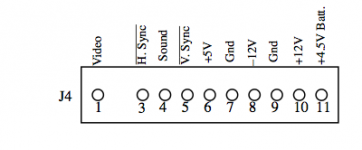 | |
Posted by: tt on 2012-11-30 20:39:41Yep, you got me there! Nice depth charging, I'm sunk. My only excuse was that I was sleep deprived during this entire Rube Goldberg inspired design session.One full four hour sleep cycle and a nap after work takes a hefty toll after four days.:-x I was brainstorming a way to do the hack without desoldering the chip since some people might be uncomfortable doing it. Other than soldering wires, I do not see how it could be done unless there is a cool IC stacking method. Rainbow ribbons seem so Apple though, at least before they went monochrome. 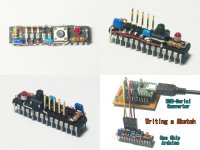 | |
| Posted by: Trash80toHP_Mini on 2012-11-30 21:00:38 No problems, tt. IC stacking is inherently less reliable than the other two approaches to the Hack. It's not like you're going to find a straight pin-for pin solution anyway. You have to have a mess of wires to do the conversion located somewhere! I like my messes of wire etched on PCBs, others have no problem splicing wires and hacking into connectors. I try to avoid that stuff like the plague. It's all a matter of what makes a hacker comfortable or uncomfortable. After grinding or nipping all the legs off the original Controller IIC, desoldering each pin individually should be a piece of cake. Soldering wires down in that crevasse to the Controller Chip's legs is what gives me the heebie-jeebies. The point of the PCB/header hack is the creation of a robust, reliable, detachable connection. The header is slightly cantilevered over the back row of pins, but the PCB should be solid as a rock the way I have it soldered to the MoBo. I don't foresee any problems cycling that connection a couple of hundred times, which would be a LOT. Better to detach the cable from the HDD, but avoiding that mess of wires without strain relief is to be avoided at all costs, IMHO. But don't go by me, I'm b@^$#!^crazy! :lol: edit: nice pics you've just added, there's only one problem, to do those mods you have complete, unobstructed access to the Arduino from every conceivable angle. :-/ | |
| Posted by: uniserver on 2012-11-30 21:06:56 well i will just wait for your solution. i went back through it and made a few adjustments according to the diagram and the crap just doesn't work. | |
| Posted by: Trash80toHP_Mini on 2012-11-30 21:44:38 How many adjustments? Which adjustments? Have you used a continuity tester to check each and every wire as to correct connector pin to controller pin according to the diagram and for good contact? | |
| Posted by: uniserver on 2012-11-30 22:10:19 what i'v done so far is remove every wire from the scsi chip and just put it back together like how it was, and now it boots off the floppy but sits at welcome to macintosh... and the external scsi zip drive no longer works. tried other boot disks, same result. i took it apart 3 times checking for solder bridges.. or anything like that. looks like i now have a parts machine... 😛 be careful guys. | |
| Posted by: uniserver on 2012-11-30 22:27:22 ok pretty much what happen was the internal power was not enough to run the SCSI zip drive, so i ended up just using the external PSU to power the scsi and i just hooked the grounds to the case of the mac, well that caused the thing to display crap all over the screen, so that was when i decided to disconnect everything and say good bye to this project., it's just now the scsi chip is not working and the the thing freezes in the middle of booting. i had to make like 4 adjustments compared to your diagram and the photo of that Japanese guys picture. | |
| Posted by: Trash80toHP_Mini on 2012-11-30 22:30:04 There are replacement SCSI Controller Chips available. If that's all you borked, it's not all that bad! If you order a socket for it as well, you can do a hybrid hack. A little of what you've already done and a little of the strain relief twist. Maybe order two replacement controllers so you can take it back to stock with the switch of a chip! p.s. which four connections are different and how? Nobody says we aren't both wrong and I'm absolutely sure that I don't KNOW that I'm right. That's why I said to wait for some of the boffins to check the wiring diagram. [😉] ]'> p.p.s. make that socket I said to order two rows of machine pin sockets! You can get those inexpensively on eBay and if I get around to making and testing PCBs, you'll be all set to plunk one into those high reliability machine pin sockets! | |
| Posted by: Cosmo on 2012-11-30 22:40:58 sorry it have taken so long. busy with private life. are the pictures still relevant and needed? | |
| Posted by: uniserver on 2012-11-30 22:46:35 well for sure i had to make a connection to "vdd" and "rst" the ground and trst were not hooked up the way your diagram was so i changed them. that is about all i can remember for the moment. | |
Posted by: Trash80toHP_Mini on 2012-11-30 22:47:31. . . are the pictures still relevant and needed?Oh yeah!!!!! :approve: | |
| Posted by: tt on 2012-11-30 22:54:19 Where would you get new SCSI chips? | |
| Posted by: Trash80toHP_Mini on 2012-11-30 23:10:00 They're available from an Amiga oriented site (IIRC) that somebody linked to as a source for a SCSI interface PCMCIA and Chiplet Reader Box . . . hrmmm . . . < scampers off to search bookmarks for "SCSI" heh! [😀] ]'> > http://a4000t.com/store/index.php?main_page=product_info&products_id=180 SCSI Chip $15 Gotta find a Datasheet to check it against the devil we know, though. :beige: | |
| Posted by: uniserver on 2012-11-30 23:57:56 i just saw'd my scsi chip out and its doing the same thing... boots to a point and locks up... when i hit the program button it will not let me type. | |
| Posted by: Trash80toHP_Mini on 2012-12-01 08:53:10 8-o Woooo . . . and here I thought I was quite a bit more impatient than the average hacker! You win! 😉 I'm surprised you're even getting as far as :?: in the boot process after that impromptu organectomy! Sounds like you may have been hit by a random static discharge incident while playing with the toys? How careful were you about avoiding that. I pretty much ignore the possibility other than grabbing everything by a plastic connector or mounting point attached to the ground plane as a matter of habit. I ALWAYS have skin contact between the hand/wrist/arm that touches the card and the chassis or PSU case during swapouts. I've got a galvanized steel pan set up as my soldering workstation, but I haven't got around to grounding everything properly or connecting the wrist strap that's still in the envelope. | |
| Posted by: uniserver on 2012-12-01 10:19:33 Well mcdermd and I were talking about de-grading this machine back to its original 128k glory anyways. now seems like a good time to get on it 🙂 I'm still angry this plus board is screwed, but oh well. My normal success rate when fixing/moding things is extremely high. | |
| Posted by: Trash80toHP_Mini on 2012-12-01 10:43:00 Now THAT sounds like a great project! :approve: I'm putting the PCB back on simmer. Can anyone verify that the Controller I linked is pin compatible with NCR 5380? | |
Posted by: tt on 2012-12-01 11:51:57Woooo . . . and here I thought I was quite a bit more impatient than the average hacker! You win!Yeah, if I was a Mac at Uniserver's house going to be opened up, I would be scared. :I Here's another config example that could work if there is room. You would still need to desolder the chip and install a socket though unless you can reach the back pins that need a connection. 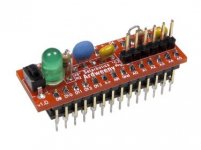 | |
| Posted by: uniserver on 2012-12-01 15:20:29 I get farther then that, I put the 6.0.8 disk in ,,, it starts to boot it says Welcome to macintosh, and starts to load i can hear floppy disk access, but then it stops after about 4 seconds, and nothing. sits there. Any idea what is causing it? originally i thought i was a bad scsi chip that was why i saw'd it out. or do i have to take the board out back and pump a couple buck shots into it ? :-D that'd be more fun! | |
| < 8 > |