68kMLA Classic Interface
This is a version of the 68kMLA forums for viewing on your favorite old mac. Visitors on modern platforms may prefer the main site.
| Click here to select a new forum. | |
| OrangePC Card on IIfx | |
Posted by: adespoton on 2026-07-17 14:21:36Moar weird shit:Congratulations on getting Windows to work as designed! 😀 I remember getting that BSOD on actual hardware back in the day. It's caused by a kernel driver or hardware component causing invalid memory access while processing interrupts. Which version of Win 95 is that? A, B or C? | |
Posted by: Concorde1993 on 2026-07-17 16:58:52Which version of Win 95 is that? A, B or C?I’m not sure. The preinstall package was created in 1999, so I’m guessing Version C? | |
| Posted by: Concorde1993 on 2026-07-18 17:36:17 I successfully downloaded and installed a 21-disk copy of Win 95. I used RawWrite to transfer the image files onto 3M 1.44MB floppies using my A21M ThinkPad. This is how the setup looks now: 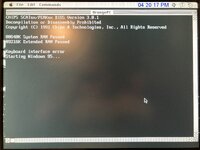 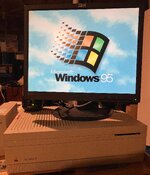 Never thought I’d see this on a Mac: 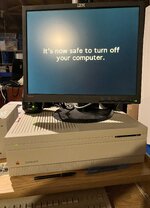 Of course, there are some minor caveats. I can’t get 256 color to work (it was fine in Win 3.1) so I’m just using 16-bit color, which is the only option that seems to work without Win 95 freaking out. Secondly, the MIDI files for the Win 95 alerts never installed in the media folder. I did a custom install and made sure to checkbox all the options in the Multimedia section. Not sure what happened here. Win 95 recognized my SB-2770 card, so I have sound. But the only alert I hear is the infamous startup chime. 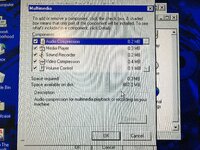 They show up in the Sound Properties control panel, but do nothing. Do I need to download them from a Win 95 CD image? Maybe it’s a floppy thing? | |
| Posted by: Byrd on 2026-07-18 18:36:00 Windows 95 didn't have many interface sounds as I recall - Windows 98 had many more themes to try. | |
Posted by: Concorde1993 on 2026-07-19 02:59:40Windows 95 didn't have many interface sounds as I recallThere’s a few of them listed in Sound Properties. But their .wav files never showed up in the Media file, so I can’t hear them. Still trying to figure that out. 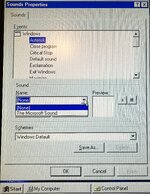 | |
| Posted by: Concorde1993 on 2026-07-20 17:36:44 Fixed the sound alerts issue. I accessed the media folder on my 600E (which is running Win 98SE) and transferred the .wav files I wanted into my Win 95 media folder. I also found the correct chord.wav online for Win 95. According to Google AI, the .wav files I was looking for were never available on the floppy version of Win 95 in order to save space. I also transferred over the Win 98 welcome.exe file over. Does anyone know how to get that working in Win 95? Google AI sez it’s impossible. Still working on the 256 color issue. I’m using version 3.8.2 of the OrangePC software. Did any PC drivers come included within the software? I never saw a folder or means of accessing these drivers. | |
| Posted by: Byrd on 2026-07-21 02:22:29 What's the model of your Orange 386? I suspect the earlier 386SX cards were "VGA" which noted standard VGA resolution of 640 x 480 4-bit colour depth. Have a look over the card and Google what you think the video chipset is, it might be Video 7, Trident, Cirrus Logic. | |
Posted by: Concorde1993 on 2026-07-21 05:53:41What's the model of your Orange 386?I still can’t find any hint as to what the model number is on this card after all these years. I always thought it was the 250, or possibly the 290 (I know it predates the 300/400 series). Really wish I could access the BIOS on this one, but I don’t think that could be accomplished without some crafty ResEdit hacking. | |
Posted by: Concorde1993 on 2026-07-21 23:02:58Have a look over the card and Google what you think the video chipset is, it might be Video 7, Trident, Cirrus Logic.So it’s actually a Western Digital WD90C30-LR. Pic of chip on the card: 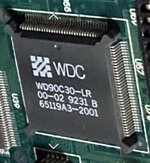 None of the generic WD drivers seem to work in 256 color mode in Win 95. I either get this: 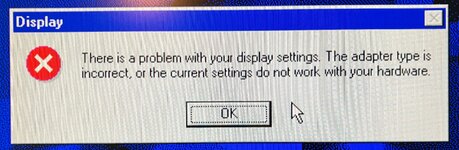 Or this: 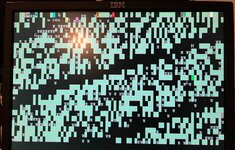 Is Win 95 looking for the original driver that came with the OrangePC card? Google search sez the Paradise Super VGA driver is correct for my video chipset. | |
| Posted by: Byrd on 2026-07-22 02:47:26 I'm sure I posted drivers for this card for you with Windows 3.1; it might just be a 258K card. I suspect if not working with the WD stock drivers stay on the Standard VGA ones, some drivers here | |
| < 7 |