68kMLA Classic Interface
This is a version of the 68kMLA forums for viewing on your favorite old mac. Visitors on modern platforms may prefer the main site.
| Click here to select a new forum. | |
| PowerBook 3400c Repair Stories | |
| Posted by: raoulduke on 2016-02-21 14:02:03 Yeah I've noticed that too. Salvaged one for the 3400c I think, but not for the Kanga. So it's not recurring corrosion from that in this case. Look I don't know. Hopefully yours comes out fine, but I don't think it's worth the risk - particularly since who really cares about PRAM batteries (especially now). Is there a way to totally bypass the SCSI bus on boot and force it to ATA? I tried forcing to SCSI ID and holding down mouse button [both via internal key/track, bc it doesn't seem to recognize ADB keys] to no effect. I'll take a look at where the traces from the ATA bus are coming from. Weirdly despite the symptoms, it clearly is an ATA bus problem - who (who knows more about this than I) knows how the ATA bus initially interacts - like what's the process, and what would be missing (signal-wise ?) that would cause it to fail to be recognized, but then later recognized once the SCSI bus powers up? | |
| Posted by: MikeatOSX on 2016-02-29 01:27:10 Did anybody solder a new backlight lamp into a PowerBook 3400c display? I have two pieces of them, a soldering station and some soldering experience. Is it easy or hard? | |
| Posted by: Syntho on 2018-12-09 08:20:09 I have a 3400c that seems dead. It started when I'd boot it up and there was the typical white screen, but without the cursor. It never moved past there. Now it won't boot or get power at all. No chime or anything. There's a new PRAM battery in it so I don't think that's the problem. Maybe the motherboard is corroded from the old one though? I reset the power manager using the reset button on the back, unplugged it, tried everything. | |
| Posted by: Syntho on 2018-12-09 15:03:21 Turns out, the power board wasn't seated securely. I pushed it in, booted up and got the cursor and question mark (new HD). I thought all was well so I turned it off, put it back together and tried booting up, only to get a white screen. I've disassembled the whole thing, taking cables, pram batteries and ram boards out piece by piece to see what the culprit is, but I only get a white screen every time. There's got to be some simple thing going on here that I'm not aware of. | |
| Posted by: Syntho on 2018-12-10 09:08:18 Looks like it’s going to stay frozen with a white screen and cursor at the top left. It won’t move. I did get it to show the blinking question mark a time or two but usually it’s just a frozen cursor at the top left. Anyone have any ideas? I might just use this one for parts if it’s too much trouble to repair. | |
| Posted by: Syntho on 2018-12-10 16:01:00 More info: it powers up, I hear the chime, the HD spinning up, and it goes to a white/grey screen. Sometimes it'll go as far as having the cursor frozen on the top left, and oddly, sometimes it'll go to the disk icon with a ? while the cursor is still frozen. I'm not sure about this but I think taking out the ADB ribbon cable helps the disk icon show up more often. When I have an adb mouse plugged into it, the cursor still doesn't move. I have a good, working HD in it (tried multiple) but that doesn't seem to have an effect. At one time i thought I smelled burnt plastic/smoke coming from it after installing a new PRAM battery and HD, but it may have just been my imagination. The logic board actually looks good. No corrosion or anything. The PRAM battery was still good, but I switched it out anyway. In fact, that's when this all happened: when switching the HD and PRAM battery. I switch back and forth between the old and new HDs and batteries but that doesn't seem to have any effect. Is it at all possible that the PRAM battery I put into it, or the new HD (actually an ATA SD card adapter) has somehow fried something on the board? It was working fine before all of this, but now it's dying a slow death. The problem started right after switching out the aforementioned parts. A few times after getting the white/grey screen after switching those out, I seem to have disconnected the little power board out of its socket by mistake which caused it to not boot at all. After figuring that out I pushed it back in, but it went right back to the grey screen problem. I didn't do anything out of the ordinary on it or damage it either. I've done this exact sequence of switching out the PRAM battery and HD on another 3400 and it worked flawlessly and runs fine. I'm thinking it's best to just gut it and use it for parts. If someone can come up with a simple fix I'll see what I can do, but I don't have too much time to keep running diagnostics. I'll just look for another one that's working 🙂 | |
| Posted by: Jinnai on 2018-12-10 21:13:17 I had a Classic II that booted to a gray screen and the issue was either RAM or a dirty motherboard, I'm not sure. Is there any chance the issue is caps? I only know about caps so... I hope you can figure out the issue. | |
| Posted by: Syntho on 2018-12-10 22:40:21 I'm not sure I even see any caps on it. If I knew where they were I'd take a look. | |
| Posted by: CC_333 on 2018-12-12 22:59:17 Jinnai might be on to something. If it has a RAM card, you might try removing it. Or did you already try that? c | |
| Posted by: Syntho on 2018-12-13 00:21:06 Not the ram card. Doesn’t affect booting. | |
| Posted by: Papichulo on 2019-09-12 20:46:47 I found this in my powerbook 3400c and there was a little leakage on a board but i cleaned it with water. This is what was leaking. Really bad. If it wasnt for this website i wouldnt of known to remove the pram battery! 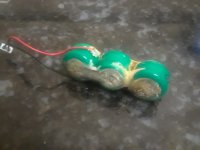 | |
| Posted by: MikeatOSX on 2020-04-22 05:43:54 After 4 years (I had a personal tragedy in the meantime) I got out all my 3400c, Kangas and 5300. Omg, only 1 of them was working again. :disapprove: A PB 3400c survived and I put in a mSata SSD and installed all volumes new. When I nearly finished this after some days, the 3400c showed a strange behavour: Errors when copying files, unwanted newstarts and more. And getting hot on the left side of the bay (where the mSata sits). I thought there was something wrong with the mSata and tried CF adapters and harddisks. A complete wrong idea: It was the power supply board and nothing more. I removed all connections and connected one after another and it turned out, when the power supply board was overburdened the 3400c did not start. I had a spare ps board and after putting it in the 3400c started immediately. But only for some hours. So I have to refurbish several power supply boards. Any ideas what I should do first with them? Only put in new [SIZE=12pt]capacitors?[/SIZE] | |
| Posted by: Syntho on 2021-07-20 16:39:31 Two and a half years later, I pulled out my old 3400c and I STILL have a white screen. I get a chime and the screen comes on, but it stays at that white screen no matter what I do. HALP. | |
Posted by: Tazintosh on 2026-02-07 11:49:05Two and a half years later, I pulled out my old 3400c and I STILL have a white screen. I get a chime and the screen comes on, but it stays at that white screen no matter what I do. HALP.I just got in the same boat Syntho. | |
| Posted by: MissDlys on 2026-02-27 06:08:32 Hi everyone! I'm new here and French. I just bought a 3400c/200 with 16MB of extended RAM. It works 🥰 except for the battery, and the Pram... Normal. 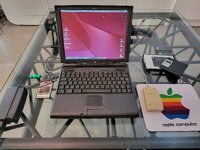 I removed the PRAM, which didn't leak, but I'm looking for a replacement. I found one on eBay : link, but it's a bit pricey (€47 including shipping). It's build from 6 cells V70H in serial. So I also could rebuild it but 'm afraid the cells doesn't support the heat of the soldering tool. I'm also rebuilding the battery, which I was able to disassemble with a thin blade, and I ordered the four cells from Grandado.com under the description: Original high-capacity lithium battery 26650A 5000mAh 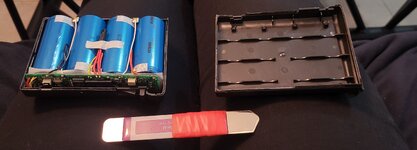 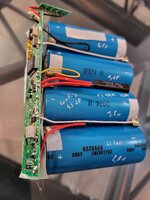 I ordered a replacement capacitor kit from www.console5.com, part number APL-PB3400-POLYMER-CK. I didn't have the rear I/O door cover, so I'm 3D modeling it in Tinkerpad. It's a work in progress, and as soon as it's ready, I'll buy an SLA 3D printer to make it. 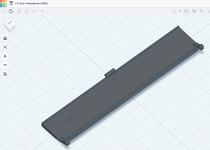 I'm missing the 128MB RAM card. I tried a PCMCIA CF card I ordered from Amazon for €7, and it works perfectly. I'm going to look for an Airport PCMCIA card, hoping to connect to Wi-Fi, but I don't know if it will work. By ethernet, it doesn't work, not enough Ram... So, if anyone has any information on the availability of a PRAM battery, a 128MB RAM card, and Airport compatibility, I'd appreciate it. Have a good day! | |
Posted by: AlpineRaven on 2026-02-27 16:28:26Hi everyone! I'm new here and French. I am interested if you have success rebuilding the main battery! Cheers AP | |
| Posted by: 3lectr1cPPC on 2026-03-07 21:16:53 I am also interested if your rebuild was successful. | |
| Posted by: Classic_II on 2026-04-03 14:14:23 Wow!! @MissDlys did you ever finish that rear door 3d render? Would love to print it as my door is long gone 🙂 | |
| Posted by: Classic_II on 2026-04-06 20:53:15 Having some trouble with my 3400c. Powers up and will boot but ONLY if an external VGA monitor is plugged in. I thought the LCD was dead until I plugged in the VGA monitor. The screen went to the monitor and once I got into the OS I was able to select 800x600 (Built In) and the LCD came alive! I checked the pram battery and it was still in there but did not look to leak the whole area looks really clean. Once I boot it now with a monitor plugged in the system will then turn on the LCD automatically. When I boot the internal HD the 800x600 Built In option is missing. IT will say Dell17xxx above all the resolutions. Not sure what is going on here. | |
| Posted by: Byrd on 2026-04-06 22:56:36 HI Classic II, That's a weird one, I'd reset the PRAM (which will reset to the default monitor/resolution) and check the external monitor port if there is any pin damage? | |
| < 7 |