68kMLA Classic Interface
This is a version of the 68kMLA forums for viewing on your favorite old mac. Visitors on modern platforms may prefer the main site.
| Click here to select a new forum. | |
| OrangePC Card on IIfx | |
| Posted by: lolo799 on 2026-07-14 06:52:51 Win95 floppy disks (other than the 1st one) use the DMT format with a capacity of 1.68MB iirc. You'd have better luck copying the win95 directory from an install cdrom to the partition (or virtual hdd image, whatever it uses), and install directly from it. | |
Posted by: Concorde1993 on 2026-07-14 07:14:17You'd have better luck copying the win95 directory from an install cdrom to the partitionProblem is I don’t know if my OrangePC card is able to read devices on the SCSI bus. I asked that in the previous post. Still waiting for confirmation on that. | |
| Posted by: lolo799 on 2026-07-14 07:37:57 I'm completely unfamiliar with the OrangePC series of cards, what i/o does your card have? Serial and/or parallel? You can easily transfer files that way with the appropriate cable from another pc. Some have a pcmcia slot, right? Using a passive compact flash adapter and cheap CF card is a good option. I saw an ISA slot on the first page, you could also put a network card in there, or a scsi controller. Can you transfer files from the Mac side to the OrangePc side directly? | |
Posted by: croissantking on 2026-07-14 09:47:55Connected my “new” 1.2GB Quantum drive to the IIfx. Although it works, there’s a lot of stuff on it. I tried transferring said stuff to my 9GB Avid/Seagate SCSI drive, but I get this error when I try to mount the drive in SCSIProbe:I wonder if the 68040 requirement is artificial. | |
Posted by: Concorde1993 on 2026-07-14 09:52:13Serial and/or parallel?Parallel You can easily transfer files that way with the appropriate cable from another pcI’ve been looking for the breakout cable for this card for over 4 years now. I’ve been told several times by other members they are made of unobtainium. I saw an ISA slot on the first pageI’m using that slot for my SB-2770 card, so I have sound in Windows. Can you transfer files from the Mac side to the OrangePc side directly?Only way to do that is through the SuperDrive, unfortunately. | |
Posted by: Concorde1993 on 2026-07-14 09:54:19DMT format with a capacity of 1.68MB iirc.MS was really cramming in the data in those days lol I wonder if the 68040 requirement is artificial.Not sure. AppleTalk did the job, albeit slowly. | |
| Posted by: Concorde1993 on 2026-07-14 21:00:27 So System 7.1 lacks the DMF support I need to run these Win 95 floppies (they work fine in my 6100). Is there any way of adding DMF support to System 7.1? If not, can I get OrangePC to run the Win 95 Setup installer directly from the IIfx’s hard drive? I can convert the DMF floppies to .IMG files in Disk Copy 6.3.3 - I just can’t fit the data onto a regular 1.44MB floppy. | |
| Posted by: lolo799 on 2026-07-15 05:42:33 There are versions of the Win95 (for both RTM and OSR1) install floppy disks as standard 1.44MB images on winworld, that would be the easiest way for you to install it, without buying a network or serial/parallel ISA card. Make a win95 directory and copy the contents of each floppy in it, have fun swapping disks over 20 time back and forth between two computers. | |
| Posted by: Unknown_K on 2026-07-15 09:39:22 You can't mount a Windows CDROM? | |
Posted by: Concorde1993 on 2026-07-15 09:58:03You can't mount a Windows CDROM?Not with the OrangePC software, no. | |
| Posted by: Unknown_K on 2026-07-15 10:07:41 Which card are we talking about? The Orange PC Setup generally has options for floppy drive (using the Mac drive) and emulated and shared drives. Once you start installing W95 from the provided PC boot floppy you get to the point where the install asks for the disk 'CD-ROM setup boot disk" is now required' which should setup the Apple CDROM drive with your Windows 95 CD for the rest of the install (going from page 44 of the Orange PC user's manual for Model 300/400/500 series Nubus and PCI cards. | |
Posted by: Concorde1993 on 2026-07-15 10:17:02Which card are we talking about?It was never determined which exact model of OrangePC card I own. with your Windows 95 CDUnfortunately, I don’t have Win 95 on CD. Just the upgrade floppies. | |
| Posted by: Unknown_K on 2026-07-15 10:18:38 https://www.macintoshrepository.org/2200-orange-pc You have to sign up to download more than a 100Mb file which the CDROM is. | |
| Posted by: Concorde1993 on 2026-07-15 10:32:10 Pretty sure I have an account with MR. Which link am I downloading? 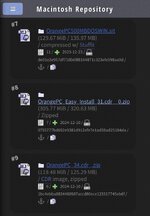 | |
| Posted by: Unknown_K on 2026-07-15 14:13:25 The CDR image #9 I assume. | |
| Posted by: Concorde1993 on 2026-07-15 21:16:42 Here are my Setup options in OrangePC: 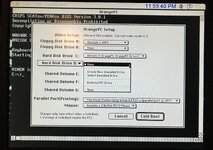 I can create another emulated HD (this would be Drive D) or use a shared volume. It doesn’t seem to recognize my external Apple CD drive on the SCSI bus. If only the IIfx had a built-in CD-ROM drive, as there is an eject CD option in the command menu: 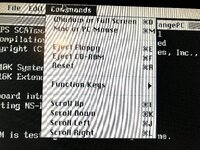 So I guess I could download the Win software from MR, transfer its contents onto the IIfx’s HD, and use the shared volume option to see if it will initiate Windows setup from the IIfx’s HD. Otherwise, it’s back to floppies. | |
| Posted by: Unknown_K on 2026-07-16 01:45:36 Look for a floppy disk image for installing, that should use the CDROM in an Apple drive. | |
| Posted by: Byrd on 2026-07-16 02:48:17 Can you share the PC side on the Mac; copy the \WIN95 folder of setup files to the drive, boot into PC mode and run SETUP /IS to commence install. As Bill Gates said through gritted teeth "8MB is enough for Windows 95"; 10MB and a 386 might be a long install period, Windows 95A might be a good choice as starter. | |
| Posted by: Concorde1993 on 2026-07-16 19:46:52 Downloaded the #9 option on MR. Got it onto the IIfx. I had to delete my 900MB OrangePC partition as there wasn’t enough room on the HD for the Win 95 preinstalled partition (260MB in total). Install was fine, but I get this gobbledygook: 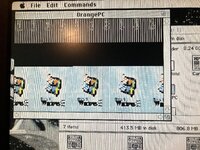 I think it’s because this Drive C was formatted for the later PCI versions of the OrangePC cards. | |
| Posted by: Concorde1993 on 2026-07-16 20:07:01 Moar weird shit: 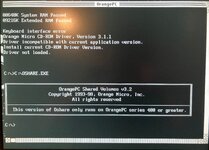 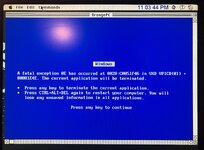 | |
| < 6 > |