68kMLA Classic Interface
This is a version of the 68kMLA forums for viewing on your favorite old mac. Visitors on modern platforms may prefer the main site.
| Click here to select a new forum. | |
| Designing a portable RAM card | |
| Posted by: techknight on 2014-11-03 19:47:27 Adding one select line at a time, added bank switching A20 line. Now I am seeing up to 5MB so far, NICE... I will keep doing this for each 1MB block at a time until I figure out where my issue was. | |
| Posted by: techknight on 2014-11-03 20:08:22 I found the problem. Not the solution yet... Soon as I tie in the last MB of RAM, to take it up to 9MB is when it goes haywire. I'm thinking its running into ROM somehow. odd... As long as I stay at 8MB and under, it all works beautifully. Soon as I add the last MB, spectacular failures 😉 My original CPLD design is perfect. Just didnt like the last MB. | |
| Posted by: techknight on 2014-11-03 20:16:50 Nevermind. I am an idiot. I had to re-read the notes, I can only go to 8MB. Not 9MB.. So my card actually works perfectly. I just tried to expand it past limits. | |
| Posted by: aplmak on 2014-11-03 20:18:23 Techknight.. from what I recall they could only go up to a certain size depending on the model.. I think the limit was 9 on one of them.. the other 8MB.. I remember seeing this.. Perhaps this is why my PDS was missing the last chip so it only had 8MB total.. and that was a card from a 5120.. I wish i could remember.. but the max was 8MB on one and 9 on the other.. | |
| Posted by: aplmak on 2014-11-03 20:19:24 This is also including the 1MB of onboard memory of course…. so 7MB on one card for one model and 8MB total for the other. | |
| Posted by: aplmak on 2014-11-03 20:19:35 YOU DID IT!!!!! HORRAY!!!!! | |
| Posted by: aplmak on 2014-11-03 20:23:44 So can you add the last chip for a total of 8MB on the card and make a jumper depending on the model??? So you can flip between 7MB and 8MB.. Get the order forms ready.. LOL!!!! | |
| Posted by: techknight on 2014-11-03 20:29:40 There... All good now. Its awesome, you can actually watch the diagnostic LEDs switch between banks as the mac starts up and tests RAM. 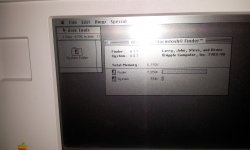 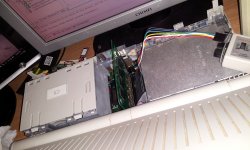 | |
| Posted by: techknight on 2014-11-03 20:30:51 No jumper needed. its right at 8MB. I just turned off the last MB, so it stays at 8MB instead of 9MB. So basically we are wasting half of the last chip. doing nothing. I could remap it in the expansion ROM area, but then we would need a special driver to tell the Mac OS to use it as RAM. The last thing I need to do is toss it in a Backlit model and see if it works. In theory, it should be universal. I actually did NOT need the DTACK connection on the non-backlit. So, we will see on the Backlit whether I need it or not. | |
| Posted by: aplmak on 2014-11-03 20:33:44 So I think the 5120 can go up to 8MB MAX but the 5126 can take a total of 9MB... | |
| Posted by: techknight on 2014-11-03 20:36:13 I dont know. depends on where ROM is. if ROM is sitting at &H900000, then its stuck at 8MB as well. | |
| Posted by: aplmak on 2014-11-03 20:38:55 Found this... NAME MACINTOSH Portable M5126 MANUFACTURER Apple TYPE Portable Computer ORIGIN U.S.A. YEAR 1990 END OF PRODUCTION 1991 BUILT IN LANGUAGE None KEYBOARD Typewriter style, 80-key with numeric keypad CPU Low power version of Motorola 68000 SPEED 16 MHz RAM 1 MB (up to 9 MB) ROM 256 KB GRAPHIC MODES 640 x 400 COLORS Monochrome SOUND 8-bit stereo SIZE / WEIGHT 33.8 x 37.7 x 10.3 cm / 7.1 kg I/O PORTS Serial, Parallel, SCSI, ADBx2 BUILT IN MEDIA One 3.5'' FDD 40 MB HDD (optional) OS MAC OS 6.0.4 to 7.5.5 POWER SUPPLY Internal lead-acid battery 6.5V PRICE $4200 | |
| Posted by: aplmak on 2014-11-03 20:39:59 So 5120 can only go to 8MB total and 5126 to 9MB total.. You are testing on a 5120.. You should test on a 5126 board and bring it up… Perhaps my 5126 board.. heeee…. | |
| Posted by: techknight on 2014-11-03 20:42:46 That means I need two different CPLD firmwares. One for backlit, one for not... Maybe the next PCB i need to add a jumper to enable/disable the 9th MB. On my machine, that 9th MB will overlap ROM and she falls flat on its ass. lol. I only ordered 5 PCBs on the first run to make sure I didnt have any hardware bugs. And I didnt, as I figured i wouldnt. I looked over that thing time and time again proofreading it. New PCB will have the jumper. I need to see if the fab house has solder paste stencils. that will make things so much easier and faster. I did my first board all by hand. | |
| Posted by: aplmak on 2014-11-03 20:44:01 I'm sure everyone is cool with just getting 8MB's… I just thought there might be a way to just use that little extra ram… Yeah next design throw a jumper scenario on it if possible to flip back and forth.. 🙂 | |
| Posted by: techknight on 2014-11-03 20:48:10 According to the Backlit developer note, it has an 8MB ceiling as well... | |
| Posted by: aplmak on 2014-11-03 20:48:51 You did a freakin awesome job!!!!!!! | |
| Posted by: uniserver on 2014-11-03 20:55:29 good job dude! | |
| Posted by: Paralel on 2014-11-04 02:21:28 The plot thickens, the Service Source also says there is a 9 MB ceiling: http://tim.id.au/laptops/apple/legacy/macintosh_portable.pdf | |
| Posted by: techknight on 2014-11-04 04:31:40 Well, I know for a fact that the M5120 I have here on my desk, ROM starts at &H900000 which is the 9Megabyte marker. So yea I cant go past 9MB. Unless I add the last MB of RAM to the ROM Expansion address location, but that would require a special extension to tell System 6/7 to use that as RAM. That is something I dont know how to do. | |
| < 6 > |