68kMLA Classic Interface
This is a version of the 68kMLA forums for viewing on your favorite old mac. Visitors on modern platforms may prefer the main site.
| Click here to select a new forum. | |
| Using Modern Hard Drives on Old Macs? | |
| Posted by: markyb86 on 2013-05-20 15:03:09 I'm trying to run one of Uniserver's SCA>scsi50 deals using a external jaz enclosure. The jaz itself is a dud but the power/centronics/scsi50 board still works. I can't seem to find a working combination of jumpers to boot it. The jaz enclosure has enough juice as it's 12v line is .75a and the 5v line is 1.0a. the SCA drive just needs .5 and .8 respectively. I wired an LED to the led header on the adapter to see if there was any activity when powered on. Is the jaz enclosure too much power to run it? or just some more scsi voodoo? btw: big 'LSI LOGIC' chip on hdd gets hot to the touch 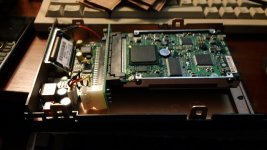 | |
| Posted by: Trash80toHP_Mini on 2013-05-20 16:49:33 That looks particularly evil, especially if that Jaz drive's connector is unkeyed. It looks to me like you have the SCSI connector on the HDD plugged into the connector on the Jaz Drive's PCB backwards/upside-down. Check for ground to ground and signal to signal continuity between connectors . . . . . . before firing that contraption up again! :O | |
| Posted by: markyb86 on 2013-05-20 17:11:23 Wow, I really can't utilize most of my brain these days... You are very right on that.. I don't know why I @$$umed that it would just work the way it fit... oh brother I hope it isn't fried. Steroid-mutilated-memory-loss-rookie mistake I guess? Report back after I check it the correct orientation. | |
| Posted by: markyb86 on 2013-05-20 17:17:36 looks like that mess will have to wait until I get an ribbon extension cord or something.... 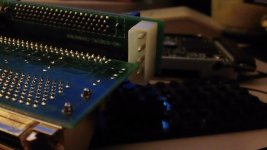 | |
| Posted by: uniserver on 2013-05-20 17:26:50 or you could unscrew the PCB out of the enclosure and just hook the board properly that way | |
| Posted by: markyb86 on 2013-05-20 17:30:49 I did in that pic, check out the molex connector on it.. lol. no access. I'm going to solder it to the other side later or tomorrow. and then add longer power cable and see how it goes. | |
| Posted by: uniserver on 2013-05-20 18:21:21 pretty hard core 🙂 | |
| Posted by: markyb86 on 2013-05-20 18:49:08 lol I just wanna get it working and see what you guys are so excited about haha | |
| Posted by: uniserver on 2013-05-20 19:19:07 well throw that drive in a mac, and just use the jazz as a terminator. should just work. | |
| Posted by: uniserver on 2013-05-20 20:54:35 i just upgraded my LC475 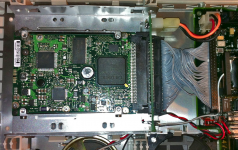 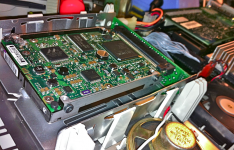 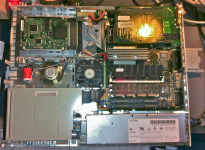 | |
| Posted by: Trash80toHP_Mini on 2013-05-20 20:59:23 It appears that won't do, uni. First he was talking about putting it into his HD20SC Now it looks like he's putting it into a Fast SCSI II enclosure for some reason or other? I just popped my external Jaz drive, unencumbered by disk or A/C adapter, open to see what the heck marky is up to . . . . . . interesting board in there . . . why the fast SCSI II angle? :?: | |
| Posted by: markyb86 on 2013-05-20 21:29:14 Oh that was CC_333 doing the HD20, I was just trying this so I didn't have to open the SE again, (and remove it's internal zip ((I don't have any double SCSI cable ATM..)) But I did make it work just now. I moved the molex to the opposite side of the board, got a longer power cable, and the configuration that booted the SE was: No TPR jumper on the adapter, actually the only jumper on there is ID2. (that leaves the ZIP at 1 I presume) Then on the Jaz board the Term switch is on 1 for on rather than Auto or 0. It booted the SE very quick, and the only caveat is something is still off... the screen is a little jumpy, only with HDD activity I think. Does anyone know what voltage LED the LED jumper can use? I pulled a PC HDD activity light but there was no light. Also jt, I thought the Jaz would be an easier option since the Jaz portion isn't working like it should. But it's still a pain in the butt. I don't know how you guys solder all the time (you especially uniserver.. heheh 😱) ) BTW thanks uniserver for configuring the drive and loading it up! 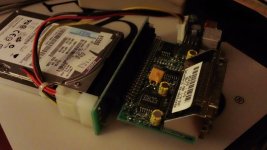 | |
| Posted by: markyb86 on 2013-05-20 22:02:46 I take it back! it works perfectly! The wobbly screen just needed a tap to the side of the SE, and it stopped! (Figured this out since I booted from zip to try something else network related) Much happier now. (prob going to need an a/b recap sooner than I thought) > 🙁 :'( :'( | |
| Posted by: uniserver on 2013-05-20 22:07:47 good job mac-gyver!  | |
| Posted by: Trash80toHP_Mini on 2013-05-20 22:11:51 I'm glad it's working, the evil apparent in that first pic looked like a good way to vent some magic smoke! 8-o | |
| Posted by: markyb86 on 2013-05-20 22:22:56 I'm very glad it didn't poof on me. I need to be more careful. Now back to the real topic at hand 'What termination or terminator is required". I'm going to chime in that active at the end of the chain works. If you use one of those internal type active terminators, do you still need to terminate the external port? | |
| Posted by: uniserver on 2013-05-20 23:29:25 man i am on a Roll, i got the IIsi done, had to swap the scsi cable from one of my lc's - works good. 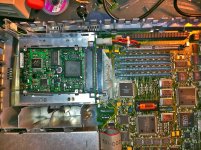 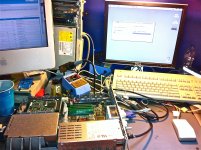 | |
| Posted by: markyb86 on 2013-05-20 23:41:41 How are you terminating those adapters? (Also I laugh every time I see AMD chips in macs) | |
| Posted by: uniserver on 2013-05-20 23:51:10 its almost 3am, i shot the moon, and did the q605, that wraps up my forth and final terminator, and my last drive as well. term pwr on I use the external passive terminator, the one for 5 bucks in my above posts. - workin great in these machines. 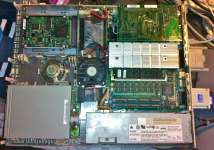 | |
| Posted by: uniserver on 2013-05-21 00:08:35 http://www.ebay.com/itm/Lot-of-100-IBM-2-5-73-4GB-10K-U320-SCSI-Hard-Drives-90P1316-/181141315047?pt=US_Internal_Hard_Disk_Drives&hash=item2a2cdd1de7 i hate my self, i made a offer of 200.00 i hope he doesn't accept it. | |
| < 6 > |