68kMLA Classic Interface
This is a version of the 68kMLA forums for viewing on your favorite old mac. Visitors on modern platforms may prefer the main site.
| Click here to select a new forum. | |
| Powerbook Duo 280c + Accessories Maintenance | |
Posted by: jmacz on 2026-02-24 22:45:38so, you just draw with this pen over the surface of the copper traces? Yup. I had mixed results though. | |
| Posted by: MacUp72 on 2026-02-25 04:05:14 ok, one keyboard messed up 😂.. 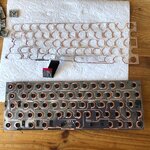 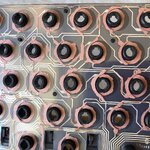 maybe I overdid the tracing, whatever, it doesnt work anymore. thinking about the actuall (stupid) physicality behind the usage of two foils over another, the thing that is making the contact actually is the ring inside the rubber dome ..I think. havent taken a photo of it, but inside the rubber dome seems to be a contact ring ( maybe with a conductive paint of some sort), so using th conductive paint there also is an option this guy used a pencil eraser to clean the traces 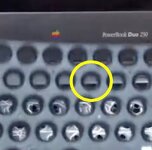 have a second keyboard with much nicer state of the foils but multiple rows are not responding..checking the ribbons again | |
| Posted by: adespoton on 2026-02-25 14:24:15 The contact ring inside the dome should be conductive, and when pressed, should bridge the two contacts. Things to watch out for with the pen: 1: don't bridge the traces, and 2: don't get too close to the key contacts. I use a pink pearl eraser to clean the contacts -- cleaning the traces shouldn't be needed unless there's a fracture, in which case you clean first (99% IPA), dry, and THEN use the pen over the area to ensure any breaks are bridged. The goal is to have lowest resistance possible from the contact end of the trace to the far end, and to have the contact ring being the ONLY thing bridging the contact to the trace. | |
| < 5 |