68kMLA Classic Interface
This is a version of the 68kMLA forums for viewing on your favorite old mac. Visitors on modern platforms may prefer the main site.
| Click here to select a new forum. | |
| Experimental VNC (Remote Desktop) Server for the Classic Macintosh | |
| Posted by: mdeverhart on 2022-04-03 16:39:41 Although I will mention, it did eventually crash, and seemed to bring down the whole machine. The MiniVNC window was frozen with a message along the lines of “invalid response 73” or something like that. I can try to reproduce if you’d like. | |
Posted by: marciot on 2022-04-05 13:30:52Although I will mention, it did eventually crash, and seemed to bring down the whole machine. The MiniVNC window was frozen with a message along the lines of “invalid response 73” or something like that. I can try to reproduce if you’d like.I’m glad it’s working better than ChromiVNC! Are you using MacTCP or open transport? If you get a chance to write down the exact message, or snap a photograph of it, that would help! | |
| Posted by: mdeverhart on 2022-04-05 16:44:41 I’m using Open Transport, wired Ethernet to my network via the built-in Ethernet. My laptop was connected to WiFi. I won’t be able to get back to it for a few days, but I’ll let you know if I have any updates. | |
| Posted by: mikes-macs on 2022-04-15 21:43:40 Running this on a Mac Classic II via PhoneNet. VNC Viewer for iOS 12.5.5 works. Further testing caused errors on Mac IIsi client and Power Mac 8600 client. Not sure what caused the problems. 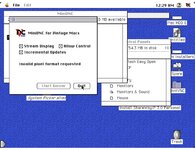 | |
| Posted by: demik on 2022-04-16 03:29:30 That's dope ! Good job | |
| Posted by: cheesestraws on 2022-09-20 13:24:50 What OS X VNC clients are people using successfully with this? The RealVNC client is misbehaving somewhat for me... | |
| Posted by: timtiger on 2022-09-20 14:01:53 Hm I‘m using the real vnc client successfully. It’s fast and reliable on my current osx. What‘s misbehaving? | |
| Posted by: cheesestraws on 2022-09-20 15:03:27 It flags up a protocol error and says that the remote system send a rectangle with coordinates that are too big (if I'm reading the error right). | |
| Posted by: cheesestraws on 2022-09-21 10:55:41 Wireshark's VNC dissector doesn't like it much either, this doesn't look like a framebuffer update any sane computer should be sending: 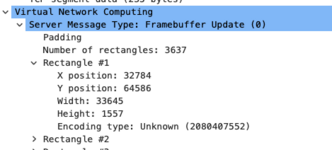 pcap attached. | |
| Posted by: mgmac on 2022-09-21 11:13:12 I really like it, great It would be great to be able to use the remote integrated desktop in MacOS as a client as well | |
| Posted by: cheesestraws on 2022-09-21 12:27:34 It looks like it's sending me non-framebuffery chunks of memory... 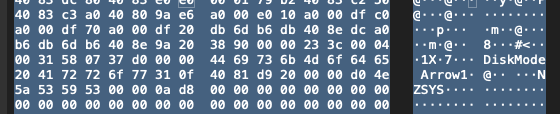 | |
| Posted by: marciot on 2024-01-08 13:51:17 Hello, I wanted to update this thread with a note that I made a pretty major update to MiniVNC. The thing I wanted to focus on in this release was compatibility with clients other than RealVNC. Due to processor limitations, B&W 68000 Macs can only use the older TRLE encoding and still require the RealVNC client, but color Macs now can use Hextile and ZRLE encodings which vastly improve compatibility with other clients. I also added a cursor pseudo-encoding which lets the client draw the cursor locally, and added an option to hide the remote cursor. This improves the perceived responsiveness of the connection. Lastly, I redesigned the UI to use of separate windows which can be shown and hidden independently, and made logging a whole lot more convenient: 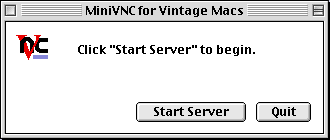 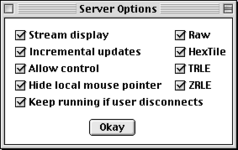 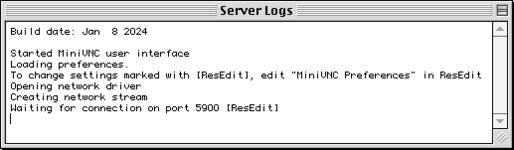 Oh yeah, it also uses a preferences file to store settings between runs. It also allows advanced users to change some more obscure parameters using ResEdit! 😀 To try out this release, go here: https://github.com/marciot/mac-minivnc/releases/tag/v1.1-beta-jan-8-2024 And now for a more technical run down... I investigated several VNC clients and found two things that were causing MiniVNC to fail with most clients 1) the use of TRLE encoding and 2) the use of indexed colors. To address these issues, I implemented the Hextile encoding and TrueColor support. This allowed TightVNC, VNCThing, and MacVNC to function. The last VNC client I had access to was Screen Sharing on macOS High Sierra. This one proved to be a bit of a bear. It always failed to get past initial handshaking, so I could never get the connection far even to know what encodings are supported. Eventually, I found out it always breaks the connection at an early stage of the handshaking and then immediately reconnects. Due to the way MiniVNC handled disconnected clients, I was not restarting fast enough to pick up on the second connect attempt. Once I resolved this, I learned Screen Sharing would only connect if password authentication was enabled. I did not want to implement DES encryption, so I implemented a fake handshake that sends a challenge string and does not check the reply. The upshot of this is that Screen Sharing now asks for a password, but will connect no matter what you type in. Once I finally was able to get past the handshaking, I learned that Screen Sharing only supported Zlib and ZRLE encodings. I wasn't sure about how successfully older Macs could run ZLib, but I decided to find the smallest implementation of Zlib I could find and try that. I settled on a library called MiniZ and implemented a new ZRLE protocol. It is very similar to the old TRLE encoding but uses larger tiles and compresses the stream with ZLib. Getting that to work meant that I could now connect using Screen Sharing on macOS! | |
Posted by: marciot on 2024-01-08 13:54:44I really like it, greatVersion 1.1 now supports this! | |
| Posted by: cheesestraws on 2024-01-09 15:33:41 Very nice! Well done. | |
| < 5 |