68kMLA Classic Interface
This is a version of the 68kMLA forums for viewing on your favorite old mac. Visitors on modern platforms may prefer the main site.
| Click here to select a new forum. | |
| Help getting started with retro software development | |
| Posted by: nightingale on 2022-08-24 06:29:00 So I will post the level editor, but first I want to figure out what was causing that bug where the last tile was an incorrect value that caused the game to crash. I manually fixed all the levels in ResEdit, but once I patch the map editor I will post it as well, in the next few days. | |
| Posted by: nightingale on 2022-08-29 11:36:20 For anyone who's interested, here's the Deluxe Version with the Map Editor included: Angry Robots Deluxe.sit drive.google.com
Any feedback is most welcome! | |
| Posted by: LaPorta on 2022-08-29 11:48:27 SWEET, I will be trying this out at some point. | |
| Posted by: olePigeon on 2022-09-01 10:59:07 I suggest you add a dialogue box that pops up when you first open it. Donate $5 if you like the game. Good ol' shareware. 🙂 | |
| Posted by: nightingale on 2022-09-01 13:21:46 I was thinking a pop up that tells you to mail $5 along with a postage paid return envelope to send you a code to remove the pop up. Really keep it authentic. | |
| Posted by: nightingale on 2022-09-22 16:02:10 So, lots of progress and updates since the last post! I've added a bunch of new enemies and features, and squashed a lot of bugs. I'll post another demo soon for anyone who is interested. One thing I'm not quite sure how to deal with is overcoming the keyboard repeat rate which is set in the keyboard control panel. To start, I just went with the default keyDown and autoKey events to handle movement of the player character. The trouble with that is depending on how you set the repeat delay and repeat rate in the control panel, holding down an arrow key will either make the player movement very slow or very fast. I would like to control the speed of the player character, and also time movement with movement of other game mechanics. What I have tried, with some success, is just setting the keyDown event to initiate continuous movement in the specified direction, and then used the keyUp event to stop all movement. This works quite well for achieving the speed and movement rate I want, but I've found it's very unreliable. Any key up event will stop movement entirely, so if you quickly switch between going up to going left, for example, and you hit the left key before releasing the up key, then releasing the up key will stop movement, even though you are holding down the left arrow. The reliability of just using the keyDown and autoKey events was much smoother, but I lose the control I want. Is there a more elegant way of overcoming the control panel settings for my specific application without affecting the rest of the system? I would imagine this is a fairly common problem to overcome with games, as you wouldn't want players to gain or lose a speed advantage by setting a control panel item. Anyone have any ideas? | |
| Posted by: LaPorta on 2022-09-22 18:05:12 This week I have vacation...and will have time to test whatever you have! | |
Posted by: joshc on 2022-09-22 18:29:04I suggest you add a dialogue box that pops up when you first open it. Donate $5 if you like the game. Good ol' shareware. 🙂 I was thinking a pop up that tells you to mail $5 along with a postage paid return envelope to send you a code to remove the pop up. Really keep it authentic. Or make it postcardware for that ultra retro feel... See https://postcardware.net/ for an archive of the postcards received by Aaron Giles, the author of JPEGView. I'll post another demo soon for anyone who is interested.I'm interested. Happy to help test, mostly on OS 9.2.2 on a G4 as that's the only classic Mac I have setup properly at the moment. (assuming you want to support something that 'late'). | |
| Posted by: LaPorta on 2022-09-22 19:02:01 But in true Mac fashion, it needs to be a dialog box, and not a dialog-youee box! | |
Posted by: Crutch on 2022-09-23 04:52:43One thing I'm not quite sure how to deal with is overcoming the keyboard repeat rate which is set in the keyboard control panel. To start, I just went with the default keyDown and autoKey events to handle movement of the player character. The trouble with that is depending on how you set the repeat delay and repeat rate in the control panel, holding down an arrow key will either make the player movement very slow or very fast. I would like to control the speed of the player character, and also time movement with movement of other game mechanics. Why does any keyUp event stop movement? Just check to see which key was released (in the ‘message’ field of a keyUp event, same as with keyDown). If the user is moving left but the ‘up’ key is released, ignore it. Or: you could skip keyDown/keyUp entirely and use GetKeys() to check which keys are down yourself every time through the event loop. | |
| Posted by: Crutch on 2022-09-23 06:11:36 Addendum: on (older versions of?) vintage Macs you won’t get keyUp events at all unless you tell the Toolbox you want them by calling SetEventMask(everyEvent) at the start of your program. I assume you are doing this already. | |
| Posted by: nightingale on 2022-09-23 11:47:24 So I worked on this a little bit last night, and I actually implemented something similar to what you are suggesting. Essentially the most recent keyDown event sets the direction of travel, and when there is a keyUp event, it checks to see if the key that was released matches the current direction of travel. If it does, it stops movement, otherwise it ignores it. This has solved the issue of having "left over" keyUp events interfere with movement. (Yes, I did change the SetEventMask to everyEvent) I was not aware of GetKeys() -- I will look into that to see what it can do for me, but it sounds like it will be a different way of getting to a similar result to what I have. I've now designed it so that the player only moves once per "turn" (1/5 of a second), and synchronized it with the movement of enemies on the map. Which is very useful for making sure the player movement aligns with the enemy movement, which is an important game mechanic, but has the disadvantage that if they press the key right at the beginning of a "turn", it feels slightly laggy, and if they push the button right at the end of the "turn", they might overlap 2 turns and end up moving two spaces. I can re-write this so it behaves more like it used to, where the movement happens instantly and independent of the enemy movement, and the repeat rate is timed from when the movement initiates instead of when the "turn" starts. That would lose the synchronization I wanted, but realistically, at 1/5 of a second, I don't think it will actually be perceptible and shouldn't affect gameplay. This is more of a choice I have to make than a technical problem I have to overcome. I gained a lot of clarity just from talking it out. I also have played some other of my favourite games and a lot of the things I thought were problems are actually the behaviour of other similar games, and I never noticed the behaviour before until I started looking for it. Thanks for your help! I'll try to finalize what I'm going to do with movement this weekend and then post another demo, assuming I still have power after Hurricane Fiona passes through tonight. | |
| Posted by: nightingale on 2022-09-26 13:49:00 Alright, so the power is back on, here's what I've been working on: Download: Angry Robots! Deluxe Edition Keep in mind the Map Editor (at least this version) was never really meant for human consumption, so I haven't put a great deal of effort into documenting it. I'd love any feedback on the game that anyone has, or if you encounter any bugs that aren't in the Read Me file. Disclaimer that none of these are final levels for the game, more like test levels for trying out the different features. In particular, Level 8 has a few items/traps that don't do anything yet so it might not make a tremendous amount of sense. If you do try out the level editor, the Play Test functionality doesn't work yet, so you'll have to do a little ResEditing to load your level into the game. Follow along in the Read Me for the Map Mover and you should be able to get it. Enjoy! @LaPorta @joshc | |
| Posted by: ry755 on 2022-10-01 00:29:26 Woah, this is awesome!! Just finished reading through the entire thread. I've wanted to get into retro Macintosh programming for a long time but I've always struggled with finding the motivation to learn how the Toolbox works, it's so different than what I'm used to 😛 | |
| Posted by: nightingale on 2022-10-01 07:58:48 Thanks! When I look back at where I started and where I am now, I'm very impressed with what I've achieved so far. While I had some programming experience, I found it very different getting started on the Macintosh. But once you get to know the toolbox, and how to use the resources that are out there (several Inside Macintosh volumes are always open in my browser), programming for the Macintosh is actually really fun and rewarding. The toolbox takes care of so many things for you, once you get over the hump of learning the ins and outs of how it works. If I could do one thing differently, I might give consideration to learning Pascal, because Inside Macintosh uses pascal for all the examples. I find I often have to find another book or resource to figure out what the C implementation of toolbox routine looks like once I find what I'm looking for in IM. But I just don't think pascal would be as relevant today and since I already knew a little bit of C it seemed like a more natural starting point. And without all of the knowledge on this forum, and the people willing to help, I never would have made it this far. I found I needed a lot of help and hand holding at the beginning, but now I'm at the point where I can figure most things out myself, and I only need to seek help when I get really stumped. If programming for the Mac interests you, I highly recommend giving it a try. Plus, now I actually know enough to help others! | |
| Posted by: nightingale on 2022-12-07 15:35:31 So, it’s been a few months since I posted an update, but things have been progressing steadily along. I’ve turned my attention to level design for the last few months, and haven’t done much with the code. The core of the game was working nicely and most of the features related to gameplay are done, which has allowed me to focus on level design. The past few weeks I’ve gone back into the code to work on implementing some of the “extra” features I wanted that weren’t gameplay related. My goal is to have both B&W and colour tilesets to allow colour on systems that have it. I’ve spent the last week struggling with colour offscreens, and I am well and truly stumped. Most of the documentation I can find relating to CGrafPorts and PixMaps talks in passing about the toolbox calls related to using these functions for offscreens, in a sort of hypothetical context, and then says you don’t actually need to ever do this, because you should just use GWorlds for offscreens instead. But GWorlds only existing System 7, and one of my main design goals is to support System 6. So I need to do this manually, and can’t figure out why what I’m doing is not working. I have found some older documentation from the System 6 era, but it’s a bit more limited, and I’m still running into problems. My program runs a check to see if Colour Quickdraw is present at startup. If it is not, then it just uses a regular GrafPort and and offscreen Bitmap for my offscreen buffer, and then uses CopyBits to blit it to the application window. This has been working flawlessly for months. If Colour Quickdraw is present, then it creates a CGrafPort and and offscreen Pixmap for my offscreen buffer. Again, using CopyBits to blit the offscreen colour pixmap to the application window. For testing purposes, I’ve just added a few token bits of colour to my tileset. The “C” on the robot’s chest also confirms my program is using the colour tileset, as it would show a “B” if it was the B&W tileset. Where I seem to be running into problems is the creation of a PixMap. Here is the code I’m using to initialize the colour offscreen (The offscreen CGrafPort and PixMap are set arbitrarily small for testing purposes): if (colourQdPresent) /* Set up colour offscreen */ And the code I’m using to create my PixMap is as follows. My understanding is that NewPixMap() creates a duplicate of the current GDevice’s pixmap except for the colour table, and then I’m changing the baseAddr and rowBytes and setting a colour table: PixMapHandle MakePixMap(short wantedHeight, short wantedWidth, short wantedDepth) Alternatively, I’ve tried creating a PixMap from scratch by setting all of the attributes manually instead of using NewPixMap(): PixMapHandle MakePixMap(short wantedHeight, short wantedWidth, short wantedDepth) The two lines that are commented out cause the program to freeze, and I’m not sure why yet. But regardless of whether I use NewPixMap() or create a pixmap from scratch, I get the same result, which is a 1-bit pixmap. The first image below shows what I get when I run the program. You can see that it is using the colour tileset (“C” on the robots chest) but is drawing a 1-bit image. The second image shows what happens if I comment out my SetPortPix when creating my CGrafPort — it just draws over the desktop, which is to be expected when I haven’t set a separate pixmap, but it’s in colour, which tells me that all of my drawing routines are correctly drawing colour, and CopyBits is also not the problem. So my best guess is that I’m doing something wrong when creating my Pixmap, but I can’t figure out what is wrong. Image 1: Using SetPortPix to change the CGrafPort pixmap to the one created -- no colour: 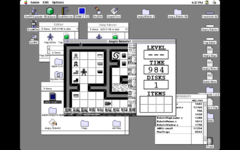 Image 2: Not using SetPortPix -- colour works: 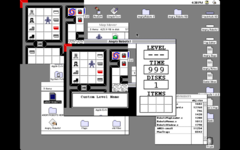 A lot of the older documentation I found suggests I need to create a new GDevice for the offscreen, but I’m not really sure why I would need to, and it seems to be working, except for the colour depth, without creating a new GDevice. A secondary issue is that in my testing, I haven’t been able to set the CGrafPort size larger than the screen resolution. No matter how large I create the PixMap, it won’t exceed screen size. I have no problem creating a B&W GrafPort and bitmap larger than screen size, so is something different about colour? Will it not let you have a port larger than the current GDevice? Finally, an offscreen colour pixmap is huge. I draw my entire level at once in an offscreen and just blit the visible portion to the screen. When I was B&W only my memory usage was right around 300k. After creating a colour offscreen, I’m now up to about 2000k. Am I doing something inefficient here? Or is colour just going to use a lot more memory? I think I need to draw the entire level offscreen when loading, because otherwise it will be too laggy on slower machines. As usual, any advice is greatly appreciated! | |
| Posted by: Crutch on 2022-12-08 06:17:44 GWorlds are actually supported under later versions of System 6 (6.0.3 and above, maybe?) if you just install the 32-bit Color QuickDraw INIT in the System Folder. (I brought this to someone else’s attention a while back but now can’t find where that INIT exists online — it’s definitely around though and you could of course presumably bundle it with your game.) Edit: oh here it is https://macintoshgarden.org/apps/apple-color-disk-32-bit-quickdraw-laserwriter-6 Here’s a check to see if GWorlds exist (you could probably also just check to see if the NewGWorld trap exists, assuming that is indeed a trap): (void) Gestalt (gestaltQuickdrawVersion, &qdVersion); gHasGWorlds = (qdVersion > gestaltOriginalQD && qdVersion < gestalt8BitQD) || qdVersion >= gestalt32BitQD; Offscreen drawing without GWorlds is a pain, and since GWorlds are available even under System 6, it’s kind of not recommended and I am actually not 100% sure I have ever done it. You have to worry about color tables and nonsense that is just not, in my view, interesting or fun. However it’s documented in its gnarly glory by Scott Knaster in the excellent Macintosh Programming Secrets, see p. 212 ff. here https://vintageapple.org/macprogramming/pdf/Macintosh_Programming_Secrets_1988.pdf That said I will try to look at your examples above and see if anything jumps out. | |
| Posted by: Crutch on 2022-12-08 06:25:09 Oh - it doesn’t look like you’re turning on the high bit of rowBytes. You need to do this to tell CopyBits (which can accept either a BitMap or a PixMap) that you’re giving it a PixMap. (**aPixMap).rowBytes &= 0x80000000; I’m also not totally familiar with the way you’re getting a color table there. Will there always be a ’clut’ resource with your specified ID? Will it always match the desired display’s color table? Knaster suggests duplicating the display’s table, see his example code for details. | |
| Posted by: nightingale on 2022-12-08 09:02:30 Thanks Crutch! Macintosh Programming Secrets has the most detailed explanation of colour offscreens that I've seen yet, so I'll read through it more thoroughly tonight! Sometimes I scroll through the list of 158 mac programming books that are scanned on Vintageapple.org and pick one that sounds promising and see if I luck out. But that's a book I haven't come across yet. I'll see if that has the solutions I'm looking for before I dive into learning about GWorlds. I'd like to keep my program as lean as possible and keep the requirements as low as possible, but also realize that if a Machine has colour, it probably has more than 2mb of RAM anyway. | |
| Posted by: Crutch on 2022-12-08 13:08:26 Yeah. Almost any book from the 90s assumed GWorlds, naturally. The first edition of this book (not the later second edition) is old enough to precede them, so its full treatment of offscreen graphics without GWorlds is pretty unusual I think. | |
| < 5 > |