68kMLA Classic Interface
This is a version of the 68kMLA forums for viewing on your favorite old mac. Visitors on modern platforms may prefer the main site.
| Click here to select a new forum. | |
| Mac LC and DB15 to VGA adapter problem... | |
Posted by: dragon_x on 2020-09-13 17:37:30Windows 7 should work fine. I write Mac disk images from a Win7 PC with a USB floppy all the time. Are you using winimage? Maybe try a different image file? If you haven't already, check out https://winworldpc.com. They have a lot of Mac software packaged in PC-friendly formats. For instance, after grabbing and unzipping copy of OS 7.5.3 (https://winworldpc.com/product/mac-os-7/75), or whatever version you plan on installing, try using winimage to write the "Disk Tools 1.img" file to a floppy. That's a bootable image and will allow you to partition the HD prior to install.I would ask You for the pinout of your adapter configuration. I have no success with that 🙁 I have a question. is the VRAM in the slot additional VRAM or is it the entire video memory? | |
| Posted by: bibilit on 2020-09-14 04:57:15 There is no vram onboard, the stick is required for early LCs. Still thinking something is not right on your Logic board. Have you replaced capacitors ? | |
Posted by: dragon_x on 2020-09-14 05:01:40There is no vram onboard, the stick is required for early LCs.Not all cause I have no possibilities for that now. i am looking for adapter or working pinout for checking. i would like to replace capacitors as fast as I will find domenie who can help me with that. Mac booting, etc. The only issue is uncorrect picture. | |
| Posted by: dragon_x on 2020-09-30 01:39:09 Mac BD15 to VGA adapter has arrived. Unfortunately Mac is not working properly in any mode. I bought capacitors to repleace them. I hope It will work after recap. Do You think that recap will help or maybe i have to search also other solution ? 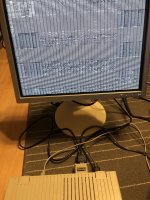 | |
Posted by: MrFahrenheit on 2020-09-30 02:53:55Mac BD15 to VGA adapter has arrived. Unfortunately Mac is not working properly in any mode. I bought capacitors to repleace them. I hope It will work after recap.That is definitely something that can be caused by bad capacitors. I strongly suggest a recap. | |
Posted by: dragon_x on 2020-10-24 08:25:45That is definitely something that can be caused by bad capacitors. I strongly suggest a recap.hello, i have replaced the capacitors. the picture improved and the computer can be used but unfortunately it is not good. I had to rebuild two paths at the C9 capacitor. I made them from thin wires and a capacitor is soldered to them. connections checked several times. What else can I do? the computer cannot see the scsi disk. in addition, I thought it has a 6MB of ram but It has 4 MB. greetings 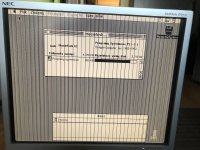 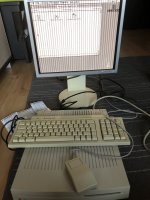 | |
| Posted by: bibilit on 2020-10-24 11:44:08 Probably a broken trace somewhere around the old capacitors. Hard drives are notorious for falling with age. | |
Posted by: dragon_x on 2020-10-24 13:09:39Probably a broken trace somewhere around the old capacitors.I have checked all connections before and after recap betwen cap pin and next possible place. the only one problem was path near C9 capacitor that i had to rebuild from thin wires. I wonder what else I can do. 🙁 Next thing is where to find working compatible hdd. | |
Posted by: MrFahrenheit on 2020-10-24 14:27:01I have checked all connections before and after recap betwen cap pin and next possible place. the only one problem was path near C9 capacitor that i had to rebuild from thin wires. I wonder what else I can do. 🙁The motherboard has 2MB soldered onto it. Your SIMMs need to be installed in pairs. So one of two things has happened here: You have 2x 1MB SIMMs and you have the 2MB onboard= 4MB. Or, your onboard RAM is bad, and you are only using the 2x 2MB SIMMs if that's what you had. As for the bad video, is it at all possible your traces to the VRAM are bad, or the VRAM SIMM is bad ? | |
Posted by: dragon_x on 2020-10-24 14:49:17The motherboard has 2MB soldered onto it. Your SIMMs need to be installed in pairs. So one of two things has happened here: You have 2x 1MB SIMMs and you have the 2MB onboard= 4MB. Or, your onboard RAM is bad, and you are only using the 2x 2MB SIMMs if that's what you had.thats good idea! I will try to check connections with VRAM, but picture on the screen is much better after recap. I hope to find solution. | |
| Posted by: Byrd on 2020-10-24 15:22:15 Check, replace VRAM if it's booting and working well sans the video glitches. | |
Posted by: dragon_x on 2020-10-24 15:56:39Check, replace VRAM if it's booting and working well sans the video glitches.I dont have a vram repleacement unfortunately | |
| Posted by: bibilit on 2020-10-25 00:40:05 Was the board cleaned properly after recap ? a bad trace can be hard to spot and is very time consuming. | |
Posted by: dragon_x on 2020-10-25 00:51:08Was the board cleaned properly after recap ?Yes. The board was cleaned before and after recap. I used isopropyl alcohol to clean It. | |
| Posted by: bibilit on 2020-10-25 02:01:32 Keep in mind that goo can be found everywhere if not cleaned properly, and cleaning only locally is not enough. Goo is conductive, and can short legs/traces. | |
Posted by: dragon_x on 2020-10-25 02:10:03Keep in mind that goo can be found everywhere if not cleaned properly, and cleaning only locally is not enough.I will clean board again | |
| Posted by: dragon_x on 2020-10-25 03:30:12 The board is in isopropyl bath... 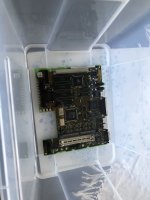 | |
| Posted by: dragon_x on 2020-10-27 02:14:43 Hello 🙂 It is a beautiful day 🙂 My LC is working properly 😀 Bath in isopropyl and toothbrush cleaning helped 🙂 The last thing is hdd. System don't see it. Thank you guys for you help. Greetings  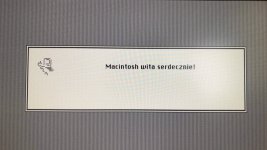  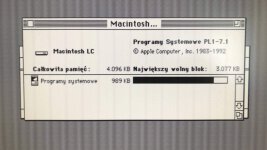 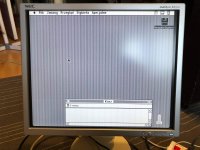 | |
| Posted by: bibilit on 2020-10-27 06:37:10 What brand is your hard drive ? if not working open the lid and try spinning it by hand | |
Posted by: dragon_x on 2020-10-27 07:00:48What brand is your hard drive ? if not working open the lid and try spinning it by handIt works mechanically, spinning etc, but system does not see It. Hdd is quantum. It was working in yamaha a3000 sampler before. I get hdd with Macintosh. Maybe i have to change hdd configuration but I dont know how cause there os no table configuration on It. | |
| < 5 > |