68kMLA Classic Interface
This is a version of the 68kMLA forums for viewing on your favorite old mac. Visitors on modern platforms may prefer the main site.
| Click here to select a new forum. | |
| Macintosh Portable 34 pin to 50 pin SCSI cable | |
| Posted by: aplmak on 2013-11-21 13:32:17 On the pic earlier in the post with the black resistor thingy.. that's the image I used.. what ground should 2,6,11,and 16 be grounded to?? The set of pins 27,28,29, and 30?? Or is there a pin they should point to on the 50 pin?? I don't see a ground on the 50 pin.. just the set for the power on 27,28,29,30 Matt | |
| Posted by: aplmak on 2013-11-21 18:01:37 Figured out those last pins here.. http://antinode.info/mac/port_scsi.html Thanks!! | |
| Posted by: aplmak on 2014-01-06 17:36:52 Well our friend in Japan who makes the AztecMonster boards is making the cables.. fyi... http://www.ebay.com/itm/MacPortable-34pin-general-50pin-SCSI-Conversion-Cable-New-condition-/301061945939?pt=US_Vintage_Computing_Parts_Accessories&hash=item4618b0ba53#ht_305wt_880 Matt | |
| Posted by: CC_333 on 2014-01-06 18:23:23 That's a pretty steep price for a cable. Judging from the picture, though, it looks like it's very well made. I find Uniserver's to be more than adequate, though (if not somewhat less polished, but who's going to see it anyway?) c | |
| Posted by: uniserver on 2014-01-06 18:44:28 well i made quite a few for hap. did the one he sent you look like this one? because that is pretty much how the final revision looks. | |
| Posted by: CC_333 on 2014-01-06 18:52:42 Yeah, it looks a lot like that. I made a slight modification, though; I took a utility knife and trimmed the ribbon cable at the 34 pin end so that it's flush with the connector. How much do you sell these for? c | |
| Posted by: uniserver on 2014-01-06 19:10:18 well i sell them to hap for 45 each, and hap sells them for 120.00 | |
| Posted by: unity on 2014-01-07 10:21:49 I thought this might make things a bit easier. When I took apart my LC to install a second hard drive I saw this bugger. Soldering wires to this would seem really easy to do from a 34 wire ribbon. Just my 2 cents. | |
| Posted by: uniserver on 2014-01-07 10:38:16 but then how will you install your HD into your poor LC now? | |
Posted by: unity on 2014-01-07 11:21:41but then how will you install your HD into your poor LC now?Well its back in the LC. But these are not hard to find. I may pick up a one and try. Just need my portable to work first! But I would also like to mount the drive in another Mac to check contents too. | |
| Posted by: uniserver on 2014-01-18 06:51:54 hot diggity dogggggggggggg 🙂 [attachment=0]Screen Shot 2014-01-18 at 9.50.23 AM.png[/attachment] | |
| Posted by: uniserver on 2014-01-18 14:50:19 yeah its gotta be done this way. for various reasons and possible variables. this way its the most compatible… I suggest installing a SCSI2SD with it. for the portable. http://www.codesrc.com/mediawiki/index.php?title=SCSI2SD  I should soon be able to distribute this and the SCSI2SD, as long as i get the ok from mike. I think he deserves a royalty per item sold. | |
| Posted by: aplmak on 2014-01-30 06:41:01 Love it Uni!!! Nice... I'm sure I will be buying some!!!! Also the Japanese guy last time I checked was selling the 34 to 50 pin cables on ebay.. not sure if they are still there.. I assume they are.. 🙂 | |
Posted by: godfatherq8 on 2018-12-14 12:20:27Hi,Thanks for every one for the useful information | |
| Posted by: pbertolo on 2021-01-17 12:23:55 Hi All, just about to start building a 34->50 pin adapter for a SCSI2SD board. I prepared the attached document as “blueprint”, I hope it can help as additional reference. View attachment Macintosh Portable SCSI adapter .pdf | |
| Posted by: pbertolo on 2021-01-30 04:16:02 Hi Guys, Update on this small project. I managed to assemble the adapter cable without any welding, just plain crimping. Result is quite neat and fits nicely (overall length: approx 30 cm, connector to connector). The board I have (v5.0a) must be powered, so I couldn’t do without the (oversized) molex connector. Mounting brackets are also minimal, no need to go for “exotic” 3D printed solutions: it’s just two “L” shaped Aluminium profiles, which - by chance - are “naturally” clamping the board in a very effective way, as there’s a groove that is just perfect for the purpose. So, no screws, no nothing. I’m using an “oversized” 16 Gb card (smaller ones are getting hard to find), virtually partitioned in 4 units of 2 Gb each (SCSI address 0 to 3). I have formatted the “drives” using Apple utilities (patched). System is now working very fine (battery reconditioned, too), but I have noticed that after putting the Mac at sleep, it kind of struggles to wake up and sometimes I need to reset the machine as it hangs forever... Another point: if I connect a SCSI CD ROM (ID: 4), sometimes (not always) at start up partitions 1 to 3 are not automatically mounted. Any clue on how to tune this setup? 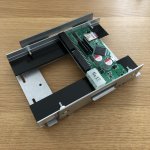 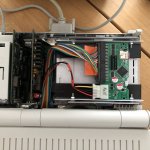 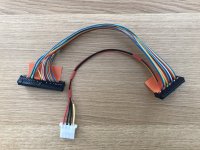 | |
| < 5 |