68kMLA Classic Interface
This is a version of the 68kMLA forums for viewing on your favorite old mac. Visitors on modern platforms may prefer the main site.
| Click here to select a new forum. | |
| Radius Pivot on SE/30 | |
| Posted by: BadGoldEagle on 2017-03-23 15:08:30 Which Apple CRT Monitor are you using? According to megabyte (also a Pivot SE/30 owner), it works with the 'Macintosh Color Display' M1212. I have one but it's dead AFAIK. | |
| Posted by: Themk on 2017-03-23 15:11:38 9166188 has an "Apple High Resolution RGB Display". I think these are the specs. They also have an LG LCD VGA monitor of sorts too. | |
| Posted by: BadGoldEagle on 2017-03-23 15:25:52 I have a Samsung LCD VGA monitor and one of those DA-15 to VGA adapters. I know it works with the IIsi Pivot with a specific combination. /monthly_12_2014/post-2677-0-36152100-1418316240.jpg">View attachment 4933 Same config with the SE/30 Pivot does not work: I'm getting the blue Screen of Confusion. I'll do some more testing this weekend. Can't actually remember which QuickDraw Profile I used back then and what version of RadiusWare I had on that HD... But I don't think the VGA adapter's the source of our problem. | |
| Posted by: Themk on 2017-03-23 15:50:31 I'm really wondering if the "blue screen of confusion" is coming from the VGA monitor only receiving input on the blue signal line. If that is really the case, then one should be able to connect the R,G and B lines all together to get white. Now, it's also possible (even likely), that the blue screen is caused by another issue. | |
| Posted by: BadGoldEagle on 2017-03-23 15:59:26 That could work, but something else is wrong... Correct me if I'm wrong (there's a lot of threads going on about the Pivot now!) but doesn't 9166188 experience problems with display position and type as well? I can't for the love of god get the Mac to acknowledge the fact the display is on the right. It defaults on the left and that can't be changed. And mine too saw the Apple CRT as a Portrait display! | |
| Posted by: Themk on 2017-03-23 16:25:22 I think they were having display size problems. I really wish I had one of these cards to try all my theories out on, maybe I could get something to work. I don't know what the answer is... | |
Posted by: Trash80toHP_Mini on 2017-03-23 16:42:13LOL! That's exactly what you just quoted me as saying. But simply tying them together at the monochrome output line's level is likely not enough to drive all three lines together, hence the amplify and split caveat.Curious to see how you deal with the Blue Screen of Confusion/Monochrome Edition when it crops up on your LCD. Toying with options, I've been thinking along the lines of an amplifier/splitter adapter that will run RGB lines at identical levels to white-correct old monochrome card output for use with color displays. Dunno, just a passing thought.Try tying the monochrome output line to both R, G, and B on the VGA monitor. SHOULD (no guarantees though) give you white when the line goes high. | |
| Posted by: Themk on 2017-03-23 16:46:00 I was trying to suggest that you may not need to amplify and split the signal, just electrically connect them all together. It sure did come out as me quoting you saying what you did, but I was trying to make it clear that I didn't think you needed a split and amplify circuit. The reason why I say this is I was expirimenting a few years ago with VGA output from an Arduino board. To get monochrome you simply tied the RGB lines all together, no split and amplify needed. | |
Posted by: Trash80toHP_Mini on 2017-03-23 16:52:40But I don't think the VGA adapter's the source of our problem.Not at all the problem. Proper straight thru DA-15 cable, a high quality/flexible VGA Adapter and proper settings on it will be the ANSWERS to the problems. 9166188 is surcing them and we'll work through the solution when they arrive. | |
Posted by: Trash80toHP_Mini on 2017-03-23 16:56:06I was expirimenting a few years ago with VGA output from an Arduino board. To get monochrome you simply tied the RGB lines all together, no split and amplify needed.Could be, dunno. Were you doing that with analog RGB on a CRT? | |
| Posted by: Themk on 2017-03-23 16:59:12 Yes I was. Unfortunately that CRT is no longer with me. | |
| Posted by: Trash80toHP_Mini on 2017-03-23 17:03:30 Sounds like you were tying discrete RGB lines together to achieve monochrome output. Going the other way could be a different story. | |
| Posted by: Themk on 2017-03-23 17:11:00 There was a single signal line out from the arduino board, it went through a resistor of I can't remember ohms, and then I connected the 3 RGB lines on the monitor to the signal line from the arduino, using a bread board. I could try to revive this setup and instead use one of my LCD monitors instead. | |
| Posted by: Trash80toHP_Mini on 2017-03-23 17:15:44 I believe you, just getting things cleared up, I'll give it a whack at somepoint. | |
| Posted by: Themk on 2017-03-23 20:09:27 Thanks for clarifying. We don't need to be running completely different experiments! 😉 | |
| Posted by: 9166188 on 2017-03-24 01:43:07 Very nice color, Eagle! I would like to get one of these IIsi cards if it can work with my Apple CRT. I have a Samsung LCD VGA monitor and one of those DA-15 to VGA adapters. | |
| Posted by: 9166188 on 2017-03-24 02:03:05 Thank you very much guys! Finally breakthrough in my LCD/VGA setup! My SE/30 has changed from blue :beige: 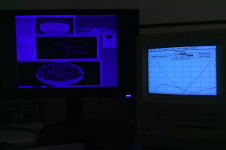 to white :b&w: 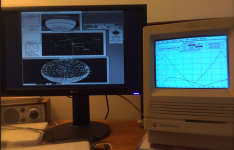 | |
| Posted by: 9166188 on 2017-03-24 02:18:39 Here is my last mile: By pure impulse, I reset my LG LCD to factory default setting. This synced the signal. All of a sudden, I can see System6's extended desktop on my LCD (although it continued to remain blue, which may not be too bad for the eyes). Then, I traced the pins from the Pivot card to the DA-15 port and found that only 8 pins are wired (highlighted below on the right). There are no R and G lines, which confirmed why it had been Blue screen. 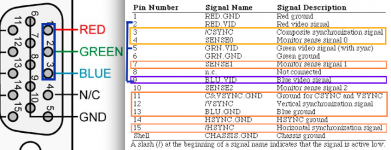 I read this thread again and noted Trash’s comment. So, I decided to wire up the first 3 pins in my VGA adaptor (Left above). In effect, the RGB pins are connected as one. And it works! Thanks all! And happy weekend! | |
| Posted by: BadGoldEagle on 2017-03-24 04:34:02 Hang on? Is your card monochrome or color? Did you manage to display colors or only white? | |
Posted by: Themk on 2017-03-24 05:23:27I read this thread again and noted Trash’s comment. So, I decided to wire up the first 3 pins in my VGA adaptor (Left above). In effect, the RGB pins are connected as one. And it works!Sweet! That's what I thought was the problem, glad to know you were able to test it! Congratulations on your breakthrough! It's also good to know that my idea regarding not needing a split and amplify circuit also works. BadGoldEagle, I think the card is monochrome. | |
| < 4 > |