68kMLA Classic Interface
This is a version of the 68kMLA forums for viewing on your favorite old mac. Visitors on modern platforms may prefer the main site.
| Click here to select a new forum. | |
| Outbound Laptop repair/reverse engineering | |
Posted by: zigzagjoe on 2026-04-14 08:01:03I bought a Microsoft InPort Mouse C3K5K5COMB and found that it wasn’t a simple pull-up design — it actually uses IC control.Ah, yes, that ID is for the serial mouse - you want the bus mouse version. Mine was marked C3K5K59937. Glad you got it working! What did you do for the cable? All the serial cables I came across have a thick cable not suited for use as a mouse, initially I spliced a serial cable to the mouse but later made a custom plug casing out of ABS. 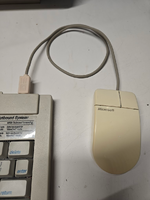 | |
| Posted by: KPT155 on 2026-04-14 23:14:47 I used a D-sub 9-pin mouse cable and replaced it with a DIN 8-pin plug (soldering it was quite a challenge). The mouse that originally came with my Outbound was discarded because it was mistakenly thought to be faulty when the keyboard battery voltage dropped (it had been lent out during a business trip). Since then, for about 40 years, I haven’t been able to find a Microsoft Bus Mouse. I also tried modifying several Bus Mice, but none of those attempts worked. Until now, I couldn’t confirm whether the external mouse port was functioning properly. But now I can confirm that everything on my Outbound Docking System is working correctly. I’m truly grateful. | |
Posted by: zigzagjoe on 2026-04-15 06:08:41I used a D-sub 9-pin mouse cable and replaced it with a DIN 8-pin plug (soldering it was quite a challenge).Glad you were able to get it working! It looks good - factory, even. What did you do for the plug? Also, I'm jealous of your working docking setup. I don't have the docking bits for mine. | |
| Posted by: KPT155 on 2026-04-15 06:59:50 I found a beige DIN plug on AliExpress. Running the Mac from a RAM disk is surprisingly smooth, and I’ve been using it in a fairly practical way by connecting SheepShaver over Ethernet with an Asante EN/SC adapter. | |
| Posted by: SuperSVGA on 2026-04-21 07:49:01 I think I'm just going to throw together an adapter to use an optical mouse for the VCF display. Probably more reliable than the ball mouse at least. | |
Posted by: KPT155 on 2026-04-30 18:53:48I bought a Microsoft InPort Mouse C3K5K5COMB and found that it wasn’t a simple pull-up design — it actually uses IC control.Just to correct my previous note: Using 4.7 nF ceramic capacitors for debouncing does not allow proper tracking when the mouse is moved quickly. Around 1.0 nF seems to be optimal. | |
Posted by: trag on 2026-05-18 19:16:53Took a second to probe the presumed video port on the outbound. As expected, it's very much not VGA and if you plugged a VGA monitor in it's going to short the -16v line to ground. Don't do that! Bought one back in the 90s that someone had done that to. It killed a diode in the power supply. Machine would not boot up until I replaced that diode. Happily, Perfit was still operating at the time and they were willing to give me the part number for the dead diode. | |
Posted by: trag on 2026-05-18 19:39:28LCD panel is fairly bulky and brutal, thankfully no caps to replace.Vulnerable part of the display seems to be the flat flex cable that is so aggressively folded. | |
Posted by: trag on 2026-05-18 19:52:05First, the driver does read CHS values from the disk: I tested 93.75 MB working (CHS 800 6 40) which all values are different from the original drive. I am sure there is a limit somewhere but I'm in no hurry to find it 🙂 IIRC, various old Connor 2.5" IDE drives worked including 20, 40, 60 and I think 80 MB. You may have already discovered this, but you can switch between internal floppy and internal hard drive, by installing the desired hardware and then running the EEPROM updater (forget what Outbound called it) and it will configure the machine for whichever was installed. Was the GAL on the floppy controller locked? | |
Posted by: trag on 2026-05-18 19:53:53I would if my mouse worked 🥲 Are you using the correct key sequence when you boot the Outbound? There's a different sequence for keyboard - docked, and keyboard - not docked, and if you use the docked when they keyboard is detached it usually won't work. Vice versa and one gets strange behavior, IIRC. | |
Posted by: trag on 2026-05-18 20:06:15Especially as they supposedly support up to 16MB in the ramdisk. Can confirm from experience that 16 MB is supported. However, even while shut down, a 16 MB RAM disk will deplete the main battery in less than 24 hours. So if one wants the Silicon disk to be persistent, one needs to leave the Outbound plugged in. I've toyed with the idea of building some SIMMs out of SRAM chips to lower the power requirements. Not sure how well that would work out by the time I add logic to deinterleave the addressing. | |
Posted by: trag on 2026-05-18 20:11:12Booting from disks (not read only) is a bit corrupt-y still but it will read disks written in other machines and write disks that other machines can read, in 1.4MB Mac, 800KB Mac, 720KB PC, and 1.4MB PC. Everything I post is IIRC, because it was 2 decades ago, so sorry for repeating IIRC, over and over again. IIRC, there's a floppy corruption issue if you leave the floppy inserted when you shut down. I think htere were some details, but I can't remember them. I probably have a written note somewhere. Where? Good question. | |
Posted by: trag on 2026-05-18 20:19:19Until now, I couldn’t confirm whether the external mouse port was functioning properly. Hmmm. Has @cheesestraws ever been in touch with you? He was trying to get a docking card working a few years ago and needed the pinout for the docking cable. | |
| Posted by: trag on 2026-05-18 20:23:50 Mouse that came with my Outbound Model 125. From the discussion here should I conclude that not all Bus Mice will work? ![IMG_2816[1].JPG](https://68kmla.org/bb/data/attachments/99/99007-b9dfaf67f45d791ebdf517391f81a31d.jpg?hash=ixPYp5Lmb0) ![IMG_2817[1].JPG](https://68kmla.org/bb/data/attachments/99/99008-a0971674d378cff35cf9cb8ded0074ae.jpg?hash=NuOVFAh9Xd) | |
Posted by: trag on 2026-05-18 20:27:50I also pulled the GAL from the External floppy and dumped it. It was a GAL16V8A 25QJ in PLCC form factor.Thank you for that. It's been 30 years since I programmed a PLD. Does the .zip file contain what I'd need to use my TL866II+ to program a GAL16VD-15 with that logic? Sorry for being obtuse. Also, do you have the SCSI adapter? Would you like to read the GAL from a SCSI adapter? | |
Posted by: zigzagjoe on 2026-05-18 20:31:17IIRC, various old Connor 2.5" IDE drives worked including 20, 40, 60 and I think 80 MB. I only have the external floppy. But yes, i dumped the GAL and eprom from it along with the earlier hdd code, it is posted in here somewhere. It was not locked. Any hdd old enough to reply with an ATA-1 identify matching what it expects could work, or a zuluide set to spoof that as I did. It would also be possible to just patch that check out. Mouse that came with my Outbound Model 125. From the discussion here should I conclude that not all Bus Mice will work? If you want to DIY a mouse as I did yes it must use mechanical encoders, not optical encoders. I posted the FCC ID of a suitable Microsoft inport mouse earlier in thread; outbound was buying those, putting a new cable on it, and slapping a new sticker on as seen in your picture. | |
| < 4 |