68kMLA Classic Interface
This is a version of the 68kMLA forums for viewing on your favorite old mac. Visitors on modern platforms may prefer the main site.
| Click here to select a new forum. | |
| Ever Heard of cc:Mail? | |
| Posted by: l008com on 2017-02-15 20:26:05 Ok I have the customer trying to remember their email password from the late 90s. That's probably going to come up nadas. The password is clearly stored somewhere in the ccMail 2.0 app. I looked in it's preferences file, but the file has no data fork, and a single resource that is 12 characters long, it doesn't seem to be the password. I don't know where else I might look to find it. This is the "autofill" password, so I doubt it's encrypted on a piece of software from 1992. That might be my only hope to get this mail working in ccMail 6, which *may* let me somehow export the mail. | |
| Posted by: rsolberg on 2017-02-15 21:51:13 Have you looked in the resource fork of the application itself? Also, could the twelve character resource you mentioned be the password with padding? I've seen a few very simplistic ways of "securing" plain text passwords in vintage software before. Let's pretend the stored string is "ekli3thtayf5" and the method of encryption is simply prepending each character with one junk character. In this case, the password is "kitty5" and half as many characters as the stored string. Does the application display a masked password anywhere? If it does, it can often be a clue as to how many characters are in the password. "******" might indicate six characters. | |
| Posted by: l008com on 2017-02-16 08:41:23 Alright I just scoured the app in ResEdit and didn't find anything that looked like a stored password. Also here's a picture of the prefs file, not much to go on here:  Those aren't even typeable characters, right? So that's probably not it. I also bought up the dot-count. There are 8 dots, which means the password may or may not have 8 characters.  I'm kind of stuck at this point. version 2 can't print without errors. I can't try version 6 without the password. And I've exhausted every other suggested means of importing/migrating this email. | |
| Posted by: IPalindromeI on 2017-02-16 09:50:41 Have you considered just taking the mail files out and reverse engineering the format to extract it yourself? I wonder if there's anything to stop you. | |
Posted by: l008com on 2017-02-16 09:52:35Have you considered just taking the mail files out and reverse engineering the format to extract it yourself? I wonder if there's anything to stop you. I wouldn't know how to do this. When I open the files directly, it's all unreadable raw data. | |
| Posted by: rsolberg on 2017-02-16 14:56:03 Looking at that wallpaper in the screenshot, I might not have been far off with my "kitty5" password example!! I have a number of ideas how to get around the printing error. Pardon me if I've missed some of these details, but can you post the following details? Installed RAM: System/Mac OS Version: Acrobat and PDF Writer version(s): Do you have a functioning Ethernet connection? Do you have a printer (serial or Ethernet) that you can print to from Mac OS on your 7300? If so, you might be able to set it up on the PowerBook and try printing one of the messages that has been causing the error to appear. If it prints without error, the issue is probably with one of the Adobe components, so trying different versions, or printing to PostScript and turning that into PDF on another machine might be solutions. | |
| Posted by: l008com on 2017-02-16 15:06:36 rsolberg answers to your questions: PowerMac 7300 / 200MHz 256 or 288 MB of RAM (forget which) System 7.5.5 I can't upgrade the OS because doing so loses the remembered password and makes me have to type it again. I have Acrobat 4.0.5 installed. Yes this Mac is connected via ethernet right to my home network and to the internet. The only printer I have is an HP 3600N laser printer. I don't think there's any way to print to this thing from System 7.5. It does have USB but certainly not a serial port. Currently it is on the network via ethernet. How would I print to postscript? I do have a copy of Acrobat 3 I could try. In this era, things generally got more and more buggy the further back you went. I suspect this would go a lot smoother with ccMail 6 on OS 8.1, if only she could remember her password. | |
| Posted by: rsolberg on 2017-02-16 17:14:57 Gotcha. I misunderstood the scenario. I thought you were working with CC:mail on the PowerBook 5x0 and thus might have your 7300 available as a support machine. I would definitely try reverting to Acrobat 3 since v. 4 is PPC only. If the 7.5.5 installation was copied over from the PowerBook, there's a chance it could be missing some PPC specific component required by Acrobat 4. If that doesn't do it, I believe there's a way to create a translator printer that will generate a PostScript file without using Acrobat or PDF Writer. The ps files could be converted to PDF quite easily on a Mac OS X machine. | |
| Posted by: NJRoadfan on 2017-02-16 17:16:03 Forget Acrobat, have you tried the AdobePS driver + PDF Printer Driver plug-in? The virtual printer plug-in can also be used to create raw postscript files that distiller can convert to PDF on a modern machine. http://supportdownloads.adobe.com/product.jsp?product=44&platform=mac Also, can't one just update to cc:mail 6 on top of version 2? Its clearly old enough to run on System 7.5.5 as it has a 68k version! I'm still wondering whats so important about e-mails that haven't been seen in 20 years 😛 Can version 2 create an "archive" file? Those at least have a chance of getting converted to something else. Outlook 2000 for Windows (and maybe Mac?) had an import option for cc:mail archive files. 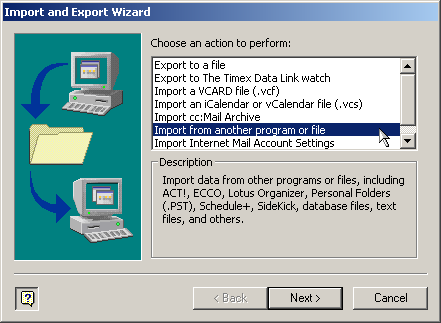 | |
| Posted by: l008com on 2017-02-16 17:22:59 Well the app was originally on the 550. I copied it to the PowerMac to make things easier and so I could work off a copy that I could revert to whenever I break stuff. Like when I tried to upgrade to OS 8 and it stopped auto-filling the password. I'll have to look into this postscript printing thing when I get home. As long as the process can be automated, I don't care how I get them to PDF. But no I can't just update to cc:Mail 6 because doing so requires you to type your mailbox password before you can log in (even though there is no server and the files are local to the computer). And we don't know the password. But the version 2 app is auto-filling the password. | |
| Posted by: NJRoadfan on 2017-02-16 17:55:20 If you can export to archive files, they appear to be plain text. At that point, there are plenty of options to move them to another, standard, format. http://www.digitalpreservation.gov/formats/fdd/fdd000391.shtml | |
Posted by: l008com on 2017-02-16 20:18:23If you can export to archive files...I'm open to suggestions on how I would do this. I've been all over this app at this point, and I haven't seen anything like this. It's not a very complicated app either. | |
| Posted by: NJRoadfan on 2017-02-16 21:39:17 Without seeing the program screens its hard to tell. cc:mail 6.0 says to choose "Archive" from the "Create" menu, but who knows if 2.0 has that. See PDF page 95: ftp://ftp.lotus.com/pub/lotusweb/countries/brazil/y2k/ccmail83/DOC/MAC/macr6ug.pdf | |
| Posted by: l008com on 2017-02-16 21:44:59 I think I might be on to something. That is, I was on to something, until the computer froze. That's not too uncommon. But now it continues to freeze during the boot, no matter which of my many OS/Volumes I use. Hopefully it works itself out. | |
| Posted by: rsolberg on 2017-02-16 22:34:19 I fired up my Colour Classic to refresh my memory with making a special "translator" printer. Apple Desktop Printer Utility is the magic piece of software. On my drive, it was in the /Apple Extras/LaserWriter/ directory. http://download.cnet.com/Apple-Printer-Utility/3000-2072_4-408.html http://vintagemacmuseum.com/desktop-printing-without-a-printer/ There's links to the printer utility and an article describing how to use it to print to PostScript files. It might be worth a go. | |
| Posted by: l008com on 2017-02-16 23:11:25 OK things are getting interesting. I have figured out how to turn the folder of emails into an "archive". AND that "Microsoft Importer for Lotus ccMail Archives" app is able to read these messages and properly import the right amount of messages!!! But here's the problem now. I have no idea what it does with the mail it imports!?  ^ this is what it tells me. Obviously there is no exchange server running on this machine. It's just a regular Windows 7 virtual machine. I was hoping this little app would convert the archives into something that I could directly import into Apple Mail. Looks like I'm not quite that lucky. | |
| Posted by: l008com on 2017-02-16 23:50:33 Holy shit it's working!!! So you go through these very odd, very non-intuitive steps to create an archive, and move all the mail to the archive. Then you move that archive over to windows and run that exchange importer tool. That creates a .pst file in your documents folder. You move that .pst BACK to mac, and import it into Outlook for Mac. Then you export that mailbox to an .mbox file. You import that .mbox into Apple mail and HOLY SHIT you have recovered mail!!! I did a partial import, I'll try the full thing tomorrow. One thing I'm noticing is that none of the emails have a "From" field. It looks like the original program doesn't have a 'to' or 'from', just a recipient. And no inbox or sent, all messages are in the same folder, some have you as the recipient, if they are emails you've received, and they have someone else as the recipient if they are emails you've sent. Very odd way to do things. And if you view raw headers in the imported email, there is no field for "to" or "recipient" in there. Oh well, this will have to do. Woo hoo! | |
| Posted by: BadGoldEagle on 2017-02-17 00:18:35 Awesome. Glad you got it working after all these months! Thanks for the step by step guide, it might be useful to someone else in the future. | |
| Posted by: l008com on 2017-02-17 10:27:00 This was so much easier the first time around. Outlook on windows and Outlook on Mac are both giving me big headaches as I try to do this conversion again the second time around, with the full data set. | |
| Posted by: l008com on 2017-02-18 00:16:56 Ok so here's where I am now: I'm able to get the mail out of ccMail and into outlook. But now I'm having outlook problems. Specifically: Every single email shows in plain text, but also has a winmail.dat attachment that contains an .rtf of the text of the email, plus any attachments that may have been on the original email. The messages are not configured this way when they are local messages on outlook, but uploading them to gmail over IMAP seems to convert them to this. I have gone into the 'mail compost' settings and changed them to plain text, but there's no direct setting to NOT make winmail.dat files. Microsoft products are such garbage, I'm really amazed anyone uses them at all. | |
| < 4 > |