68kMLA Classic Interface
This is a version of the 68kMLA forums for viewing on your favorite old mac. Visitors on modern platforms may prefer the main site.
| Click here to select a new forum. | |
| Macintosh Plus 1MB Won't boot Help/Guidance? | |
| Posted by: Phipli on 2024-01-28 12:12:18 Folks, I was only saying to check there because there looks to be an issue, and there is a corrosion source above that corner, so it is a sensible place to check? | |
| Posted by: RubyRoo on 2024-01-28 13:42:26 Welp. I'm out of ideas. I cleaned the hell out of logic board with Q-tips and alcohol. everything looks fine on the logic. I redid the wires and put more appropriate shielded wires on as opposed to the cloth ones i used previously. I reheated every single solder joint..... and still no luck. Still no damage though it's doing the EXACT same thing so i guess that's good and bad? | |
Posted by: 68kPlus on 2024-01-28 14:31:08Hum...Oh 😅 Guess Google isn't always right | |
Posted by: RubyRoo on 2024-01-28 17:38:37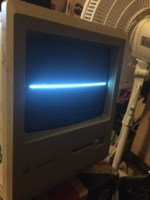 Well shit | |
Posted by: desertrout on 2024-01-28 18:48:30View attachment 68849This is still pointing at either bad / cracked solder joints on J4... or a bad harness --- check for corrosion and continuity on the cable that goes between J4 and the logic board | |
Posted by: RubyRoo on 2024-01-28 18:58:21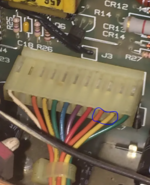 These two wires have continuity between eachother. i believe the yellow one is 12volts and the orange one is ground based on this post.. 
Mac 128k/512k/Plus Logic Board Cable to ATX (Video + Audio)I do a little bit of work on compact mac logic boards and found I needed a convenient way to power them up and get video without fussing with a case, so I made this adapter which allows me to use an ATX power supply and an RGBtoHDMI. Referring...
 tinkerdifferent.com
| |
| Posted by: joshc on 2024-01-29 06:39:40 Have you reflowed J4? | |
| Posted by: JC8080 on 2024-01-29 09:23:59 Also take a close look at all components on the analog board for damage. Look for parts that look like they have gotten hot. Or burned marks on the board around parts. Have you tried wiggling the cable between the logic board and analog board while the machine is running? This should be done VERY cautiously due to the high voltage nearby. I think Dead Mac Scrolls specifically addresses that exact symptom of a horizontally collapsed display, but I'm not in a position to look it up right now. | |
| Posted by: JC8080 on 2024-01-29 09:30:59 Adding to my prior post, and echoing what was said above... Don't rush this, look at it as a learning experience. It may take some time, but there are a lot of very knowledgeable people in this forum that are happy to help out. | |
| Posted by: bibilit on 2024-01-29 10:20:15 Almost all Analog boards i have seen had bad solder joints. Those are the weak ones. | |
| Posted by: RubyRoo on 2024-01-29 14:00:23 So i went out on a adventure today albeit a snow stormy one and bought some Solder wick. A Solder Sucker that sucks. and a new soldering iron with a sharper tip. I removed all the previous work i had done and redid it to look better.. Between pins 9 and 10 on J4 it's not beeping for continuity anymore but it reads 167.0.... does that seem normal? nothing on the PCB looks bridged that shouldn't be.. | |
Posted by: RubyRoo on 2024-01-29 16:58:12This is still pointing at either bad / cracked solder joints on J4... or a bad harness --- check for corrosion and continuity on the cable that goes between J4 and the logic boardUnlikely it's the harness as i tested continuity with it unplugged on both sides. I know it's on Analog PCB because with the analog/power PCB connected to absolutely nothing. it still persists on pins 7 9 10.(Pin 7 and 9 are both continuity together since they're both ground and on the same pathway.)... I had gotten it to the point where it the ground wasn't shorting the 12volts(pin10). but when i soldered everything back exactly how it should be based on pictures it came back... Have you reflowed J4?Yes but i don't think the issue is with the J4..... I mean it is. But i don't think the issue has to do with the connector or the harness. I'm very positive somewhere else on the PCB the ground is shorting/connecting to the 12volts and it's causing resistance/shorting. | |
| Posted by: bibilit on 2024-01-30 10:28:17 Capacitor C24 shorted ?? No continuity found in my own board, except for two ones. | |
Posted by: RubyRoo on 2024-01-30 11:57:58Capacitor C24 shorted ??i believe our boards are slightly different as our boards are different colours and i can't actually seem to find a C24 *unless it's been obstructed by the amount of glue they put around the capacitors* However i did find a C25 capacitor in the EXACT (based on photos) position of the one you're pointing to which had continuity between the two legs... Makes me feel like an idiot for not noticing earlier...  Oh in other news i ordered another macintosh off of ebay incase this one didn't work. i was actually pretty convinced it wouldn't based on all the help my tech buddies were giving me with it. | |
Posted by: RubyRoo on 2024-02-07 10:41:41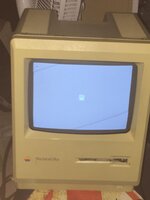 Huzzah. the new one works. It had a broken floppy drive and a broken back cover that was cracked to crap (Made worse by shipping i'm positive). Unfortunately i probably only caused more damage to the cover taking it off. but i replaced it with the old one. replaced the drive. cleaned it up a bit and it works! Now am just waiting on the SCSIdrive Ziggy made to arrive... been in Chicago for 8 days now .-. | |
Posted by: Kouzui on 2024-02-08 20:34:44View attachment 68849That's vertical collapse, which if I remember correctly is usually a capacitor issue, no? At the very least, I would check J1's solder joints and replace the capacitor at C1, it's an important capacitor for the display and is BIPOLAR, despite looking like a normal polar electrolytic capacitor. 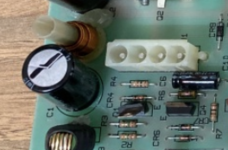 I had to do this recently to fix my own Macintosh Plus, as the display had started going wobbly on the sides. Turns out the J1 connector was so scorched I had to replace it (fortunately Molex still makes them), and had to replace C1 and dig out a buch of hot glue from the thru holes that had melted due to the heat. I recommend doing this on both of your machines, because that capacitor has probably failed on both of them. | |
| Posted by: RubyRoo on 2024-02-22 07:35:28 Anyone have a guide for setting up ZuluSCSI on the SillyTinySCSI? I"m finding very little info online ^^;; | |
| Posted by: RubyRoo on 2024-02-22 08:51:20 Ended up figuring it out but it appears the keyboard is toast... doesn't type or anything.. | |
| < 4 |