68kMLA Classic Interface
This is a version of the 68kMLA forums for viewing on your favorite old mac. Visitors on modern platforms may prefer the main site.
| Click here to select a new forum. | |
| PowerBook 5300c / 5300cs Restoration (Lid Fix) | |
| Posted by: jmacz on 2024-05-02 08:59:31 I just realized I had a picture in the other battery thread of my pack before surgery... it has a picture of what I'm looking for: 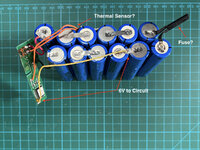 It's the yellow wire above. So yeah, it was wired this way. So it's the lower left four cells in the picture above that have drained. The rightmost of those four has the yellow wire connected to the EMM board. Those four cells are sending 1.2V * 4 = 4.8V or approx 5V to the EMM board. This setup means that the board will stay powered and slowly drain only those four batteries? Or is my understanding incorrect here. If that's correct, wouldn't these cells constantly be unbalanced? | |
| Posted by: 3lectr1cPPC on 2024-05-02 09:01:04 Ahhh - was this the aftermarket battery? I believe the original battery just had a little EEPROM on it that ID'd the battery to the laptop, no smart "EMM" system. If that's the aftermarket one, it's possible the whole purpose of that board is to get around that. | |
| Posted by: jmacz on 2024-05-02 09:13:10 Ah… I guess the aftermarket one must be different from the stock then. Hmm, this is curious… I would think this set up would cause issues. Maybe I need to find a stock one now to restore, then again, not sure how much more I want to put into this one. | |
Posted by: 3lectr1cPPC on 2024-05-02 09:17:22Hmm, this is curious… I would think this set up would cause issues. Maybe I need to find a stock one now to restore, then again, not sure how much more I want to put into this one.There are still a few left on eBay NOS, I need to buy one... You don't have to keep going forever on the restoration if you aren't enjoying it. | |
Posted by: jmacz on 2024-05-02 12:14:32There are still a few left on eBay NOS, I need to buy one... Well I can continue using this one with the power adapter. I guess given the newly developing screen issue, not sure it's worth trying to get a working battery again. I do have a '5300cs' dual scan screen if ever needed. Will take a look at the NOS batteries online although I'm curious whether those are in bad shape internally. | |
| Posted by: jmacz on 2024-05-02 12:17:15 Hmm, this guy is saying they still hold a charge and work... 
Five Apple PowerBook 190/5300 Rechargeable Battery M3254 661-0013 | eBayFive Apple PowerBook 190/5300 Rechargeable Battery M3254 661-0013. <br> <br>Never Been used from 1995. Model Number: M3254. Apple Part Number: 661-0013. Compatible with PowerBook 190 and Series <br> <br>PowerBook 5300 Series. The battery still holds a charge and works as normal.
www.ebay.com
But I don't get it... I have purchased from Ryan Cook before and I think he's legit. But there are three different eBay sellers hawking these batteries right now, and they are all using the same picture. One is Ryan, but there are two others: 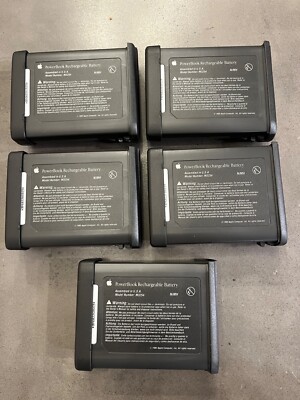
Five - Apple PowerBook 190/5300 Rechargeable Battery - M3254 - 661-0013 - New! | eBayModel Number: M3254. Apple Part Number: 661-0013. Compatible with PowerBook 190 and Series. PowerBook 5300 Series.
www.ebay.com

Apple PowerBook 190/5300 Rechargeable Battery M3254 661-0013 | eBay<p dir="ltr" style="margin-top:0; margin-bottom:0;">This rechargeable battery is designed for use with Apple PowerBook 190/5300 laptops. It is compatible with all Apple products and is a vintage item that is sure to please collectors. It will ensure that your laptop stays powered up and ready to...
www.ebay.com
Five Apple PowerBook 190/5300 Rechargeable Battery M3254 661-0013 | eBayFive Apple PowerBook 190/5300 Rechargeable Battery M3254 661-0013. <br> <br>Never Been used from 1995. Model Number: M3254. Apple Part Number: 661-0013. Compatible with PowerBook 190 and Series <br> <br>PowerBook 5300 Series. The battery still holds a charge and works as normal.
www.ebay.com
| |
| Posted by: 3lectr1cPPC on 2024-05-02 12:34:02 Ryancook’s are the ones we know are good, no clue about the others. | |
| Posted by: jmacz on 2024-05-02 12:37:56 Since if I remember correctly, Ryan had his listings first. So I guess these others reused his picture which then is suspicious since it’s not a picture of batteries they have or had on hand. | |
| Posted by: 3lectr1cPPC on 2024-05-02 12:38:22 I’m definitely not buying from the other people. | |
| Posted by: jmacz on 2024-05-02 14:45:01 I've been pondering this during some free time today and I still don't see how this particular battery pack was supposed to work 🙂 It has 12 cells in series but the EMM board is tapped into only 4 of those 12 cells to draw 4.8V for itself. Based on the design, it's constantly drawing some energy from those four cells even when the laptop is off, even when the battery pack is removed. If the battery pack is routinely charging, then from what I've read online, it will rebalance and all cells will eventually get back to a fully charged state. But if left outside and/or not charged for long periods of time, I think those four cells will slowly drain from the EMM board which is what appears to have happened to my pack. Confused. | |
| Posted by: jmacz on 2024-05-02 19:46:35 I was able to charge up the 4 cells separately using nimh charger I have, rebuild the pack, and try it again, and it works. The laptop detects the pack now. Not sure what to make of what happened. I guess I need to remember to charge this every few weeks to ensure those four cells don't drop to zero again? | |
| Posted by: jmacz on 2024-05-03 10:43:02 Still holding up fine this morning. I guess this is a signal that I need to use this PowerBook 5300c more, otherwise the battery will die. 🙂 | |
| Posted by: ChrisKT71 on 2024-05-03 21:11:42 Good stuff everyone, thought I’d share my experience, maybe it helps someone. I bought a “new” old stock battery from Ryan Cook a few months ago; I was skeptical, but it does work; used a few cycles with Battery Amnesia to get it revived from its original few mins runtime. Gets over an hour now with CF card installed as HDD. But, a rebuilt battery of mine, repaired by eBayer 80486sx gets me 3 hours or so - the Apple battery monitor will report over 4 hrs remaining. I pull the battery between uses to keep it fresh; the 5300s drain significantly even when shutdown. Say what you will about the 5300, but with the right software, some modern upgrades, a soldering iron for the power jack, and realistic expectations, it’s a fun machine to operate. | |
Posted by: jmacz on 2024-05-04 08:31:09Good stuff everyone, thought I’d share my experience, maybe it helps someone. I bought a “new” old stock battery from Ryan Cook a few months ago; I was skeptical, but it does work; used a few cycles with Battery Amnesia to get it revived from its original few mins runtime. Gets over an hour now with CF card installed as HDD. But, a rebuilt battery of mine, repaired by eBayer 80486sx gets me 3 hours or so - the Apple battery monitor will report over 4 hrs remaining. I pull the battery between uses to keep it fresh; the 5300s drain significantly even when shutdown. That's good to know that Ryan's batteries are in relatively good shape, albeit with poor runtime. The parts inside (well at least in yours) should be good allowing for the cells to be replaced. | |
Posted by: 3lectr1cPPC on 2024-05-20 09:49:03For the screen blemish, it's really hard to see it via a picture -- this is the best attempt so far:Mind if I use this photo on the knowledge base page on my website for vinegar syndrome? | |
Posted by: jmacz on 2024-05-20 12:10:38Mind if I use this photo on the knowledge base page on my website for vinegar syndrome? Please go ahead. | |
| Posted by: 3lectr1cPPC on 2024-05-20 12:38:46 Thanks! | |
| Posted by: rikerjoe on 2024-05-21 03:58:45 Ugh, my 5300c screen is just starting to show signs of vinegar syndrome. Looks like I will need to revert to the original passive matrix screen that I had replaced about two years ago. Sigh. | |
Posted by: croissantking on 2024-05-21 07:07:10Ugh, my 5300c screen is just starting to show signs of vinegar syndrome. Looks like I will need to revert to the original passive matrix screen that I had replaced about two years ago. Sigh.What does one do if they find their LCD beginning to develop vinegar syndrome? | |
| Posted by: 3lectr1cPPC on 2024-05-21 07:12:58 1. Keep it away from other laptops (I’ve heard it can spread, no idea if that’s true or not but best be safe) 2. Weigh whether it’s usable as-is or if it isnt 3. If not, choose whether you want to replace the film or just buy a new LCD 4. If it’s not an active matrix LCD, make sure you buy FSTN polarizer film. This does not apply here. | |
| < 4 > |